
- Độ tuổi4+
- Danh mụcHiệu Suất
- Nhà phát triểnShenZhen SamApp Technology Development Co., Ltd
- Ngôn ngữTiếng Anh+ 6 ngôn ngữ khác
- Kích thước3,6 MB
Liên kết đến trang App Store chính thức
Download.org không lưu trữ tệp nào của SA Group Text. Nút này mở trang ứng dụng trên App Store, nơi ShenZhen SamApp Technology Development Co., Ltd phát hành ứng dụng. Trang được kiểm tra lần cuối: 06/11/2026.
Ảnh chụp màn hình

Giới thiệu
Nhà phát triển chưa cung cấp nội dung này bằng ngôn ngữ của bạn.
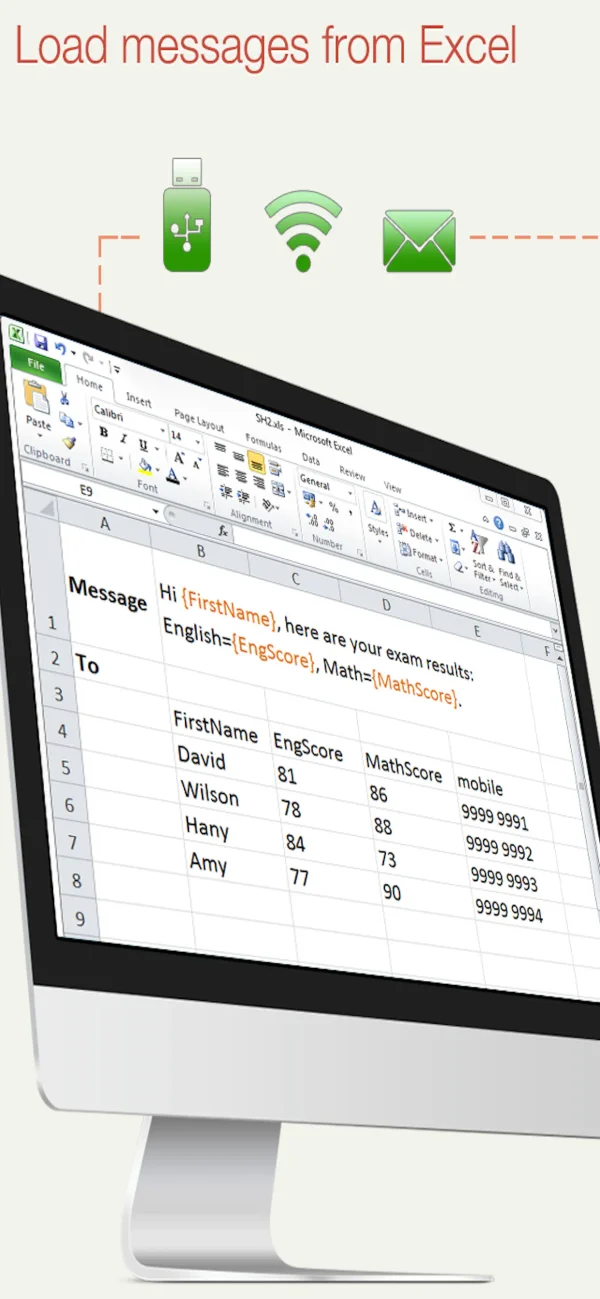
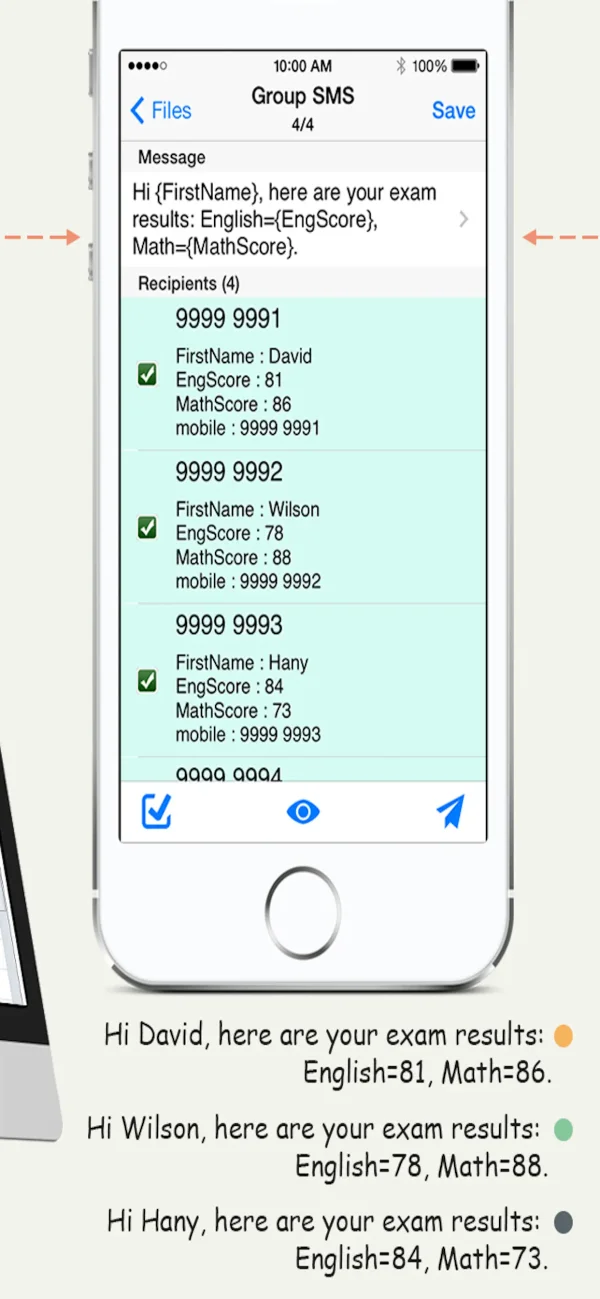
SA Group Text is the most efficient way to send group messages. You can add recipient names and phone numbers in an Excel file. You can enter static or personalized text messages right in the Excel spreadsheet. For example, if you enter “Hi {first name}, ...” in a message, the app will take the first name of the recipients and personalize the message, generating text such as “Hi David, …” , “Hi Michael, …”…
You can use an Excel spreadsheet again without editing the spreadsheet on your computer. You can just pick an Excel file, type in a quick message and send it. It is similar to sending a message to a group.
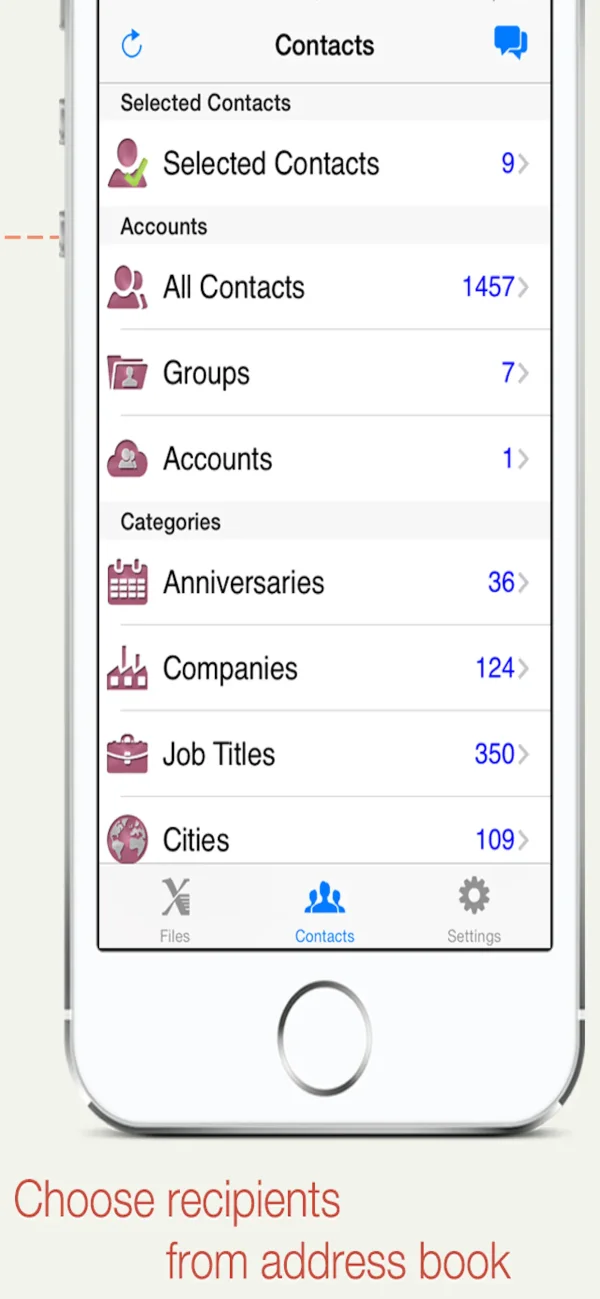
SA Group Text is also an easy way to send text messages to the contacts on your iPhone. Just pick groups or individual contacts, type in a static or personalized message and send it.
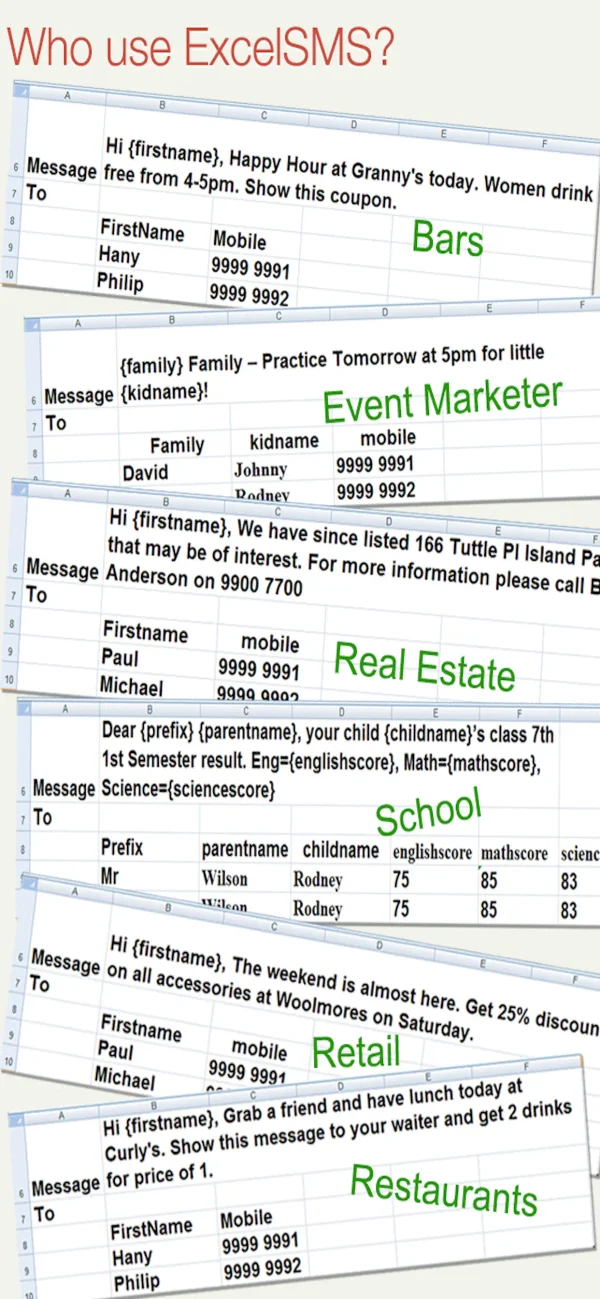
Who uses SA Group Text ?
1) Small Businesses
2) Religious Groups
3) Retail
4) Nightlife - Bars & Nightclubs
5) Restaurants
6) Banks/Financial Institutions
7) Insurance Companies
8) Event Marketers (With hundreds (or even thousands) of people attending your events)
9) Traditional Media
10) Schools
11) Social Groups
12) Real Estate
With SA Group Text you can :
1. Import group SMS from an Excel file via USB/WiFi/Email.
2. Create your own groups in an Excel spreadsheet and send messages to them.
3. Send unsent messages . If the app is terminated while sending group SMS, the sending task will be continued next time you launch the app..
4. Insert tags ({nickname},{firstname},{lastname},{nickname},{company} etc) in your text message in order to create personalized messages. When you use this function, each message has a personal touch. For example:
Dear {firstname}, Welcome to our dinner party.
5. Use MS Excel 2003 / 2007 / 2010 , OpenOffice.org , Apple Numbers or any other Excel-compatible applications to create your group text messages. Be sure to save as an Excel 97-2003 Workbook.
6. Export an Excel template , and use it to create your own Excel file.
7. Send SMS to as many recipients as you need within your Excel file
8. Limit the number of recipients per message. The app will split a large message into multiple separate messages.
9. Create a formatted Excel file easily. The file can contain only two columns : Mobile and Message. You can find more example spreadsheets on the app’s website.
10. Create flexible group SMS in your spreadsheet.
For example “{family} Family – Practice Tomorrow at 5pm for little {kidname}!” becomes “David Family – Practice Tomorrow at 5pm for little Johnny!”. The names change over and over again.
11. Create contact groups, you can create in-app groups for Exchange contacts.
12. Choose contacts organized in groups, companies, job titles and cities.
13. Preview messages before sending them out.
14. Skip duplicated phone numbers and messages.
15. The lite version has ads.
16. Send online sms, supporting Twilio and Nexmo.
17. Find a way to send messages without user interaction, please contact to samyuservice@gmail.com for details.
IMPORTANT NOTE :
Please check the setting of "Group Messaging" on the iPhone settings. If the option is available, set it to OFF (yes OFF) to be able to send to large groups. If it's on, the iPhone will try to send MMS instead of SMS and will fail to send to large groups.
More detail and up-to-date help guides are available in samapp.com.
Có gì mới
Phiên bản 3.3.12 · 16/10/2026
1. Improved iOS 27 compatibility.
Quyền riêng tư của ứng dụng
Những gì ShenZhen SamApp Technology Development Co., Ltd khai báo trên App Store về cách ứng dụng này xử lý dữ liệu.
-
Dữ liệu không liên kết với bạn
Có thể được thu thập nhưng không liên kết với danh tính của bạn.
- Danh bạ
- Nội dung của người dùng
- Chẩn đoán
Phương thức đảm bảo quyền riêng tư có thể khác nhau, chẳng hạn như tuỳ theo các tính năng bạn sử dụng hoặc độ tuổi của bạn.
Thông tin
- Người bán
- ShenZhen SamApp Technology Development Co., Ltd
- Danh mục
- Hiệu Suất
- Phiên bản
- 3.3.12
- Cập nhật
- 16/10/2026
- Phát hành
- 17/12/2010
- Kích thước
- 3,6 MB
- Yêu cầu
- iOS 17.0 trở lên
- Độ tuổi
- 4+
- Giá
- 99.000đ
- Ngôn ngữ
- Tiếng Anh, Tiếng Đức, Tiếng Nhật, Tiếng Nga, Tiếng Trung Giản thể, Tiếng Tây Ban Nha, Tiếng Trung Phồn thể
- Bản quyền
- © 2012-2026 SamApp
Có thể bạn cũng thích
-
 Ink2Post: Handwriting to TextHiệu Suất
-
 Fort Digital Emergency SystemHiệu Suất
-
 SMSAll - Group SMS AppHiệu Suất
-
 SMS FilterProHiệu Suất
-
 Neighborhood NavigatorsHiệu Suất
-
 Email & SMS TemplatesHiệu Suất
-
 Koine — Live TranslationHiệu Suất
-
 JestSMSHiệu Suất
-
 Blast - Bulk MessagingHiệu Suất
-
 ComfortAI Installer ProHiệu Suất