- Độ tuổi4+
- Danh mụcMua Sắm
- Nhà phát triểnNEIL WHITTAKER
- Ngôn ngữTiếng Anh
- Kích thước6,8 MB
Liên kết đến trang App Store chính thức
Download.org không lưu trữ tệp nào của Shoppalist. Nút này mở trang ứng dụng trên App Store, nơi NEIL WHITTAKER phát hành ứng dụng. Trang được kiểm tra lần cuối: 18/11/2026.
Ảnh chụp màn hình

Giới thiệu
Nhà phát triển chưa cung cấp nội dung này bằng ngôn ngữ của bạn.
Shoppalist is a clean, no-nonsense shopping list built for the way you actually shop — iPhone in your pocket, Apple Watch on your wrist.
MULTIPLE LISTS
Create up to five color-coded lists and swipe between them. Weekly groceries, a party run, a hardware store trip — each list has its own name and background color so you can tell them apart at a glance.
APPLE WATCH COMPANION
Everything syncs to your wrist the moment you add it. The Watch app lets you check items off directly from your Apple Watch, and a complication on your watch face always shows how many items are still outstanding.
SIRI SHORTCUTS
Just say "Add milk to Shoppalist" and it's done — no need to unlock your phone or open the app. Shoppalist's Siri integration handles quantities too, so "Add three avocados to Shoppalist" works exactly as you'd expect.
SMART SUGGESTIONS
Shoppalist remembers everything you've ever added. As you type, it offers quick-tap suggestions so your regular favorites are only one tap away.
QUANTITIES & EDITING
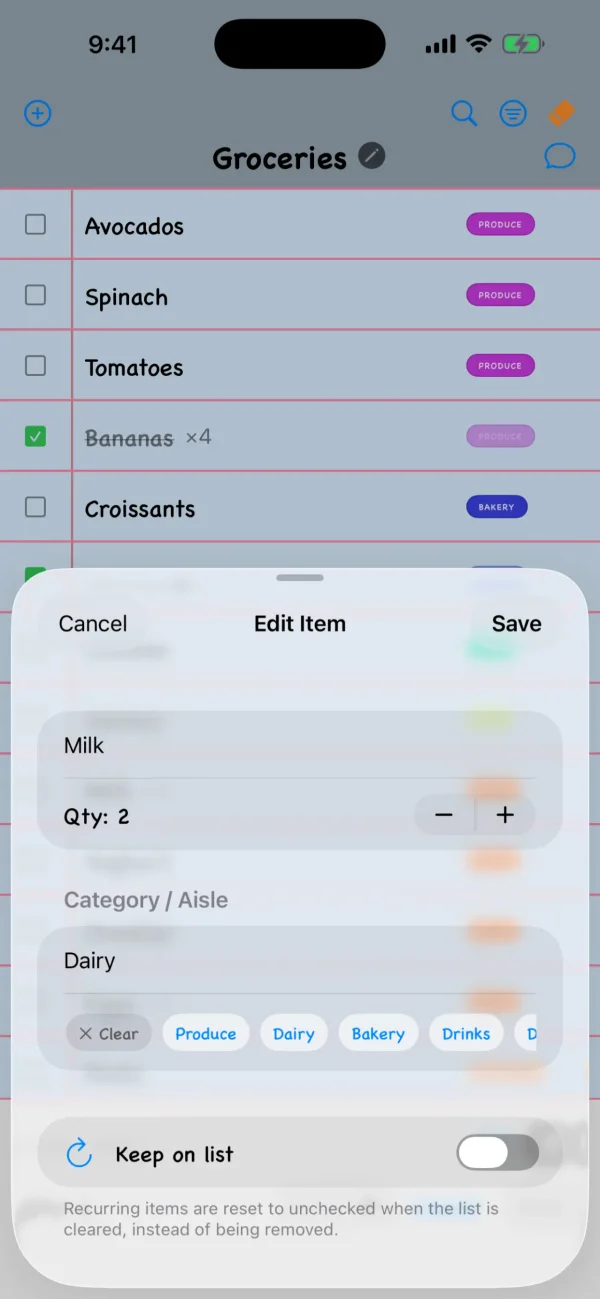
Set exact quantities with the built-in stepper when you add an item.
CHECK OFF WITH UNDO
Tap an item to check it off — it disappears after a short delay so your list stays tidy. Changed your mind? An undo bar catches you before it's gone for good. Swipe to delete instantly, or undo that too.
SHARE YOUR LIST
Send your shopping list to anyone via iMessage or the system share sheet with a single tap. Only unchecked items are included, so what you share is always current.
COMPLETELY PRIVATE
All data lives on your device and syncs privately via iCloud. No account required. No ads. No analytics. No third-party SDKs. Nothing leaves your devices except through Apple's own iCloud — ever.
BARCODE SCANNER
Quickly scan barcodes to add items to your shopping list. It’s an easy way to check what you already have at home and keep track of what you need while doing a fast inventory scan.
Có gì mới
Phiên bản 2.4.2 · 11/09/2026
A shopping list that keeps itself out of the way.
Shoppalist has no account, no sign-up and nothing to configure. Your lists are ordinary Apple Reminders lists, so they are already on every device you own, already backed up, and already shared with whoever you share them with. Delete Shoppalist tomorrow and your lists are still there.
IT IS JUST REMINDERS, DONE PROPERLY
Everything you add lives in Apple Reminders. Say "Hey Siri, add milk to my shopping list" — from your iPhone, your Watch, your HomePod, or CarPlay — and it is on the list before you have put your phone down. Add something in Apple's own Reminders app and it is here too. There is only ever one list, so the two can never disagree.
Share a list from Reminders and the other person sees your shopping as you tick it off, even on a different Apple ID.
IN THE ORDER YOU WALK THE SHOP
Shoppalist files what you buy into aisles — dairy, produce, bakery, frozen — and sorts your list into the order a shop is actually walked, so you are not doubling back. It files most things on its own without being asked. You can arrange the aisles to match your own supermarket, and it remembers what an item is filed under, so adding milk next week puts it straight back in Dairy.
Each aisle has its own colour, so a run of one colour is one aisle. On the Watch, where there is no room for a word, the colour is the label.
ON YOUR WRIST, PROPERLY
The Watch app reads your lists itself rather than waiting for your phone, so it works with the phone in the car. Tick things off, change a quantity, add something by voice, edit an item — and if the two are apart, every change is held and applied the moment they are back together. Nothing is lost.
Complications put the number of things left on your watch face.
GETTING THINGS ONTO IT
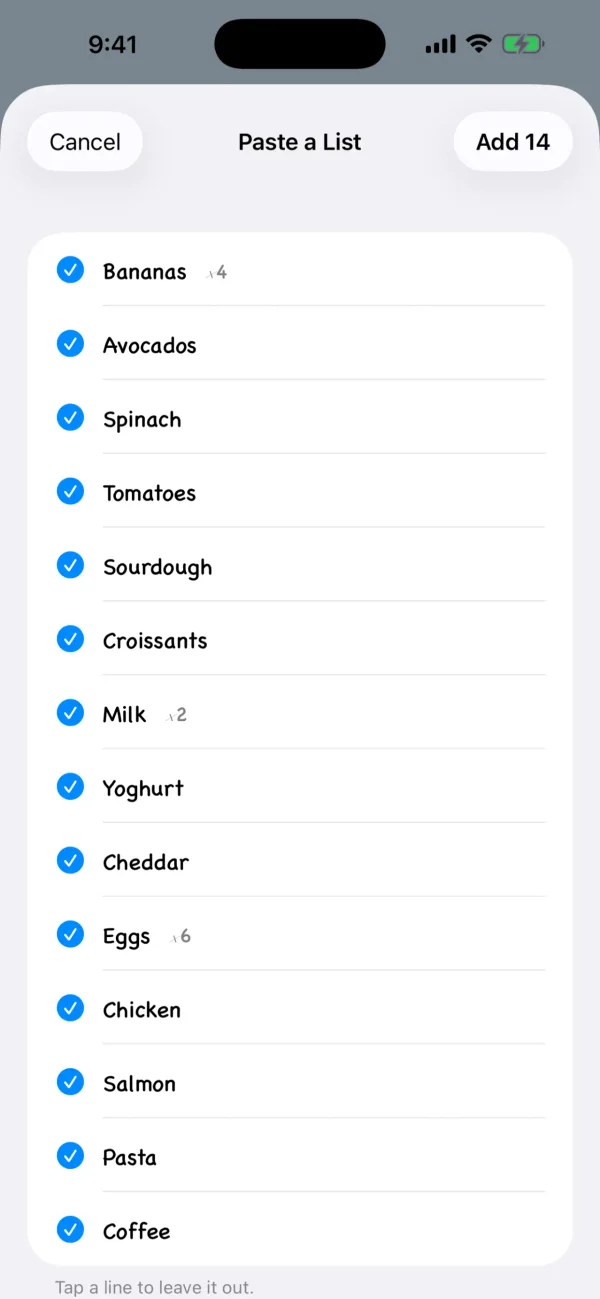
Type and it suggests what you usually buy, most-bought first. Paste a recipe or a message and it reads the whole thing in at once, showing you what it found before anything is added. Scan a barcode. Or just say it.
Add the same thing twice and it adds to the row already there instead of making a second one.
WHILE YOU SHOP
Tap to tick off. Bought items sink to the foot of their aisle rather than disappearing, so you can see what you have got. When you are done, clear the bought ones in a tap.
Mark the things you always buy as Keep on list and they survive a clear — back on the list, unticked, ready for next week.
Undo catches you if you clear something you meant to keep.
ON THE HOME SCREEN
Widgets in three sizes show what is left, and you can tick items off without opening the app.
BUILT TO BE READ
Shoppalist works at every text size, including the accessibility sizes, and the layouts genuinely rearrange rather than just growing — rows restack so nothing is squashed or cut off. Full VoiceOver support, and touch targets sized for real hands in a cold supermarket.
This is not an afterthought. It is the reason the app is shorter than its competitors: no store profiles, no pantry, no running totals, no shopping mode to get stuck in. Just the list.
PRIVATE BECAUSE THERE IS NOWHERE ELSE TO GO
Shoppalist has no server. There is no account and no login. Your lists are in your Reminders, syncing through your own iCloud, and nothing is sent anywhere else. No ads, no analytics, no tracking, no third-party SDKs.
Quyền riêng tư của ứng dụng
Những gì NEIL WHITTAKER khai báo trên App Store về cách ứng dụng này xử lý dữ liệu.
-
Dữ liệu không được thu thập
Nhà phát triển không thu thập bất kỳ dữ liệu nào từ ứng dụng này.
Phương thức đảm bảo quyền riêng tư có thể khác nhau, chẳng hạn như tuỳ theo các tính năng bạn sử dụng hoặc độ tuổi của bạn.
Thông tin
- Người bán
- NEIL WHITTAKER
- Danh mục
- Mua Sắm
- Phiên bản
- 2.4.2
- Cập nhật
- 11/09/2026
- Phát hành
- 13/05/2026
- Kích thước
- 6,8 MB
- Yêu cầu
- iOS 26.4 trở lên
- Độ tuổi
- 4+
- Giá
- Miễn phí
- Ngôn ngữ
- Tiếng Anh
- Bản quyền
- © 2026 Neil Whittaker