
Stack Memo
Toss thoughts, stack them up
Được thiết kế cho iPhone, iPad, Mac
Miễn phí
- Độ tuổi4+
- Danh mụcHiệu Suất
- Nhà phát triểnSaein kim
- Ngôn ngữTiếng Anh+ 1 ngôn ngữ khác
- Kích thước1,5 MB
Liên kết đến trang App Store chính thức
Download.org không lưu trữ tệp nào của Stack Memo. Nút này mở trang ứng dụng trên App Store, nơi Saein kim phát hành ứng dụng. Trang được kiểm tra lần cuối: 18/11/2026.
Ảnh chụp màn hình
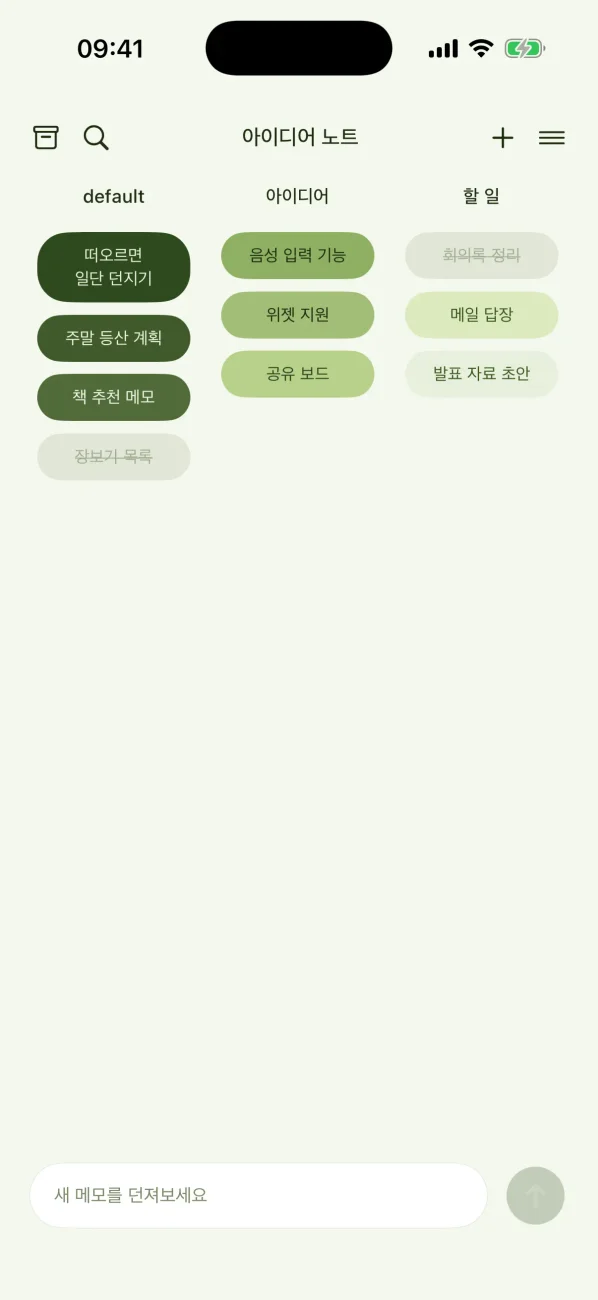

Giới thiệu
Nhà phát triển chưa cung cấp nội dung này bằng ngôn ngữ của bạn.
Ideas don't arrive pre-organized.
Stack Memo is a notes app for capturing the flow of thought before it's organized — not the polished result. Don't agonize over where a fleeting idea belongs. Just toss it. You can sort things out later on a horizontal board.
■ Toss it, lightly
Type a line in the input bar and send — your memo stacks onto the board. Colors are assigned automatically, so the board stays visually rich without any decisions on your part.
■ Horizontal columns
A vertical list emphasizes chronological order, but ideas aren't organized by time. Like a kanban board, Stack Memo uses horizontal columns to make context-based grouping natural. Drag memos between columns, and reorder columns too.
■ Done in one tap
Tap a memo and it flips to mark complete. Tap again to bring it back.
■ Three themes
Ube, Mono, Matcha — shift the board's mood to match your day. Switching themes also changes the home screen app icon.
■ Archive
Stash finished topics by column or page to keep your board clean. Restore them anytime.
■ Same memos everywhere
Auto-sync via iCloud — see the same memos across iPhone, iPad, and Mac. No separate account needed, no ads, no tracking.
Có gì mới
Phiên bản 1.0.1 · 16/11/2026
• Added a quick how-to guide for first-time users (≡ menu > How to use)
• Added Import (compatible with exported files) and Full Backup of all pages
• Double-tap a column to send new memos straight into it
• Long-press a column to rename it
• Tap the text in memo details to edit right away
• You can now scroll the board while reordering columns
• Fixed memos staying dimmed after certain gestures
• Added a way to reconnect when iCloud sync drops
Quyền riêng tư của ứng dụng
Những gì Saein kim khai báo trên App Store về cách ứng dụng này xử lý dữ liệu.
-
Dữ liệu không được thu thập
Nhà phát triển không thu thập bất kỳ dữ liệu nào từ ứng dụng này.
Phương thức đảm bảo quyền riêng tư có thể khác nhau, chẳng hạn như tuỳ theo các tính năng bạn sử dụng hoặc độ tuổi của bạn.
Thông tin
- Người bán
- Saein kim
- Danh mục
- Hiệu Suất
- Phiên bản
- 1.0.1
- Cập nhật
- 16/11/2026
- Phát hành
- 01/11/2026
- Kích thước
- 1,5 MB
- Yêu cầu
- iOS 17.0 trở lên
- Độ tuổi
- 4+
- Giá
- Miễn phí
- Ngôn ngữ
- Tiếng Anh, Tiếng Hàn
- Bản quyền
- © 2026 continued
Có thể bạn cũng thích
-
 Make Time for YourselfHiệu Suất
-
 Tarte - Daily Time TrackerHiệu Suất
-
 MemoWhale - Keep Ideas SimpleHiệu Suất
-
 토덕 To.duck - 성인 ADHD인을 위한 토닥임Hiệu Suất
-
 Caliu - Markdown NotesHiệu Suất
-
 NoteCard - Simplest Memo AppHiệu Suất
-
 Kipin: Lưu Liên kết & Ghi chúDấu trang, ảnh chụp màn hình
-
 Haru – Lịch & Việc cần làmSự kiện, công việc & thời tiết
-
 Plan Builder - Mandalart,TODOHiệu Suất
-
 HAVIT - 콘텐츠 아카이빙 앱, 해빗Hiệu Suất