
- Độ tuổi4+
- Danh mụcKinh Doanh
- Nhà phát triểnStride Transport Ltd
- Ngôn ngữTiếng Anh
- Kích thước56,1 MB
StrideGo Driver hiện có thể không có trên App Store
Ở lần kiểm tra gần nhất, chúng tôi không truy cập được trang trên cửa hàng. Liên kết vẫn dẫn đến trang App Store chính thức.
Ảnh chụp màn hình

Giới thiệu
Nhà phát triển chưa cung cấp nội dung này bằng ngôn ngữ của bạn.
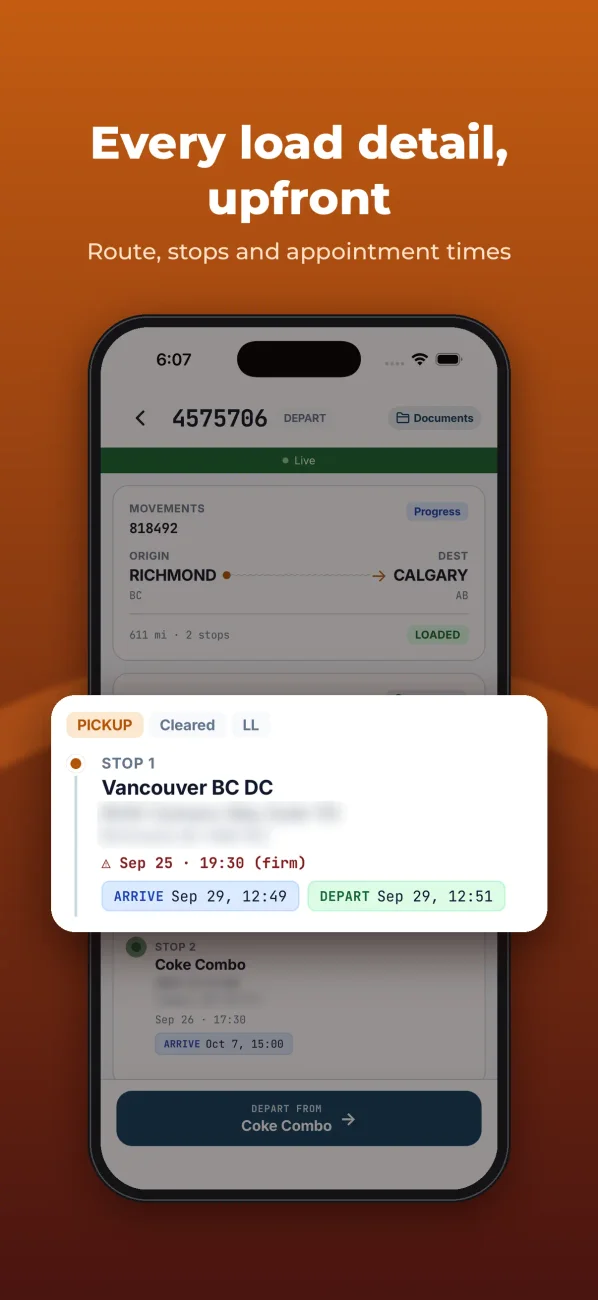
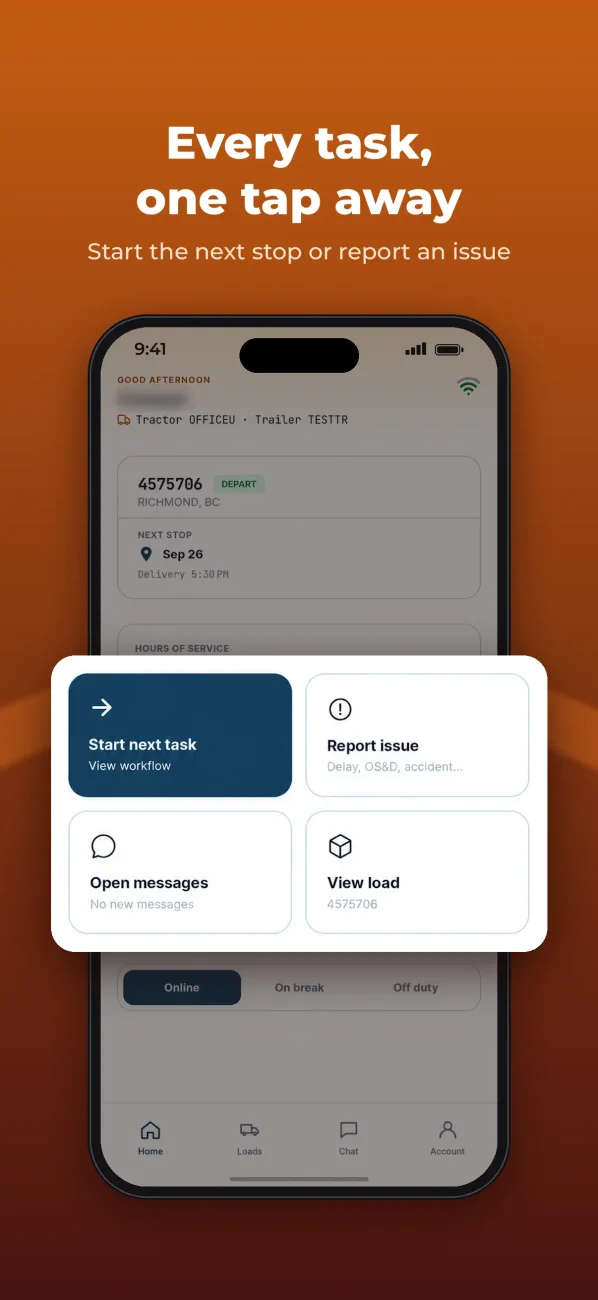
StrideGo is the app for Stride drivers. It keeps your assigned loads, stops, documents and messages in one place on your phone.
This app is for Stride drivers and owner operators. You cannot sign up in the app. Ask your Driver Manager for your login.
WHAT YOU CAN DO
- Sign in with your company login and unlock the app with Face ID, Touch ID or your device unlock.
- See your assigned loads and accept, acknowledge or decline them, as your carrier allows.
- Follow each load stop by stop. The steps and fields you see are set by your carrier.
- Photograph paperwork, including bills of lading, with multiple pages, retake and crop. If a document is rejected, send a new version.
- Report exceptions with a reason, notes, your location and photos where your carrier requires them.
- Send and read messages with dispatch.
- Get push notifications for new load assignments and dispatcher messages.
- Use the same app for reefer and cross-border loads, where your carrier has set them up.
WORKS WITHOUT SIGNAL
Many drivers lose coverage. StrideGo saves what you do on the phone in encrypted storage, then sends it when you are back online. You can see the status of each item, such as queued, syncing, synced or failed. If something conflicts with a change from dispatch, it is held for a dispatcher to review. It is not silently overwritten.
PERMISSIONS, IN PLAIN TERMS
- Location: used to check that you have arrived at or left a stop, and to attach your position to events like step completion and exceptions. On a personal device you are shown a privacy notice and asked for consent first.
- Camera: used to photograph documents and to add photos to exception reports.
- Notifications: used to alert you to new loads and messages from dispatch.
COMPANY-ISSUED AND PERSONAL DEVICES
StrideGo runs on company-issued phones and on personal phones where your carrier allows it. Data stored on the phone is encrypted.
Questions about your login or which loads you can see go to your carrier's dispatch or IT team.
Có gì mới
Phiên bản 1.0.1 · 18/11/2026
New
- Choose from your photo library. Drivers can now pick an existing photo instead of only scanning or taking one:
- Departure documents: pages can also be previewed full screen and removed.
- In-trip document capture: the library option sits beside the camera.
- Home layout:
- Load card first: the current load card now leads the screen, with the next action directly under it. The "Needs you" strip and the clock card sit below.
- Guided pickup. When a required check is still open, the bottom button reads "Complete checks · N remaining", names the check and opens it, instead of a Depart button that's blocked. Depart comes back once nothing blocks it.
- Clearer reefer step. It now shows the load number, the stop, the required setpoint as dispatch sent it, and the unit. If no unit was sent, the screen says so and offers a pre-filled message to dispatch.
- Same stop everywhere. A task opened from the checklist or from Home names the same stop as Load Detail.
- Account screen:
- Order: My hours and My reports come first, and Sign out is last.
- Version line: a read-only "Stride Go version (build)" line.
- Copy support info: a button that copies version, build, platform and environment for support.
- Saved departures say they're waiting. A departure recorded offline shows a "Saved on your phone" notice before the screen closes.
Fixes
Times and appointments
- Pinned time zones: stop and appointment times in BC, Alberta and Manitoba now use fixed time-zone offsets for those provinces instead of the phone's time-zone settings, so they show correctly (latest staging, PR #156).
- Dates with no time: an appointment set as a date with no time now reads "Time not provided", instead of showing 00:00 or being marked late before the day is over.
- Uses the API's flag: the app now reads the API's own flag for "date with no time", and only guesses from midnight when that flag is missing.
- Late shown in words: Home now says "Late" in words.
Chat
- Delivery ticks: a message's tick no longer gets stuck or shows the wrong state. Messages still sending show a spinner.
- Read receipts: they're retried if they fail, and messages count as read only when the driver is looking at the newest ones.
- Unknown dispatcher status: when the app can't tell whether dispatch is online, it says "status unavailable" instead of guessing.
- Photo messages: the app no longer matches a photo to the wrong message bubble.
- Removed: the "Arrived" quick reply, the Edit option on event cards, and the "System" sender name.
Reliability
- Complete step: tapping it twice no longer sends the step twice, and the button stays disabled once the step is confirmed or queued.
- Retry on arrive/depart: it can no longer re-send something that's already sending.
- Pop-ups: a dismissed pop-up now always closes completely.
Quyền riêng tư của ứng dụng
Những gì Stride Transport Ltd khai báo trên App Store về cách ứng dụng này xử lý dữ liệu.
-
Dữ liệu liên kết với bạn
Có thể được thu thập và liên kết với danh tính của bạn.
- Vị trí
- Mã định danh
Phương thức đảm bảo quyền riêng tư có thể khác nhau, chẳng hạn như tuỳ theo các tính năng bạn sử dụng hoặc độ tuổi của bạn.
Thông tin
- Người bán
- Stride Transport Ltd
- Danh mục
- Kinh Doanh
- Phiên bản
- 1.0.1
- Cập nhật
- 18/11/2026
- Phát hành
- 06/11/2026
- Kích thước
- 56,1 MB
- Yêu cầu
- iOS 16.4 trở lên
- Độ tuổi
- 4+
- Ngôn ngữ
- Tiếng Anh
- Bản quyền
- © Stride Transport Ltd