SynoDocker
Synology Docker in your pocket
Được thiết kế cho iPhone
Miễn phí · Mua hàng trong ứng dụng
- Độ tuổi4+
- Danh mụcTiện Ích
- Nhà phát triển钊辰 王
- Ngôn ngữTiếng Anh+ 1 ngôn ngữ khác
- Kích thước1,8 MB
Liên kết đến trang App Store chính thức
Download.org không lưu trữ tệp nào của SynoDocker. Nút này mở trang ứng dụng trên App Store, nơi 钊辰 王 phát hành ứng dụng. Trang được kiểm tra lần cuối: 11/11/2026.
Ảnh chụp màn hình


Giới thiệu
Nhà phát triển chưa cung cấp nội dung này bằng ngôn ngữ của bạn.
SynoDocker is an app for signing in to Synology DSM and managing containers in Container Manager—without sitting at a computer.
WHY SYNODOCKER
If you run Home Assistant, Plex, reverse proxies, or other services in Container Manager, you often need a quick look at what is running, why something stopped, or a way to restart it while you are away. SynoDocker talks directly to your NAS. There is no SynoDocker cloud account and no extra server in the middle.
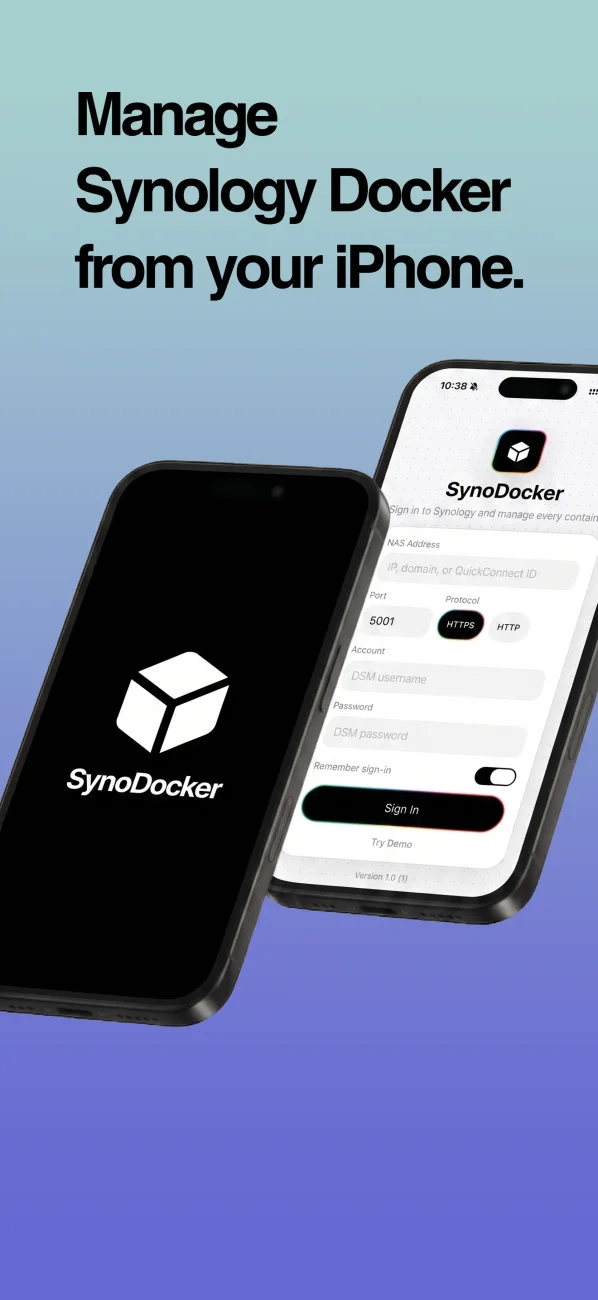
SIGN IN YOUR WAY
• Local IP, DDNS hostname, or QuickConnect ID
• HTTP or HTTPS, including self-signed certificates on networks you trust
• Common DSM ports (HTTP 5000, HTTPS 5001), or QuickConnect with no port to fill in
• DSM username and password (not a QuickConnect account)
• Two-factor authentication with a one-time code and a Paste shortcut
• Optional Remember sign-in: the session is stored in the on-device Keychain and cleared when you sign out
CONTAINER LIST
After sign-in you can:
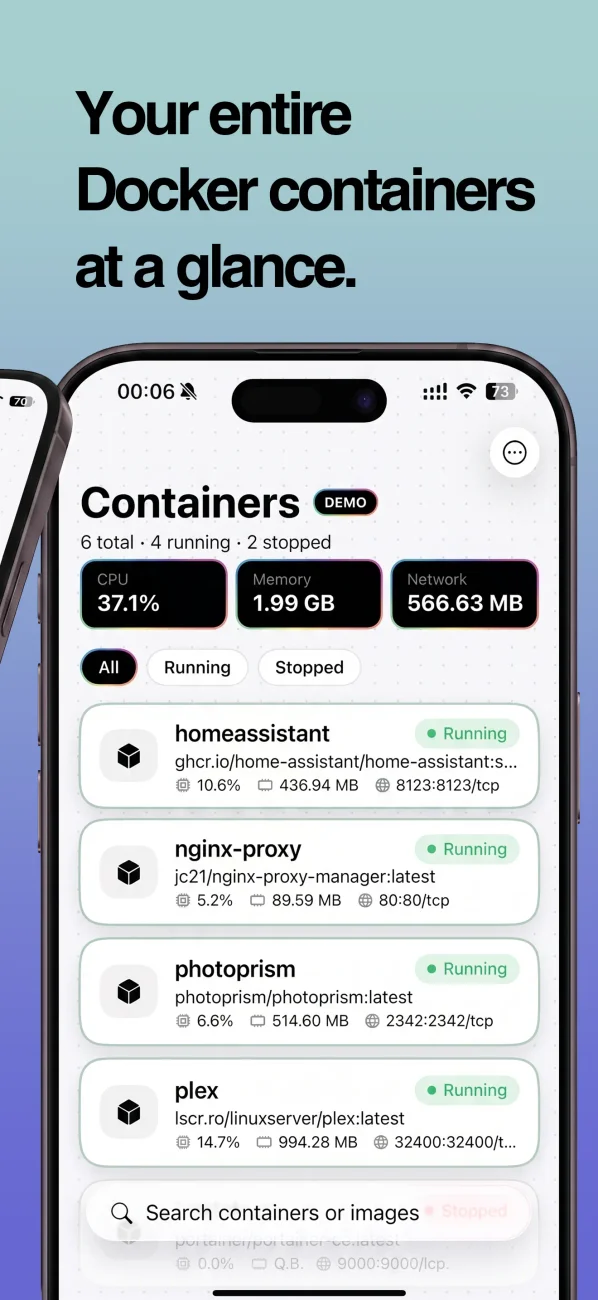
• See every container’s name, image, and running or stopped status
• Check CPU, memory, and network overview at a glance
• Search by name or image
• Filter All / Running / Stopped
• Pull to refresh, or turn on auto-refresh (3, 5, 10, 30 seconds, or a custom 1–3600 seconds)
The list is available after sign-in. Opening a container for full details is a premium feature.
CONTAINER DETAILS (PREMIUM)
Unlock monthly, yearly, or lifetime to:
• View live CPU and memory
• See container ID, image, project, CPU priority, memory limit, auto-restart, and web portal
• Inspect network mode, gateway, IP, MAC address, restart policy, and port mappings
• Read real volume mount paths and the start command
• Browse environment variables as KEY / VALUE
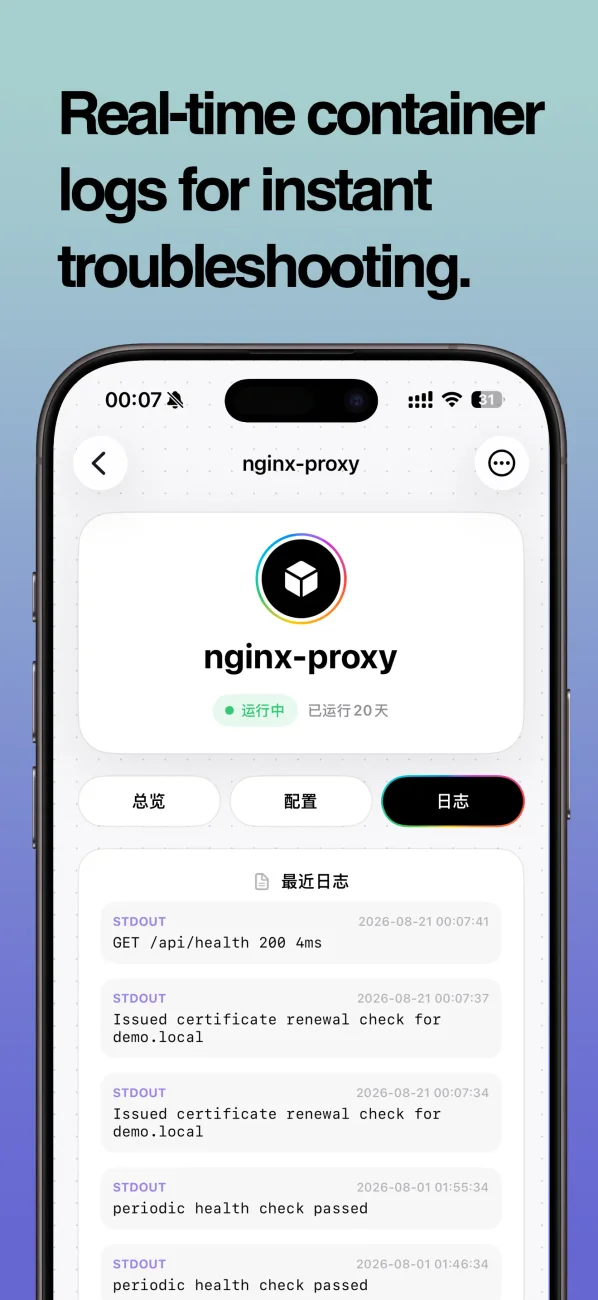
• Scroll recent logs (ANSI color codes stripped)
• Long-press to copy logs, env vars, mounts, command, gateway, IP, MAC, and ports
• Start, stop, restart, or force-stop a container (force-stop is for unresponsive containers—use with care)
DEMO MODE
Tap Try Demo on the sign-in screen to explore six sample containers with no NAS. Demo data is discarded when you leave.
PRIVACY
Login and container traffic go from your iPhone to the NAS you enter (and to Synology QuickConnect only if you use a QuickConnect ID). Container lists, logs, and environment variables are not uploaded to us. Purchases are handled by Apple.
WHAT YOU NEED
• iPhone, iOS 17 or later
• A Synology NAS with Container Manager (or the older Docker package) installed and running
• A DSM account allowed to use that package
SUBSCRIPTIONS
• Monthly — auto-renews every month
• Yearly — auto-renews every year
• Lifetime — one-time purchase, no renewal
The container list is included after sign-in. Container details, logs, configuration, and start/stop/restart require an active subscription or a lifetime purchase. Prices are shown in the app and charged to your Apple ID. Subscriptions renew automatically unless auto-renew is turned off at least 24 hours before the end of the current period. Your account is charged for renewal within 24 hours prior to the end of the current period. Manage or cancel anytime: iPhone Settings → Apple ID → Subscriptions, or Manage Subscription in the app. Restore purchases on a new device with the same Apple ID.
Privacy Policy: https://jiw.github.io/SynoDocker/privacy_en.html
Terms of Use (EULA): https://www.apple.com/legal/internet-services/itunes/dev/stdeula/
Synology, DSM, Container Manager, Docker, and QuickConnect are trademarks of their respective owners. SynoDocker is an independent app and is not affiliated with Synology Inc.
Có gì mới
Phiên bản 1.1 · 11/10/2026
- Save previously used sign-in addresses
- Edit stopped containers, including the container name, resource limits, CPU priority, memory limit, auto-restart, and the Web Station web portal
- Polish other details
Quyền riêng tư của ứng dụng
Những gì 钊辰 王 khai báo trên App Store về cách ứng dụng này xử lý dữ liệu.
-
Dữ liệu không được thu thập
Nhà phát triển không thu thập bất kỳ dữ liệu nào từ ứng dụng này.
Phương thức đảm bảo quyền riêng tư có thể khác nhau, chẳng hạn như tuỳ theo các tính năng bạn sử dụng hoặc độ tuổi của bạn.
Thông tin
- Người bán
- 钊辰 王
- Danh mục
- Tiện Ích
- Phiên bản
- 1.1
- Cập nhật
- 11/10/2026
- Phát hành
- 29/08/2026
- Kích thước
- 1,8 MB
- Yêu cầu
- iOS 17.0 trở lên
- Độ tuổi
- 4+
- Giá
- Miễn phí
- Mua hàng trong ứng dụng
- Có
- Ngôn ngữ
- Tiếng Anh, Tiếng Trung Giản thể
- Bản quyền
- © Geekast