VokabelWidget
Learn words in passing
Được thiết kế cho iPhone, iPad, Mac
Miễn phí
- Độ tuổi4+
- Danh mụcGiáo Dục
- Nhà phát triểnRolf Fuessner
- Ngôn ngữTiếng Đức+ 1 ngôn ngữ khác
- Kích thước1,0 MB
Liên kết đến trang App Store chính thức
Download.org không lưu trữ tệp nào của VokabelWidget. Nút này mở trang ứng dụng trên App Store, nơi Rolf Fuessner phát hành ứng dụng. Trang được kiểm tra lần cuối: 12/11/2026.
Ảnh chụp màn hình

Giới thiệu
Nhà phát triển chưa cung cấp nội dung này bằng ngôn ngữ của bạn.
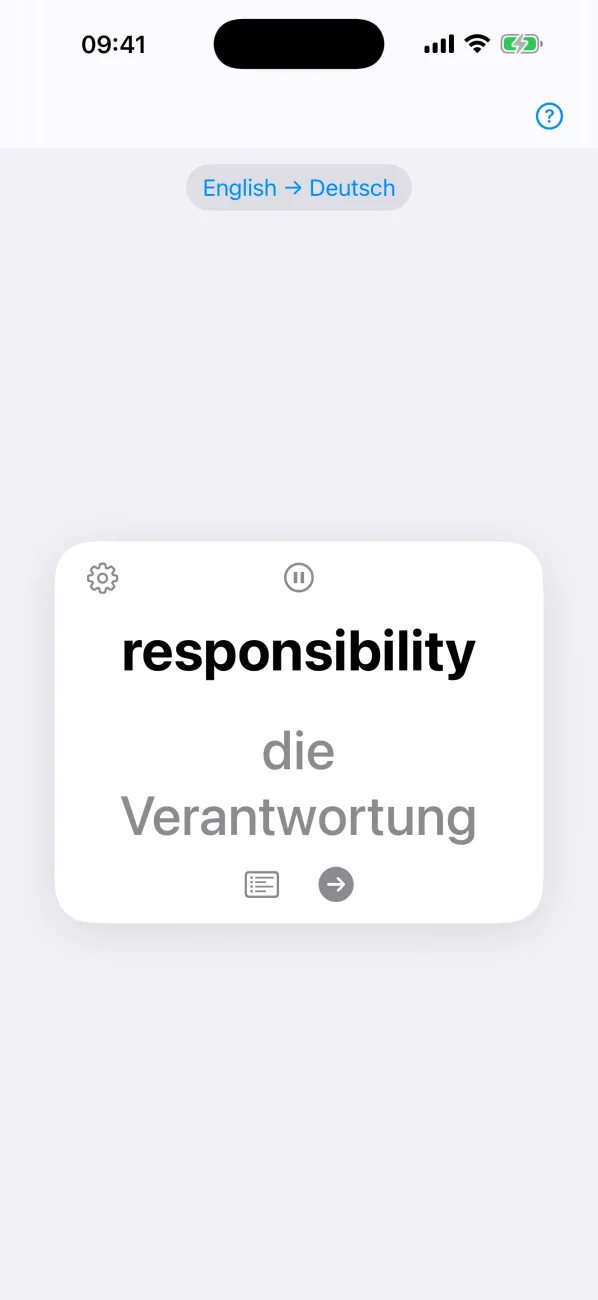
VokabelWidget shows your words large on a flashcard — one after another, at the pace you set. You lay your iPhone next to you or stand the iPad beside you, and between two pieces of work your eye catches a word. You learn in passing, without setting time aside for it.
THE FLASHCARD
The word stands large in the middle. After a delay you choose, the translation appears below it — a moment to answer for yourself before you read it. When the display time is up, the next word follows; anywhere between five seconds and five minutes. The arrow on the card moves on sooner, the pause button holds a word for as long as you want — and you can still page on while it does.
YOUR LIST AT A GLANCE
A tap on the list symbol shows every word currently going round: the foreign word and its translation side by side — on an iPhone the translation sits below the word, so that long words can be read in full. Above it sits a search field that searches both at once — upper and lower case, umlauts and accents may all be left out, “grusse” finds “Grüße”.
BESIDE YOUR WORK
On an iPad the app does not need the screen to itself. Put it beside another app in Split View, in Slide Over or as a window of its own: as long as it can be seen it keeps going, and you read along while you do something else.
YOUR OWN WORDS
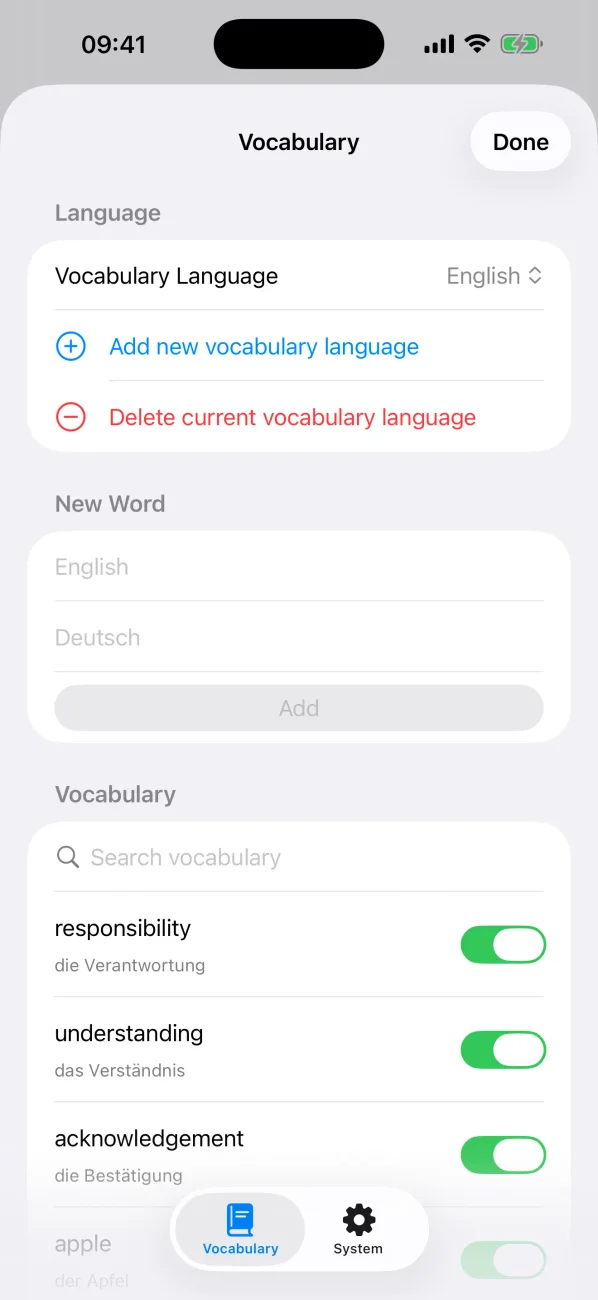
Behind the gear on the card you enter both words and tap “Add”. You often need to type only one half: the app suggests the translation, worked out on your own device, with nothing leaving it. If either word is already in your list, the app asks first and shows you what it found. Every word can be corrected in place, hidden with a switch instead of deleted, and removed for good with a swipe. The free edition holds 200 entries.
AS MANY LANGUAGES AS YOU LIKE
Set up as many vocabulary languages as you want and name them yourself; the home language you pick from every language your device knows. Each language keeps a list of its own, and a tap turns the direction of questioning around.
ON IPHONE, IPAD AND MAC
Your words live in your iCloud: what you enter here is already there on your other devices with this app — and the other way round. The Mac edition is in the same store.
SAVING AND BRINGING BACK
In the gear, on the “System” tab, you save your whole vocabulary to a file — every language at once. It goes into the Files app, into your iCloud if you like, and opens in Numbers or Excel, to look at or to pass on. Loading works the same way, and it works with someone else’s list too: two columns are enough, the word and its translation. Before anything happens the app shows you what it found and asks whether it should be added to your stock or replace it.
ALSO
• Sample vocabulary from the first launch, so there is nothing to set up first
• Interface in English and German
• No ads, no accounts, no subscription, nothing to sign up for
Your words stay your business: the app collects nothing and sends nothing to us. The only outside service is your own iCloud.
If you would also like to test yourself on your words, print them or hear them read aloud, VokabelWidget Pro does that.
Có gì mới
Phiên bản 1.3 · 15/09/2026
New
• The app now follows the language of your device. Until now it was German everywhere, even on an English iPhone.
• On the very first launch, the pair of languages follows your region: in Germany, Austria and Switzerland you learn English, everywhere else German.
Quyền riêng tư của ứng dụng
Những gì Rolf Fuessner khai báo trên App Store về cách ứng dụng này xử lý dữ liệu.
-
Dữ liệu không được thu thập
Nhà phát triển không thu thập bất kỳ dữ liệu nào từ ứng dụng này.
Phương thức đảm bảo quyền riêng tư có thể khác nhau, chẳng hạn như tuỳ theo các tính năng bạn sử dụng hoặc độ tuổi của bạn.
Thông tin
- Người bán
- Rolf Fuessner
- Danh mục
- Giáo Dục
- Phiên bản
- 1.3
- Cập nhật
- 15/09/2026
- Phát hành
- 19/08/2026
- Kích thước
- 1,0 MB
- Yêu cầu
- iOS 18.0 trở lên
- Độ tuổi
- 4+
- Giá
- Miễn phí
- Ngôn ngữ
- Tiếng Đức, Tiếng Anh
- Bản quyền
- © 2026 VMM GmbH
Có thể bạn cũng thích
-
 TurboTerms - Vocab trainerGiáo Dục
-
 Wordent: Improve Your EnglishGiáo Dục
-
 PicToCards: Camera FlashcardsGiáo Dục
-
 Frankenstein - notesTham Khảo
-
 BlattGiáo Dục
-
 Từ Vựng Tiếng Anh - PollyHọc Tiếng Anh, Hàn, Trung
-
 Vokabwerk: Học tiếng ĐứcTừ vựng & mạo từ der die das
-
 PORO - Portuguese GrammarGiáo Dục
-
 Vocabit: Vocabulary BuilderGiáo Dục
-
 RemindVocab - Learn & RepeatGiáo Dục