
- Độ tuổi4+
- Danh mụcDẫn Đường
- Nhà phát triểnIvan Sekretariuk
- Ngôn ngữTiếng Anh+ 8 ngôn ngữ khác
- Kích thước3,7 MB
Liên kết đến trang App Store chính thức
Download.org không lưu trữ tệp nào của WayPointMaster. Nút này mở trang ứng dụng trên App Store, nơi Ivan Sekretariuk phát hành ứng dụng. Trang được kiểm tra lần cuối: 18/11/2026.
Ảnh chụp màn hình


Giới thiệu
Nhà phát triển chưa cung cấp nội dung này bằng ngôn ngữ của bạn.
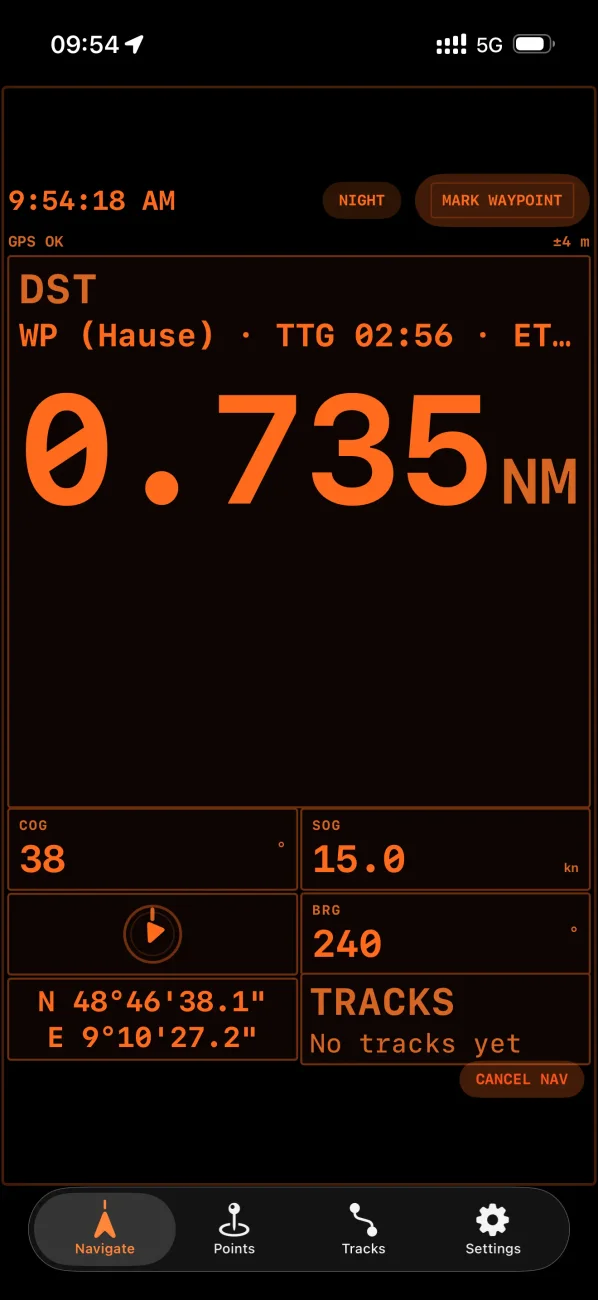
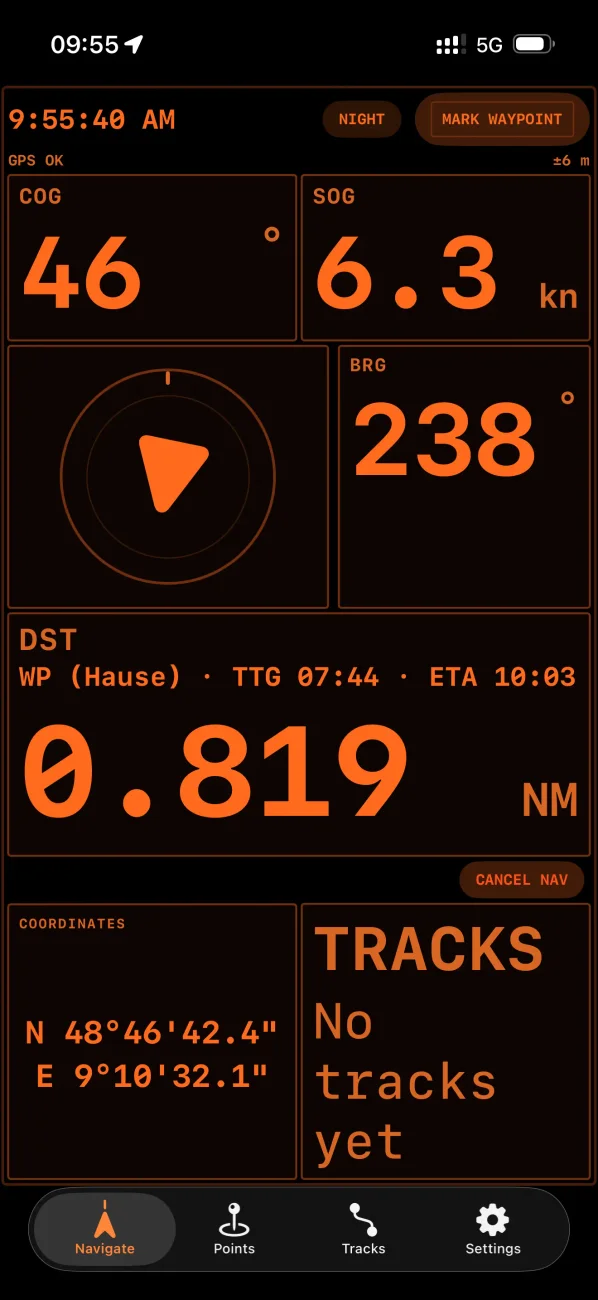
WayPointMaster is an offline GPS instrument for the helm. It shows live course and speed, stores waypoints, records tracks, and steers you to a mark or along a saved route — with no account and without sending your location to a server.
Built for small-craft and coastal work: large monospaced readouts, day and night screens, and everything stored on the iPhone.
THE BRIDGE (FREE) • Course over ground (COG) and speed over ground (SOG), with compass heading when the GPS course is stale • Bearing (BRG), distance (DST), time to go, and ETA while navigating • Coordinates in decimal degrees, degrees–decimal minutes (DDM), or degrees–minutes–seconds (DMS) • GPS status you can trust: OK, weak, poor, lost, plus horizontal accuracy and a warning when the fix is old • If Location is denied, a clear screen explains why GPS is needed and opens iOS Settings • Mark a waypoint from a live, accurate fix — not from a dead last-known position • Waypoints listed as WP (name), with categories (anchorage, fishing, pier, hazard, other), notes, search, and sort • Navigate to a waypoint: steering arrow, arrival alarm (default 50 m, adjustable) • Follow a saved track along its recorded points • Record tracks with time and distance intervals; average speed ignores time spent stopped • Export waypoints and tracks as GPX via the system Share sheet • Day / night display, optional auto day–night, optional keep-screen-on • GPS modes: Precise (navigation accuracy) or Economy (saves battery) • Speed in km/h or knots; distance in kilometres or nautical miles • Languages: English, Ukrainian, German, French, Italian, Greek, Spanish, Hindi, Simplified Chinese, or follow the iPhone
LIFETIME (ONE-TIME IN-APP PURCHASE) • Import GPX: waypoints (wpt), tracks (trk), and routes (rte) • Optional background GPS so the live fix and an open track can continue when the app is not in front
A 7-day trial of the extra features starts on first launch. After it ends, the bridge, your waypoints, and your tracks stay fully usable. Restore Purchases is in Settings and on the paywall.
PRIVACY AND LOCATION WayPointMaster has no developer backend, no ads, and no tracking. Precise location is used only on the device for course, speed, marks, navigation, and logs. Background / Always access is off until you turn on Settings → GPS → Background GPS. While it is on, iOS shows the system location indicator. Coordinates stay on the phone unless you yourself export or share a GPX file.
Support and the privacy policy are in Settings 1.
WayPointMaster is an instrument, not a chartplotter: it does not include nautical charts or official notices to mariners. Use it with your own paper or electronic charts and good seamanship.
Quyền riêng tư của ứng dụng
Những gì Ivan Sekretariuk khai báo trên App Store về cách ứng dụng này xử lý dữ liệu.
-
Dữ liệu không được thu thập
Nhà phát triển không thu thập bất kỳ dữ liệu nào từ ứng dụng này.
Phương thức đảm bảo quyền riêng tư có thể khác nhau, chẳng hạn như tuỳ theo các tính năng bạn sử dụng hoặc độ tuổi của bạn.
Thông tin
- Người bán
- Ivan Sekretariuk
- Danh mục
- Dẫn Đường
- Phiên bản
- 1.0
- Cập nhật
- 23/09/2026
- Phát hành
- 23/09/2026
- Kích thước
- 3,7 MB
- Yêu cầu
- iOS 17.0 trở lên
- Độ tuổi
- 4+
- Giá
- Miễn phí
- Ngôn ngữ
- Tiếng Anh, Tiếng Pháp, Tiếng Đức, Tiếng Hy Lạp, Hindi, Tiếng Ý, Tiếng Trung Giản thể, Tiếng Tây Ban Nha, Tiếng Ukraina
- Bản quyền
- © 2026 Ivan Sekretariuk
Có thể bạn cũng thích
-
 Nami NavigatorDẫn Đường
-
 ReefMap: Marine NavigationDẫn Đường
-
 Piri Reis: Hải đồ GPSĐịnh vị tàu & báo động neo
-
 Waypoint: Outdoor NavigationDẫn Đường
-
 GPS Measure Distance MapDẫn Đường
-
 moodSailorDẫn Đường
-
 Navigation MarineDẫn Đường
-
 Scirocco - Hàng HảiGPS, thời tiết, lộ trình, bảo
-
 AnchorFinderDẫn Đường
-
 FellowTripDu Lịch