
WeBudget: Expense Tracker
Budgets without the typing
Được thiết kế cho iPhone, iPad
Miễn phí · Mua hàng trong ứng dụng
- Độ tuổi4+
- Danh mụcTài Chính
- Nhà phát triểnHeythem Ben Hadj Youssef
- Ngôn ngữTiếng Ả Rập+ 3 ngôn ngữ khác
- Kích thước81,4 MB
Liên kết đến trang App Store chính thức
Download.org không lưu trữ tệp nào của WeBudget: Expense Tracker. Nút này mở trang ứng dụng trên App Store, nơi Heythem Ben Hadj Youssef phát hành ứng dụng. Trang được kiểm tra lần cuối: 26/11/2026.
Ảnh chụp màn hình
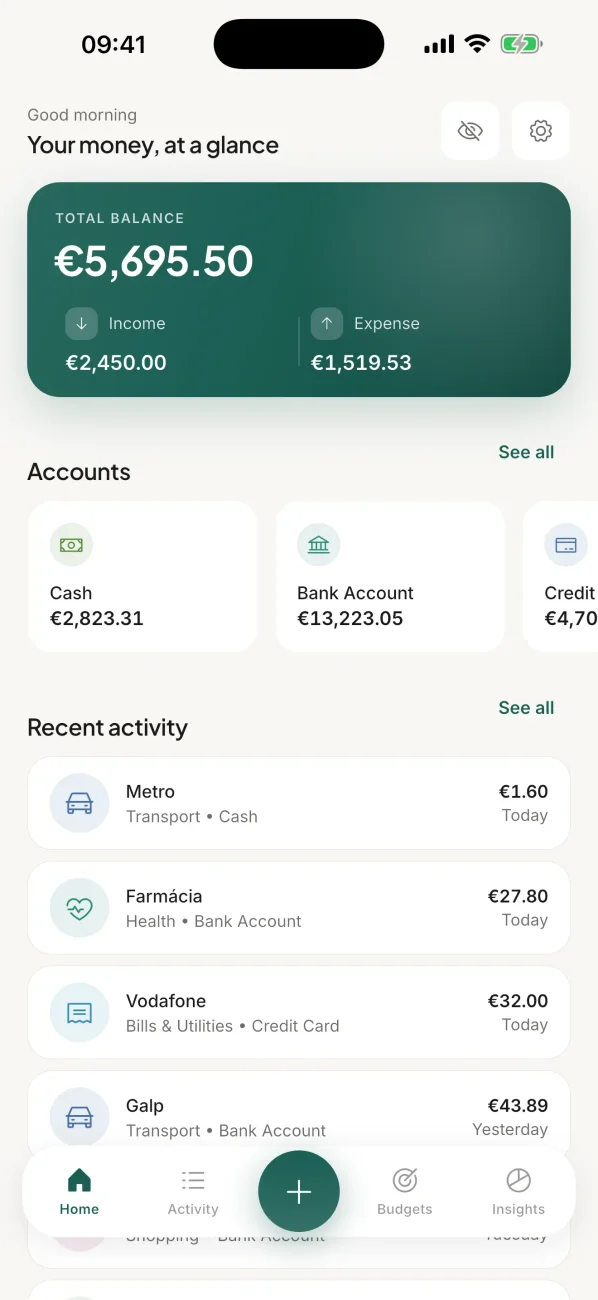
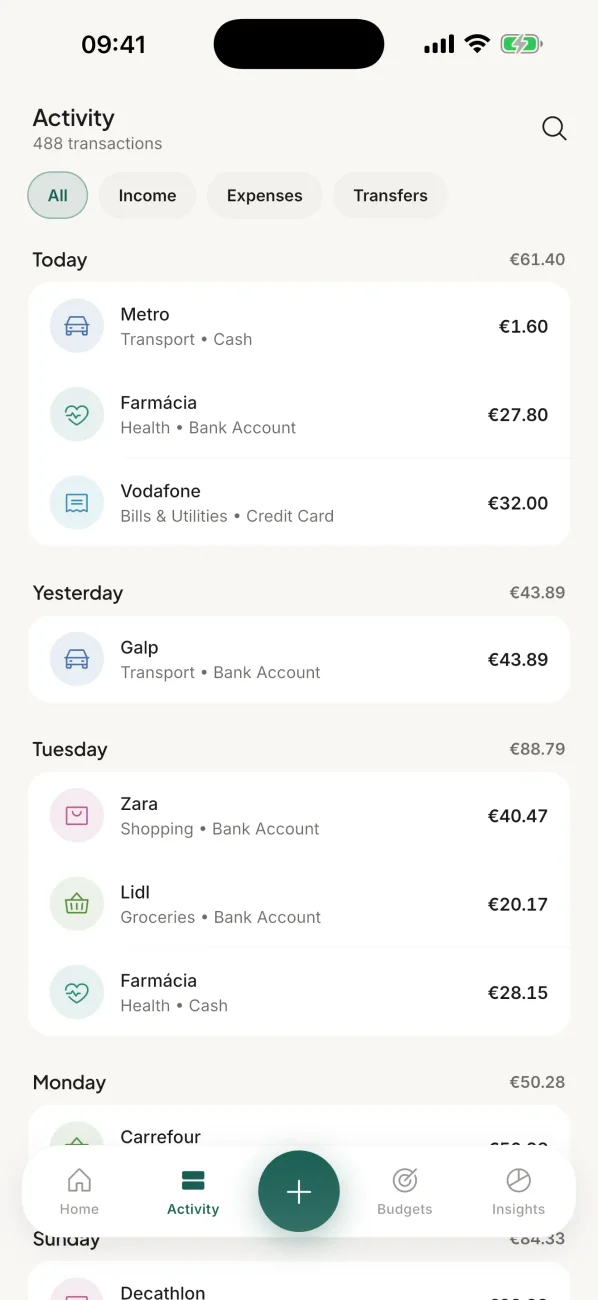
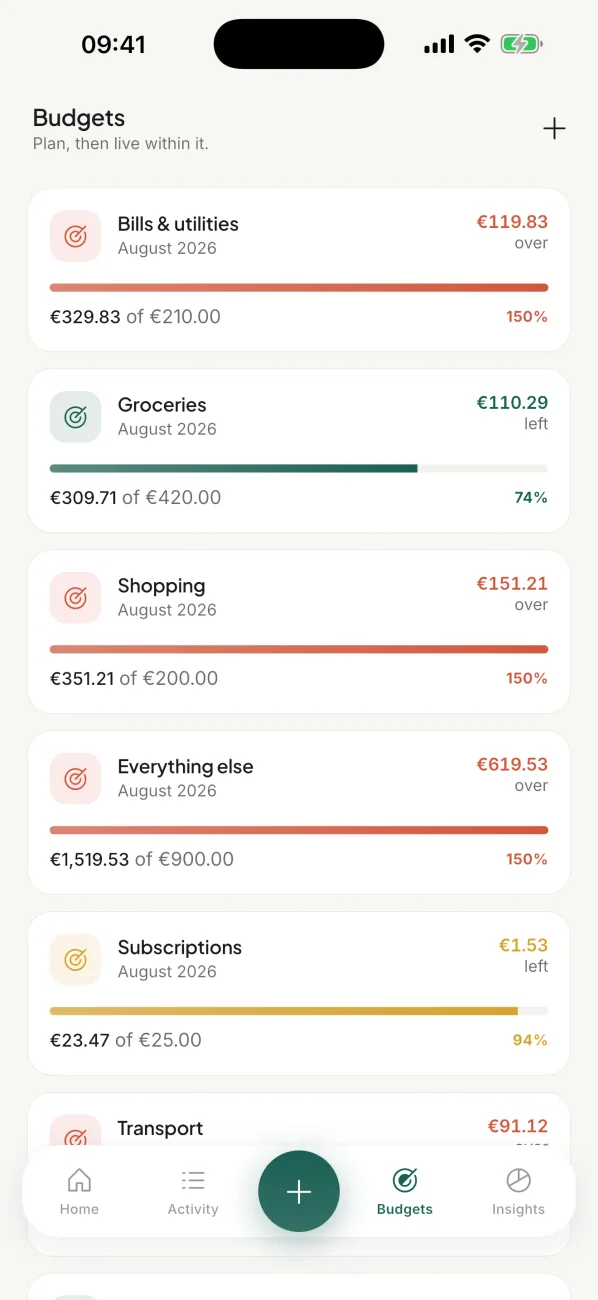
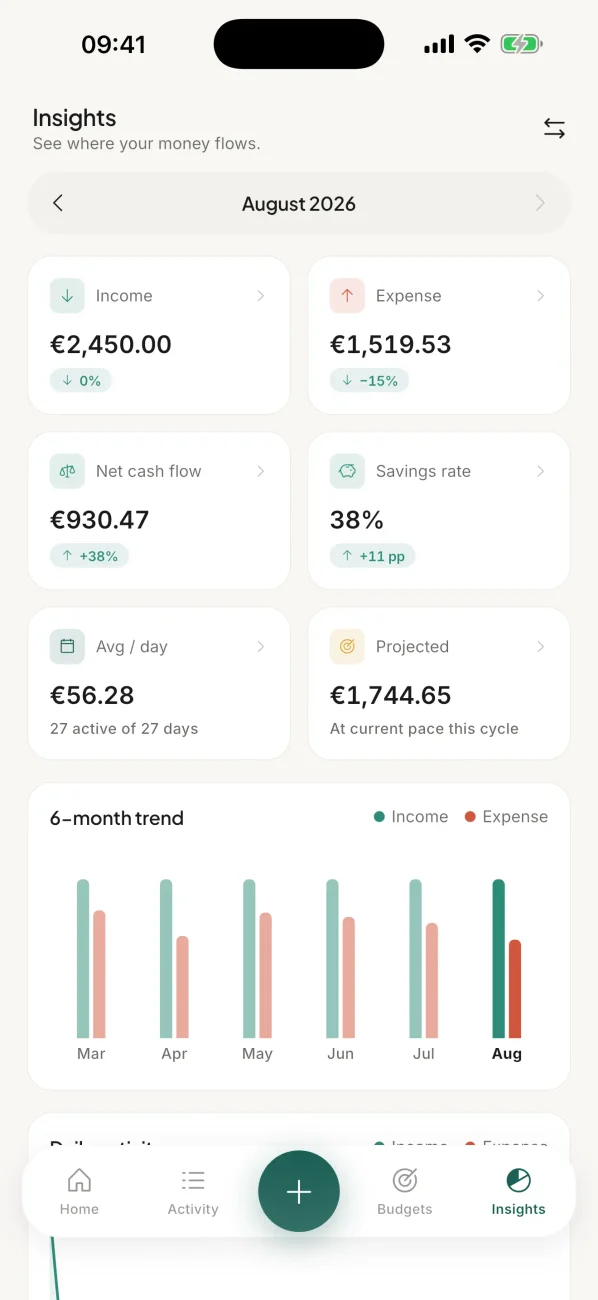
Giới thiệu
Nhà phát triển chưa cung cấp nội dung này bằng ngôn ngữ của bạn.
WeBudget is an expense tracker that does the typing for you.
Share a bank message, an email receipt or a screenshot into WeBudget and it
becomes a transaction — the amount, the merchant, the account and a category it
works out for itself. Screenshots are read on your device. You confirm it, and
that is the whole loop.
Nothing is ever saved behind your back. Every capture waits in a review queue
until you say yes, and correcting one teaches WeBudget the merchant for next
time.
WHAT IT DOES
• Share text or a screenshot from any app and have it logged for you
• Budgets per category, with a warning before you go over — not after
• Charts that answer a question: where it went, what changed, what this month
is on pace to cost
• Multiple accounts and currencies
• Import from a WeBudget backup or from Money Manager
• Export everything, whenever you like
• Face ID or PIN lock, and a covered screen in the app switcher
• Full support for English, French, Spanish and Arabic
YOUR DATA STAYS ON YOUR IPHONE
The ledger lives on your device. There is no account to create and nothing needs
a connection — use WeBudget without signing in and your spending exists in
exactly one place: your phone.
Sign in and your ledger is backed up automatically, free, on every device you
sign in on.
If you do turn it on, your records are encrypted on your phone before they leave
it, under a key only your devices hold: we store them and cannot read them. Your
iCloud Keychain can bring the key to your next iPhone, and you can also add a
device with a QR code or keep a recovery key. If the key is lost everywhere
(every device, your iCloud Keychain and the recovery key), nobody can open the
backup, us included. You can delete the cloud copy at any time without touching
your phone.
WHAT IS FREE, AND WHAT IS NOT
Free, with ads, forever: adding transactions by hand, unlimited transactions,
every chart, every budget, local backup, import and export. Your own data is
never held behind a paywall.
WeBudget Plus is a subscription. It turns on automatic capture, gives you the
WeBudget Score — your financial health from 0 to 100, built from your own
records — and removes the ads. Cloud backup is free for anyone with an account
and is not part of it. Both plans start with a free trial.
ABOUT THE ADS
The free tier carries ads, and they stay out of the way: never inside your
transactions, balances or review queue, and never on the screens where you add
money or manage your account. No transaction, amount, merchant or balance is
ever used to target an ad — not one. WeBudget Plus is the only way to remove
them: subscribe and you see none at all.
Privacy policy: https://we-budget.app/privacy
Terms: https://we-budget.app/terms
Support: https://we-budget.app/support
Có gì mới
Phiên bản 1.8.0 · 25/11/2026
WeBudget is now on Apple Watch. See what you spent today and, with a monthly budget, what is left to spend today; your budgets, this week and the bills due soon. Confirm or dismiss a payment WeBudget caught, and add an expense from your wrist: it reaches your iPhone when they are next together. Connect it in Settings › Smartwatch.
Your cloud backup is end-to-end encrypted again: it is sealed on your iPhone under a key that only your devices hold, which iCloud Keychain can carry to your next iPhone, and you can also add a device by scanning a QR code or keep a recovery key. Shared trips you start now are sealed the same way, and their key travels in the invite link.
Also in this version:
• The app lock now covers every screen, sheet and dialog, and asks for your code again after the timeout.
• A balance below zero shows its minus sign, on Home, Accounts and the widgets.
• The home-screen widgets move to the new day at midnight, even when the app has not been opened.
• Days, weeks and months add up correctly across daylight-saving changes.
• A captured payment that names no currency is shown in its account's currency.
• With cloud backup on, Reset now clears your data on all your devices.
• Dates, times and counts are written the way each language writes them, and the French, Spanish and Arabic text has been reviewed throughout.
Quyền riêng tư của ứng dụng
Những gì Heythem Ben Hadj Youssef khai báo trên App Store về cách ứng dụng này xử lý dữ liệu.
-
Dữ liệu được sử dụng để theo dõi bạn
Có thể được sử dụng để theo dõi bạn trên các ứng dụng và trang web do công ty khác sở hữu.
- Mã định danh
-
Dữ liệu liên kết với bạn
Có thể được thu thập và liên kết với danh tính của bạn.
- Mục mua
- Thông tin tài chính
- Thông tin liên hệ
- Mã định danh
-
Dữ liệu không liên kết với bạn
Có thể được thu thập nhưng không liên kết với danh tính của bạn.
- Vị trí
- Mã định danh
- Chẩn đoán
Phương thức đảm bảo quyền riêng tư có thể khác nhau, chẳng hạn như tuỳ theo các tính năng bạn sử dụng hoặc độ tuổi của bạn.
Thông tin
- Người bán
- Heythem Ben Hadj Youssef
- Danh mục
- Tài Chính
- Phiên bản
- 1.8.0
- Cập nhật
- 25/11/2026
- Phát hành
- 22/09/2026
- Kích thước
- 81,4 MB
- Yêu cầu
- iOS 16.0 trở lên
- Độ tuổi
- 4+
- Giá
- Miễn phí
- Mua hàng trong ứng dụng
- Có
- Ngôn ngữ
- Tiếng Ả Rập, Tiếng Anh, Tiếng Pháp, Tiếng Tây Ban Nha
- Bản quyền
- © 2026 WeBudget
Có thể bạn cũng thích
-
 WeBudget: Budget PlannerTài Chính
-
 DuePlan: Bills & InstallmentsTài Chính
-
 We Budget: Couples Budget AppSplit Expenses & Shared Bills
-
 PayTrack: Bills & InstallmentsTài Chính
-
 Spendy: Sổ Thu Chi Cá NhânQuản lý chi tiêu hàng ngày
-
 Sincap: Bills & InstallmentsTài Chính
-
 SecureGiveTài Chính
-
 FinEye: Budget & Money TrackerTài Chính
-
 Bills ManagerTài Chính
-
 Bobby - Track subscriptionsTài Chính