WoodStepper
Sequencer/Synthesizer
Được thiết kế cho iPhone, iPad, iPod touch
179.000đ
- Độ tuổi4+
- Danh mụcNhạc
- Nhà phát triểnWoodman's Immaculate Maple Syrup Studio
- Kích thước112,4 MB
Liên kết đến trang App Store chính thức
Download.org không lưu trữ tệp nào của WoodStepper. Nút này mở trang ứng dụng trên App Store, nơi Woodman's Immaculate Maple Syrup Studio phát hành ứng dụng. Trang được kiểm tra lần cuối: 17/11/2026.
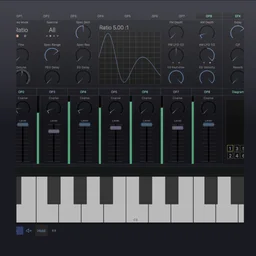
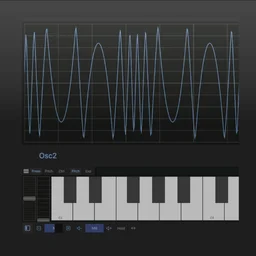
Ảnh chụp màn hình

Giới thiệu
Nhà phát triển chưa cung cấp nội dung này bằng ngôn ngữ của bạn.
The WoodStepper is a sequencer/synthesizer/sampler having both audio and midi out.
The audio sources can be the track audio, sampled audio (live/track recorded or from file) or the built-in VCO's.
The VCO notes can also be set by the Chordulator which finds chord notes in a live stream or recorded track.
It consists of 4 independent 8-steps sequencers which can be linked to a 16, 24 or 32 steps sequencer.
Each sequencer can independently be set to Synth mode.
So WoodStepper can be used in any combinations of sequencers, synths and looper/samplers.
Each step can also send 4 midi messages (note on, CC, …) to 2 midi channels.
The audio part for each sequencer has a pitch (down) shifter, (Moog lowpass) filter with A(D)SR envelope, saturator, amplitude A(D)SR envelope and delay line which can all be set independently per step.
The VCO notes can be set by midi input and WoodStepper has a function to limit the notes produced by VCO + pitch shifters to a specified key and interval scale.
The app can be used stand-alone (device audio input and output) or as a plugin in a DAW.
The manual can be downloaded from : http://www.woodmansimmaculatemaplesyrupstudio.be/woodstepper/WoodStepperHelp.pdf
- IOS plugin type : AUv3 effect, AUv3 instrument and stand-alone app.
- Has 4 independent 8-steps sequencers.
- Each of the 4 sequencers can be set to Synth mode, the steps can then be used to automate parameters while playing.
- Sequencers can be linked to form 16, 24, or 32 steps sequencer(s).
- Each sequencer can have a different timing.
- Steps can be disabled for non 4/4 patterns.
- Each step can send up to 4 midi messages (+ all previous notes off) on 2 midi channels
- Audio sources can be the track audio, sampled audio or 3 VCO's (per sequencer).
- Sampling (audio coming live or from the DAW track) can be armed (per sequencer) with a button or a midi in CC.
- Samples can also be loaded from file (sample files should be in the WoodStepper iCloud folder)
- Each sequencer has it’s own gain, clipping led and brick-wall limiter.
- VCO’s have the usual waveforms and can be modulated in various ways.
- Full polyphonic mode sends 4 subsequent note-ons to the 4 sequencers/synths.
- Para-polyphonic mode (per sequencer) sends notes 2&3 to the sequencer/synth VCO's 2&3, giving max 12 voices.
- Each sequencer/synth can set the range of receiving midi notes (which allows for up to 4 split keyboard regions).
- Each step has a pitch down shifter (sequencer mode only).
- Pitch shifters have a glide control.
- Pitch shifters can be set to a random value (out of a list of scales).
- Pitch values can be harmonically locked to the Just Scale or the Equally Tempered Scale.
- VCO + Pitch can be limited to a specified key + interval scale (e.g. C Major Pentatonic)
- Each step has a 4-pole Moog Lowpass filter with resonance and ASR (sequencer) or ADSR (synth) envelope.
- Steps have an additional high-pass filter and a saturation control.
- All steps have an ASR (sequencer) or ADSR (synth) amplitude envelope and a step gain.
- Each step has its own delay line with independent timing, feedback, and filtering.
- Step audio and delay can be panned independently per step.
- Sequencers can be started manually, started with the DAW transport, start after receiving a midi note or start audio gated.
- Sequencers can be stopped manually or after a number of bars have been played.
- A “Play 1 Step” button allows to finetune step settings
- An “All Steps” button allows to set the same parameter value in all steps.
- Has a global Dry-Wet, Input gain and Output gain control.
- Presets can be stored in iCloud Drive (makes them available on all your devices).
- Presets can be switched with Midi Program Changes or with the "Next Preset" button when running.
- Major controls can be set with Midi CC messages.
- Ableton Link can synchronise tempo, phase and start-stop with other Ableton Link enabled apps.
Có gì mới
Phiên bản 4.1.1 · 01/07/2024
Factory presets and samples not copied to user space any longer but read from the package.
Added more factory samples.
Quyền riêng tư của ứng dụng
Những gì Woodman's Immaculate Maple Syrup Studio khai báo trên App Store về cách ứng dụng này xử lý dữ liệu.
-
Dữ liệu không được thu thập
Nhà phát triển không thu thập bất kỳ dữ liệu nào từ ứng dụng này.
Phương thức đảm bảo quyền riêng tư có thể khác nhau, chẳng hạn như tuỳ theo các tính năng bạn sử dụng hoặc độ tuổi của bạn.
Thông tin
- Người bán
- Woodman's Immaculate Maple Syrup Studio
- Danh mục
- Nhạc
- Phiên bản
- 4.1.1
- Cập nhật
- 01/07/2024
- Phát hành
- 01/06/2019
- Kích thước
- 112,4 MB
- Yêu cầu
- iOS 11.4 trở lên
- Độ tuổi
- 4+
- Giá
- 179.000đ
- Bản quyền
- © Wim Cliquet