
XML to PDF: Code Printer
Syntax Highlight & Export
Được thiết kế cho iPhone, iPad
Miễn phí · Mua hàng trong ứng dụng
- Độ tuổi4+
- Danh mụcHiệu Suất
- Nhà phát triểnMuhammad Mujahid Khan
- Ngôn ngữTiếng Đức+ 15 ngôn ngữ khác
- Kích thước2,0 MB
Liên kết đến trang App Store chính thức
Download.org không lưu trữ tệp nào của XML to PDF: Code Printer. Nút này mở trang ứng dụng trên App Store, nơi Muhammad Mujahid Khan phát hành ứng dụng. Trang được kiểm tra lần cuối: 12/11/2026.
Ảnh chụp màn hình
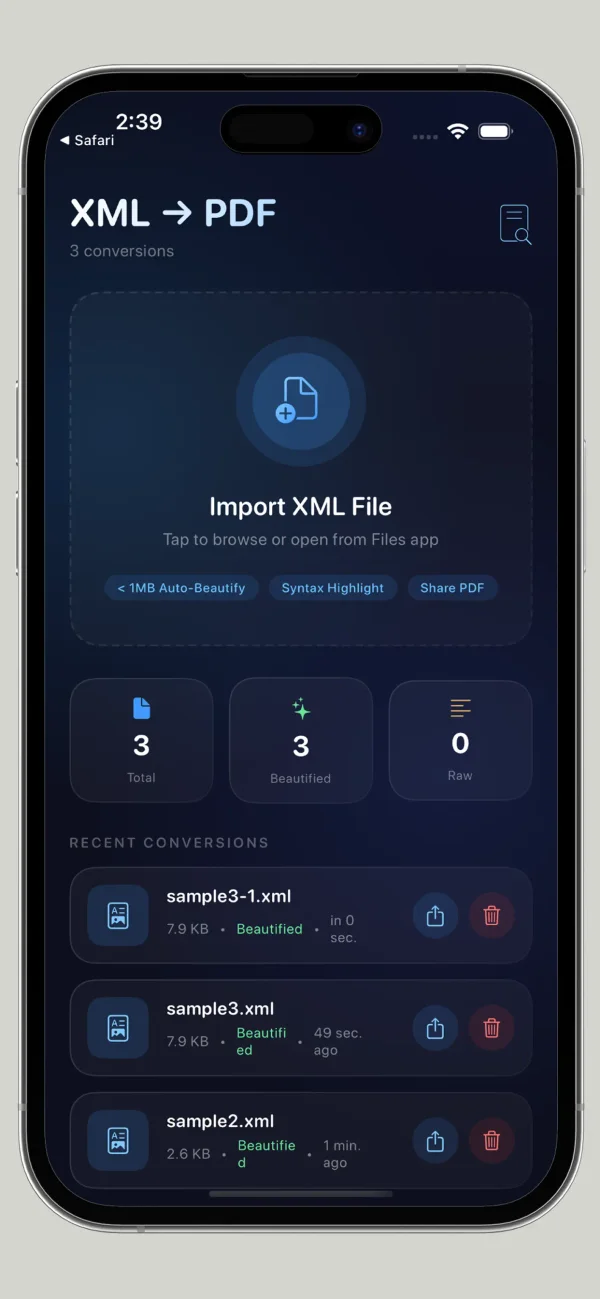
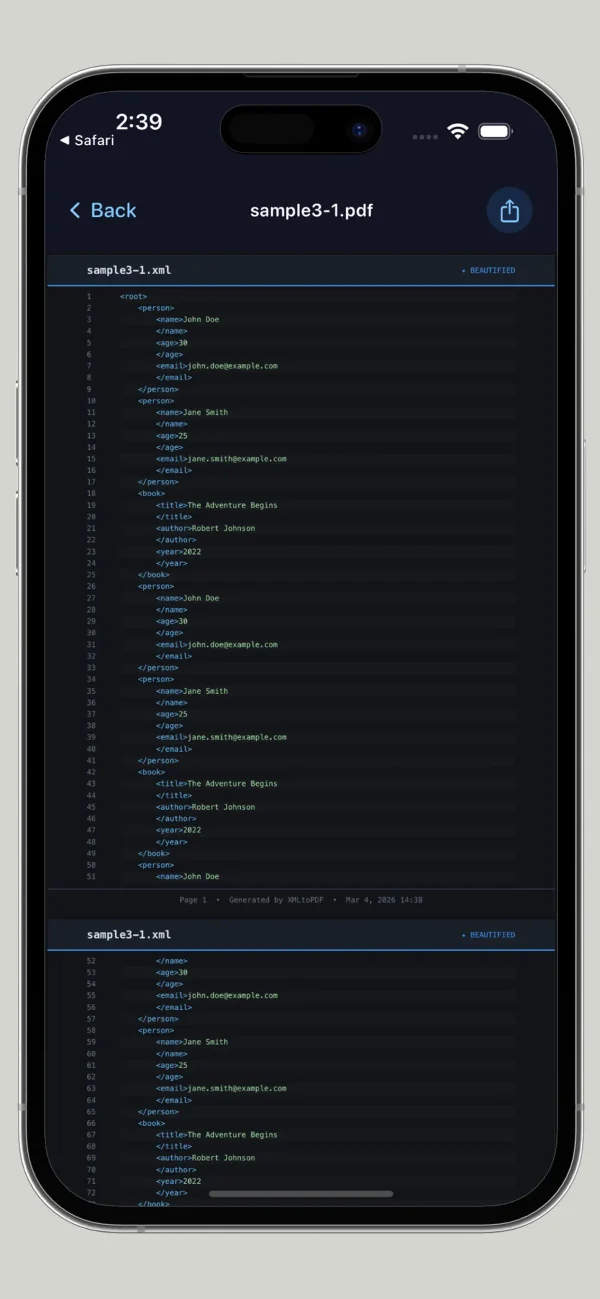
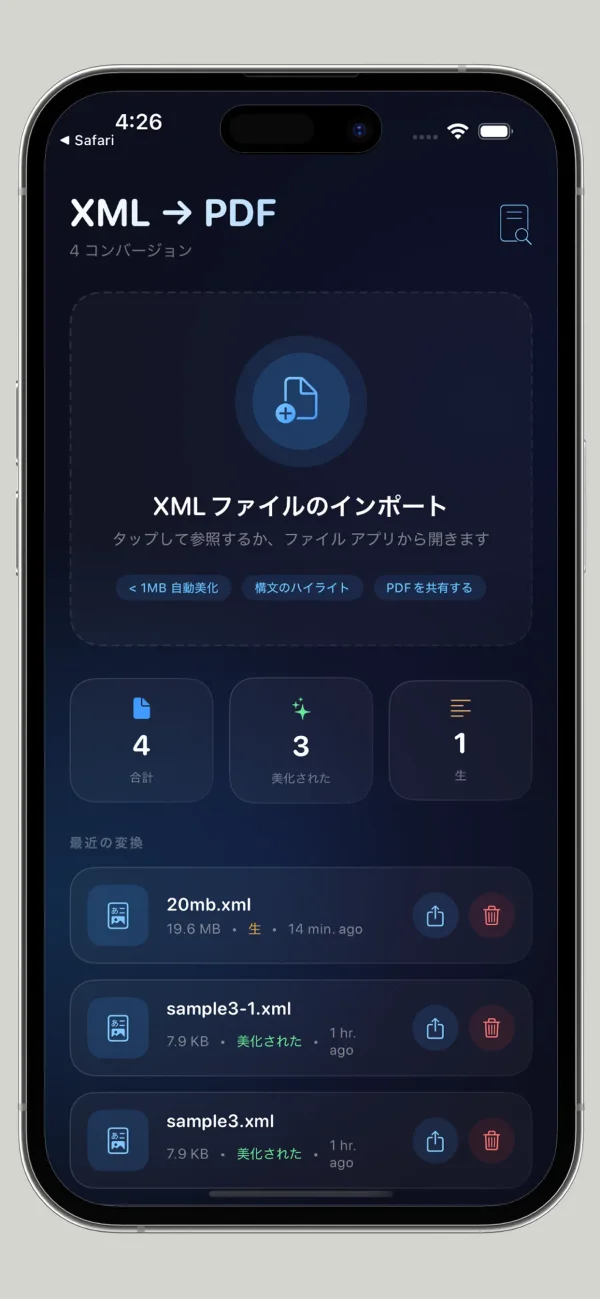

Giới thiệu
Nhà phát triển chưa cung cấp nội dung này bằng ngôn ngữ của bạn.
FREE VERSION: 1 XML to PDF conversion per day
PRO VERSION: Unlimited conversions (subscription)
Convert XML Code to Beautiful PDFs with Syntax Highlighting
Perfect for developers, students, and anyone who needs to print XML with syntax highlighting and line numbers. Transform raw XML code into professionally formatted PDF documents - completely offline with no uploads and no tracking.
WHAT MAKES THIS APP DIFFERENT
Most XML to PDF tools just dump raw text. This app adds syntax highlighting, line numbers, and beautiful formatting so your code is actually readable when printed or shared.
KEY FEATURES
Syntax Highlighting
Tags, attributes, values, and comments appear in different colors - just like your favorite code editor. Green for values, blue for tags, orange for attributes.
Line Numbers
Every line of XML is numbered for easy reference during code reviews, documentation, or team discussions.
Auto-Beautify (Files Under 1MB)
Small XML files are automatically formatted with proper indentation. No more messy, unreadable XML. Just clean, structured code.
Dark Theme PDF Output
PDFs use a dark background with light text - easier on the eyes when reviewing code on screen or printing.
100% Offline Processing
Everything happens on your device. No internet connection required. No uploads to any server. Your data never leaves your phone.
No Tracking. No Accounts.
Zero data collection. No sign-up required. No email requests. Just download and use.
Fast Rendering Engine
Handles large XML files efficiently with real-time progress indicators. You always know how much longer the conversion will take.
Share Anywhere
Export PDFs via AirDrop, Mail, Messages, Files app, or any app that accepts PDFs.
Open From Files App
Convert any XML file directly using the Open In menu. Works seamlessly with the iOS Files app.
Conversion History
Every PDF you create is saved automatically. Access previously converted files anytime without reconverting.
PERFECT USE CASES
Code Reviews
Review XML structure on paper or iPad. Line numbers make team discussions precise and efficient.
Student Assignments
Students learning XML can print their code with proper syntax highlighting for submission.
Data Archiving
Save important XML data as PDFs for long-term storage. No need to keep raw XML files.
Developer Portfolios
Showcase your XML work in a professional PDF format that non-technical people can review.
Business Reports
Convert XML data exports into readable PDFs for stakeholders who don't understand raw XML.
HOW IT WORKS
Step 1: Open XML File
Tap the import button or use Open In from the Files app. Your app supports XML files of any size.
Step 2: Auto-Beautify
Files under 1MB are automatically beautified with proper indentation. Larger files process as-is for speed.
Step 3: Preview with Colors
See your XML with syntax highlighting before converting. Tags, attributes, values, and comments are color-coded.
Step 4: Export as PDF
Tap the share button. Your PDF is generated instantly with line numbers, syntax highlighting, and dark theme.
FREE VS PRO
Free Version (Always Available)
- 1 conversion per day
- All features included (syntax highlighting, line numbers, beautify, sharing)
- No time limit on the app itself
Pro Version (Subscription)
- Unlimited conversions per day
- Same great features, no daily limit
- Priority support if you need help
SUBSCRIPTION DETAILS
Weekly Subscription: $2.99
Monthly Subscription: $6.99
Yearly Subscription: $17.99 (best value)
SUPPORT & LEGAL
Support: https://justclack.blogspot.com
Privacy Policy: https://justclack.blogspot.com/p/privacy-policy.html
Terms of Use (EULA): https://www.apple.com/legal/internet-services/itunes/dev/stdeula
ABOUT THE DEVELOPER
This app was built for developers by a developer. No corporate tracking. No hidden agendas. Just a tool that solves a real problem - printing XML code with proper syntax highlighting and line numbers.
Có gì mới
Phiên bản 1.2 · 28/05/2026
PRO VERSION ADDED
• Unlimited conversions with Pro subscription
• Daily limit: 1 free conversion (always available)
• Syntax highlighting in PDF output
• Line numbers for code reviews
• Auto-beautify for files under 1MB
• 100% offline processing
• Dark theme PDF with colors
• Conversion history saved automatically
• Share PDFs via AirDrop, Mail, Files
• Open XML files directly from Files app
• Performance improvements and bug fixes
Quyền riêng tư của ứng dụng
Những gì Muhammad Mujahid Khan khai báo trên App Store về cách ứng dụng này xử lý dữ liệu.
-
Dữ liệu không được thu thập
Nhà phát triển không thu thập bất kỳ dữ liệu nào từ ứng dụng này.
Phương thức đảm bảo quyền riêng tư có thể khác nhau, chẳng hạn như tuỳ theo các tính năng bạn sử dụng hoặc độ tuổi của bạn.
Thông tin
- Người bán
- Muhammad Mujahid Khan
- Danh mục
- Hiệu Suất
- Phiên bản
- 1.2
- Cập nhật
- 28/05/2026
- Phát hành
- 05/03/2026
- Kích thước
- 2,0 MB
- Yêu cầu
- iOS 17.6 trở lên
- Độ tuổi
- 4+
- Giá
- Miễn phí
- Mua hàng trong ứng dụng
- Có
- Ngôn ngữ
- Tiếng Đức, Tiếng Đan Mạch, Tiếng Anh, Tiếng Phần Lan, Tiếng Pháp, Tiếng Ý, Tiếng Nhật, Tiếng Hàn, Tiếng Hà Lan, Tiếng Bokmål Na Uy, Tiếng Bồ Đào Nha, Tiếng Nga + 4 ngôn ngữ khác
- Bản quyền
- © Convert XML to PDF
Có thể bạn cũng thích
-
 PDF to XML ConverterHiệu Suất
-
 JSON Master: Trình chỉnh sửaJSON sang CSV, XML và Excel
-
 eFactura Xml PdfHiệu Suất
-
 PPTX to PDF ConverterHiệu Suất
-
 衛生キロク|飲食店のHACCP記録Hiệu Suất
-
 GitFocusHiệu Suất
-
 Mach WriteHiệu Suất
-
 Markdown to PDF: Pro EditorHiệu Suất
-
 My Tasks – To-Do List OfflineHiệu Suất
-
 Đêm LịchLịch cho người làm việc khuya