- Độ tuổi4+
- Danh mụcThể Thao
- Nhà phát triểnSCUBAPRO ASIA LTD.
- Ngôn ngữTiếng Anh+ 1 ngôn ngữ khác
- Kích thước40,1 MB
Liên kết đến trang App Store chính thức
Download.org không lưu trữ tệp nào của Z dive log. Nút này mở trang ứng dụng trên App Store, nơi SCUBAPRO ASIA LTD. phát hành ứng dụng. Trang được kiểm tra lần cuối: 16/11/2026.
Ảnh chụp màn hình

Giới thiệu
Nhà phát triển chưa cung cấp nội dung này bằng ngôn ngữ của bạn.
With "Z dive log" and "SCUBAPRO Diving Computer Z1" you can enjoy diving log management and Z1 settings easily. You can download Z1's diving log data via Bluetooth and you can enter the diving point, weather etc on the smartphone.
● Download dive logs
Tap the upper right "Download" button of Z dive log then set your Z1 to Bluetooth Mode "ON", Z dive log automatically start downloading dive logs.
If the "Download button is not displayed, tap the "Dive Log" button at the bottom of the display.
Downloaded logs are displayed in the Dive Log List and you can check log list by swiping.
On the Dive Log List screen, you can check the total dive times, total dive time, maximum water depth and maximum dive time etc at a glance, and you can tap each log to see the details.
- List of Z1 log items that can be downloaded by Z dive log
Date
Start time
End time
Depth Graph*
Max. Depth
Avg. Depth
Max. Depth Temp
O2 Indicator
N2 Indicator
Warnings
* Depth graph is created automatically.
● Checking, entering, and correcting dive log details
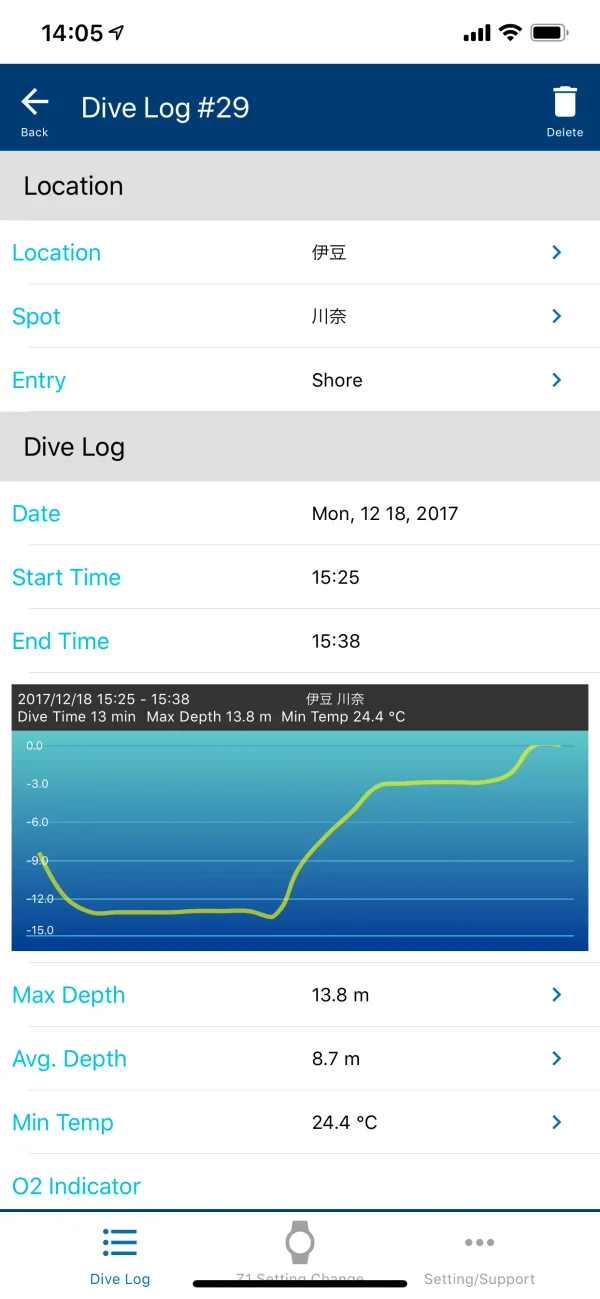
You can enter the log details when you tap each log from Dive Log List. You can fill in the same way as the paper log book, such as Location, Spot, photos, tanks, exposure protection, sea condition, buddy/instructor and comments. If you attach a photo, the photo will be displayed on the Dive Log List screen and you can enjoy a colorful logbook. You can put 3 photos, main photo, instructor photo and buddy photo in one log.
- List of items that can be input / modified in Z dive log
Location
Location
Spot
Entry
Dive Log
Date
Start time
End time
Depth Graph
Max. Depth
Avg. Depth
Min Temp
O2 Indicator
N2 Indicator
Warnings
Photo
Tank
Tank Material
Gas
Tank Capacity
Start Pressure
End Pressure
Exposure Protection
Suit
Glove
Boot
Hood
Inner
Weight
Sea Condition
Weather
Temperature
Surface Temperature
Bottom Temperature
Visibility
Wave Height
Current
Surge
Wind Direction
Wind Speed
Buddy/Instructor
Instructor
Instructor No.
Instructor Photo
Buddy
Buddy Photo
Comments
● Saving the Depth Graph Image
Tap the image of the depth graph on the log detail screen to save the depth graph image. You can upload the saved image to SNS or check on the PC.
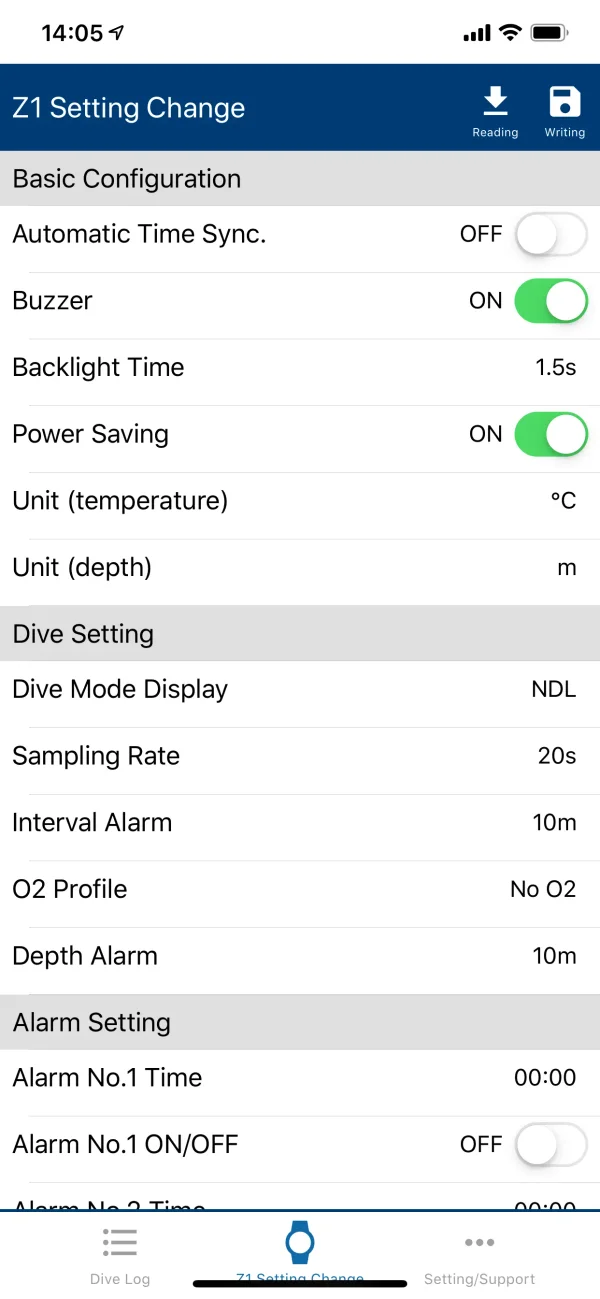
●Tap the "Z1 Setting Change" tab at the bottom of the screen. On the Z1 Setting Change screen, you can set Basic Configuration, Dive Setting, Alarm Setting, Timer Setting, Configuring Time and Date Settings and World Time. You can change the Z1 settings from Z dive log.
Tap the "Reading" button at the top right of the screen and tap the CONNECT button. Set your Z1 to Bluetooth Mode and press PLAN button once to change Bluetooth state "ON". Starts connection and reads the Z1 settings.
After reading, you can change Z1 settings from Z dive log. Change the item you want to change and tap the "Writing" button and set your Z1 to Bluetooth Mode "ON", the Z1 settings are changed.
-Z dive log Setting · Support menu list
App Settings
App color scheme
Restore deleted Dive Log
Items of Log display
Tank
Exposure Protection
Sea Condition
Buddy/Instructor
Photo
Unit
Depth
Temperature
Pressure
Volume
Weight
Log Data
Export
About Z dive log
Web manual
Introducing app to friends
Write a review on the app store
● Export Log data CSV
Choose the Export menu from the Settings / Support menu. A confirmation message will be displayed. Save the CSV data to the destination you want to save. You can check the saved CSV data on the PC.
Có gì mới
Phiên bản 2.0.1 · 05/01/2024
- Fixed an issue where the latest dive logs were not reflected during version updates.
- Fixed an issue where the latest dive logs were not reflected when creating backups.
Quyền riêng tư của ứng dụng
Những gì SCUBAPRO ASIA LTD. khai báo trên App Store về cách ứng dụng này xử lý dữ liệu.
-
Dữ liệu không được thu thập
Nhà phát triển không thu thập bất kỳ dữ liệu nào từ ứng dụng này.
Phương thức đảm bảo quyền riêng tư có thể khác nhau, chẳng hạn như tuỳ theo các tính năng bạn sử dụng hoặc độ tuổi của bạn.
Thông tin
- Người bán
- SCUBAPRO ASIA LTD.
- Danh mục
- Thể Thao
- Phiên bản
- 2.0.1
- Cập nhật
- 05/01/2024
- Phát hành
- 10/04/2017
- Kích thước
- 40,1 MB
- Yêu cầu
- iOS 16.0 trở lên
- Độ tuổi
- 4+
- Giá
- Miễn phí
- Ngôn ngữ
- Tiếng Anh, Tiếng Nhật
- Bản quyền
- © 2017 SCUBAPRO ASIA LTD.