
Android System Repair 2.1.9 for Windows
Fixes stuck or frozen Android phones over USB
Screenshots
Description
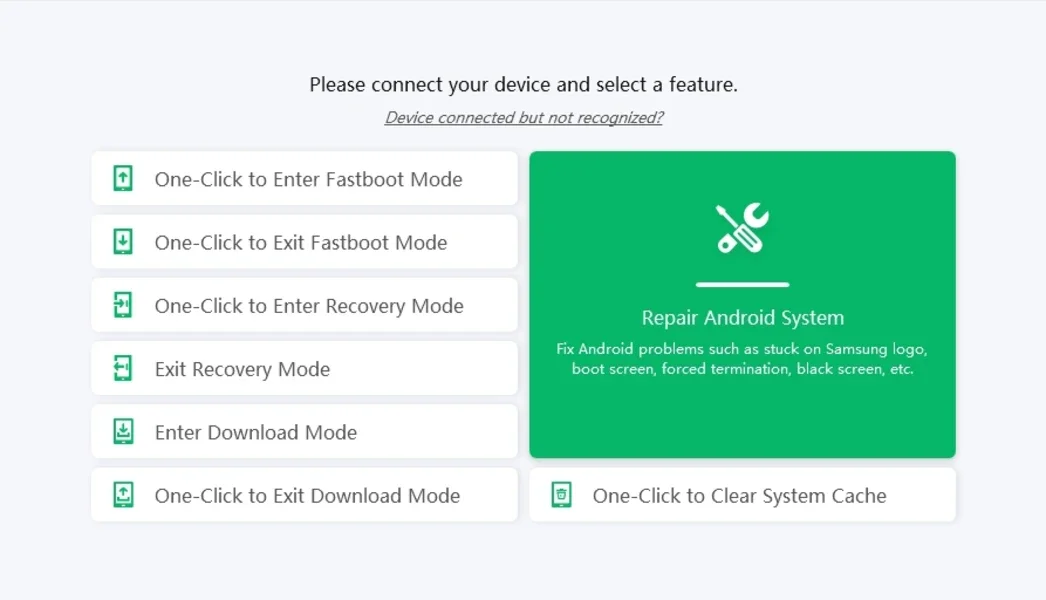
Android System Repair gets an Android phone or tablet out of the states it can get stuck in and back to a working screen. It handles more than 50 system issues and works with over 600 phone and tablet models, from Android 2.0 onward. Installation runs from on-screen prompts, so there is nothing to configure.
Modes and the problems they cause
The program moves a device into Recovery, Fastboot, or Download (Odin) Mode with one click, and back out again, at no cost. No button combinations are needed. That covers a phone stuck in Recovery, Fastboot, or Download Mode that will not exit, and a "No Command" message after entering Recovery. Guided steps walk you through leaving Recovery Mode safely. It also takes on a Samsung phone that is frozen, unresponsive, or will not power on, along with black screens, freezes, touch screen failure, the Samsung logo hang, bricked devices, lag, stuttering, and slow operation. Lag or repeated app crashes that start after a system update are on the list too.
A one-click cache cleaner wipes the system cache partition to clear out corrupted temporary files. Personal data stays where it is: photos, documents, apps, and other files are untouched. The interface language can be set to Simplified Chinese from the Settings icon in the top right. Carriers whose models are covered include AT&T, Verizon, China Mobile, China Unicom, and China Telecom.
Download files
6bd3ba80a0a2f19240b6077c643ab9401761e10a7a36a68ab3336029fd655569
Signed by Tenorshare Co., Ltd. · valid until Jul 11, 2024System requirements
Available on:
Minimum OS:
Windows XP or later
Additional information
Developer
Latest release
Size
Category
File type
SHA-256
6bd3ba80a0a2f19240b6077c643ab9401761e10a7a36a68ab3336029fd655569