

Baidu Browser 43.23.1008.106 for Windows
Chromium-based browser with video download and screen capture built in
Screenshots


Description
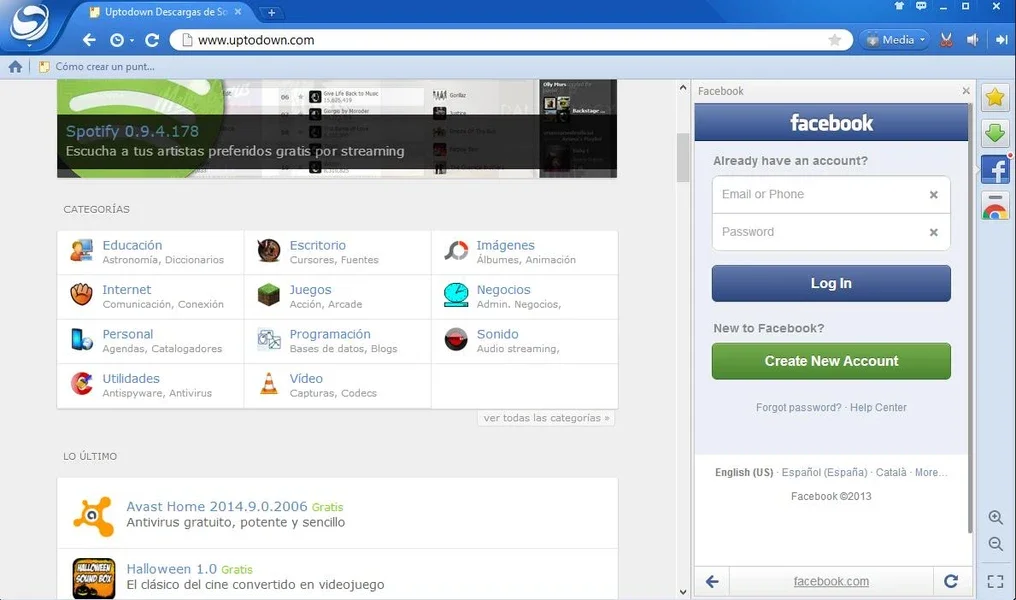
Baidu Browser is a web browser, and the way most people start with it is the same as any other: type an address, open a page. Under the interface it uses the same engine as Google Chrome, and on the surface it looks largely similar, with a set of extra features layered on top.
A media button downloads videos from pages you are viewing, at any resolution the site makes available. Screen capture gets its own direct button, so grabbing what is on screen does not mean going through a menu. The interface can be customized, color included.
Shortcuts to frequently used services sit directly in the browser, Facebook among them alongside other often-visited sites. It runs on Windows.
Download files
1641707895fda754ba4f8649e1eeb3421626405544b0c69ff0b7453eb4067eb5
Signed by Baidu Online Network Technology (Beijing) Co.,Ltd. · valid until Mar 15, 2018756e23b07e5e12bee7a21590ea55a3ac3e7b5365a98924eba9e2ec57a6e0399c
Signed by Baidu Online Network Technology (Beijing) Co.,Ltd. · valid until Mar 25, 20164c0c62a18a475494ae31ac2214d8933e672ac775f9b91f7d99883f087ddc902c
cd5f7f55f550ecb9963f4d1f3ec0206024333b98671d7c5ee487b0d5f8a3a5a8
9d210d3013266d5f818ff5d56cba9fcb42fa98a885728390c76c5d92d1361d51
System requirements
Available on:
Minimum OS:
Windows Windows 10 or later
Additional information
Developer
Latest release
Size
Category
File type
SHA-256
1641707895fda754ba4f8649e1eeb3421626405544b0c69ff0b7453eb4067eb5