
CADe SIMU 4.2 for Windows
Draws and simulates electrical command and automation circuits
Screenshots
Description
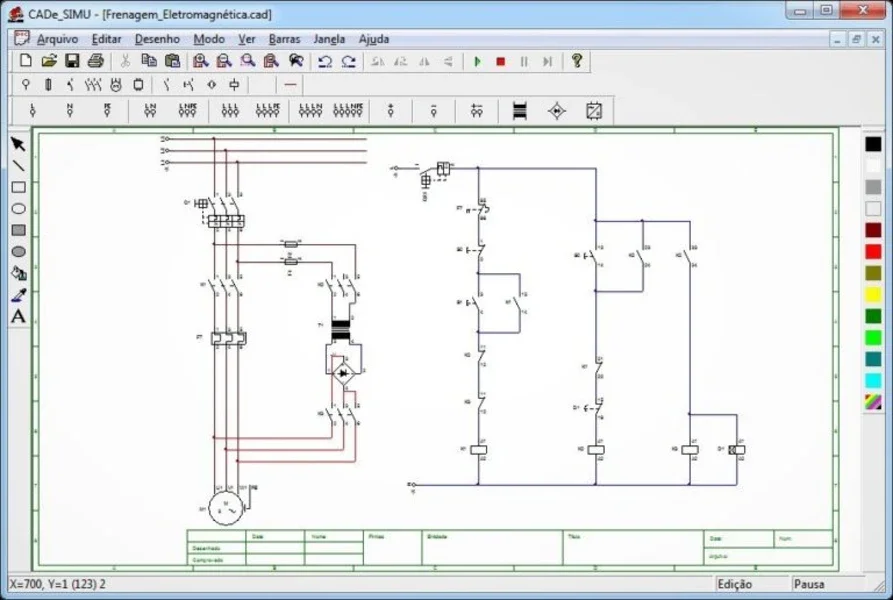
CADe SIMU is a CAD application for drawing electrical circuits and then running them to see how they behave. It is a didactic program: the point is to learn and train on diagrams for electrical commands, automation and pneumatic systems.
You build a circuit by inserting symbols from its libraries, and the catalog of parts is large enough to cover many circuit types, from direct engine start onward. Each component appears instantly once you activate it. Once the drawing is done, the simulator runs it, which lets you watch command and automation circuits work and understand their operation. The same run shows design failures, so you can detect possible problems in a design and correct them. You can also highlight conductors when current passes through them, though that access requires a valid key. Designs can be saved, printed and organized. The program runs on minimal system resources and needs no installation; you just run the executable file.
It is free, and it has only basic features, without advanced design tools.
Download files
3c93d8b1e69fab840a52746dc183e2bcac113cf1f05bd558a689c0bb5f24f4aa
System requirements
Available on:
Minimum OS:
Windows XP or later
Additional information
Developer
Latest release
Size
Category
File type
SHA-256
3c93d8b1e69fab840a52746dc183e2bcac113cf1f05bd558a689c0bb5f24f4aa