
Highlight 2.14 for Windows
SHA-256 listed
Turns source code into formatted, coloured text
You are on macOS — this is the Windows version. See the macOS version
All ages
Age rating
Screenshots
Description
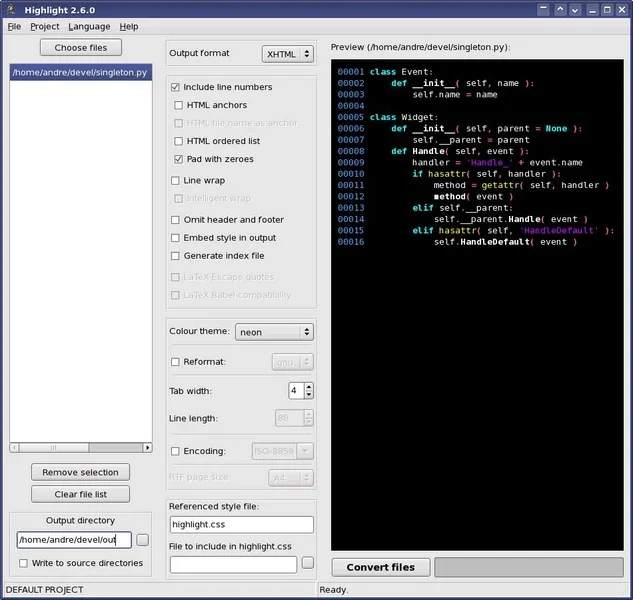
Highlight is a source code formatter for web programmers. It converts source code into formatted text and supports over 100 programming languages, both popular and obscure.
Many color schemes are available to apply, which helps distinguish the parts of a web document. The interface is available in several languages, including Spanish. It runs on multiple platforms and is free.
Download files
Filehighlight-2.14.exeEXE
Version2.14
ReleasedSep 15, 2026
Size4.0 MB
SHA-256
Get
6d6c0c664cf97981f14a5c7800c659bc1c7821c64ac07e91a793cd1ab245cbde
No digital signatureFile3.16EXE
Version3.16
ReleasedOct 8, 2013
Size5.9 MB
SHA-256
Get
f9f4412d37f81bd96060018d7a282c738d486c9e7f11971d49ca9f60ba7aa8ac
No digital signatureFilehighlight-3.7.exeEXE
Version3.7
ReleasedJan 23, 2012
Size4.8 MB
SHA-256
Get
8860c0986c6811699c69055717a0743651ee81dab28e4fd16067206fcd8dcd69
Filehighlight-3.6.exeEXE
Version3.6
ReleasedOct 14, 2011
Size4.7 MB
SHA-256
Get
40c74213d1fdfda05a1c1f9a5a3d13799bf52f2f7319e3b6e4c9c0bc52e720f1
Filehighlight-3.5.exeEXE
Version3.5
ReleasedJun 3, 2011
Size4.7 MB
SHA-256
Get
62b0a843d55f7efb369a9c3527b6e723054bb11f9beab88e037181b972c8cafe
System requirements
Available on:
Minimum OS:
Windows Windows 98 SE or later
Additional information
Developer
Latest release
2.14 · Sep 15, 2026
Size
4.0 MB
Category
File type
EXE
SHA-256
6d6c0c664cf97981f14a5c7800c659bc1c7821c64ac07e91a793cd1ab245cbde
Digital signature
No digital signature