
Screenshots
Description
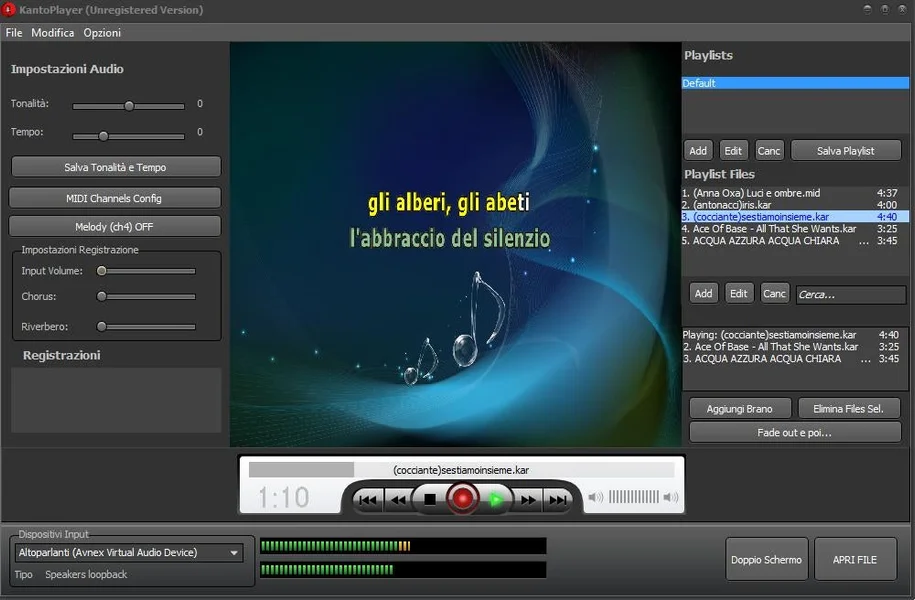
Kanto Karaoke plays karaoke from your computer, using the songs you load into it. You fill it with your own songs, so the playlist and the order they play in are yours to set. Song files and the playlist sit on the right-hand side. The karaoke video plays in the center of the screen, and you can jump to any song at any time without waiting. Adding a video file with karaoke lyrics or a CD+G file lets you sing along. It can record your own voice, and it can convert MIDI files to MP3. There are effects to add too, such as clapping between songs.
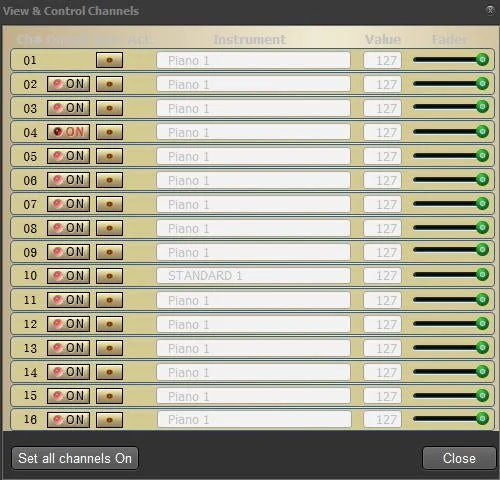
Audio settings are in the left-hand panel. The interface looks complicated, with many buttons and panels using terms most people won't understand, especially the audio options. Subtitles on MP3 files are a struggle to add, if they can be added at all. In Dual Display mode you cannot use your second monitor.
Extensive online tutorials are available to help users learn the software.
Download files
246e9c7f67c808550ad6e6334c0308e6022585c3afbeea1626926ce4d6534be0
Signed by Globosoft S.R.L. · valid until Dec 6, 202854c710afe02866549bd77d1ed79ece1afa4e85bf69186ba7cafa1df3e76146f8
Signed by Globosoft S.R.L. · valid until Nov 6, 2025912a4cf8e31f8518a33996f4d24cc3a20640c6865e74ea80eb71d047d4797a85
02edf3548b2f13a23f3638c089708e2c41dee09d78cd0a9581ce051f9490b1d6
5e54c45260a74244e8d698b4ddabf501392a9dc5ac6ecc1045157ee97dfc9bcb
System requirements
Available on:
Additional information
Developer
Latest release
Size
File type
SHA-256
246e9c7f67c808550ad6e6334c0308e6022585c3afbeea1626926ce4d6534be0