
MSEdgeRedirect 0.8.0.0 for Windows
Sends Edge-bound requests to Chrome without touching the registry
Screenshots
Description
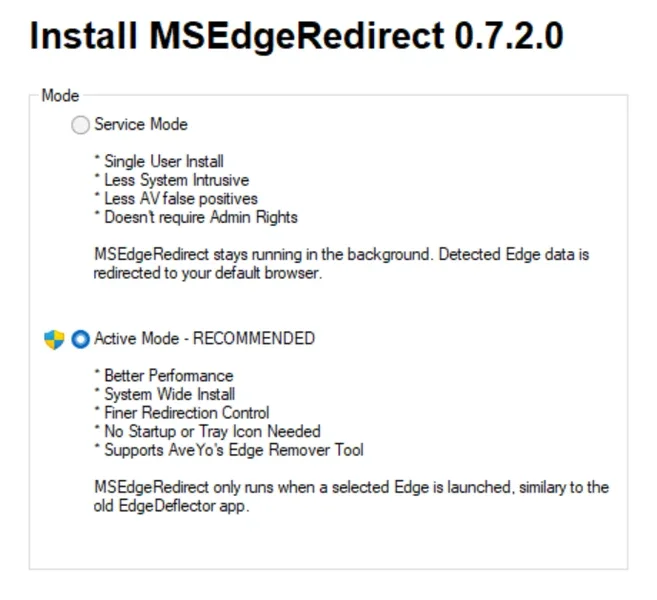
MSEdgeRedirect sends any request Windows makes for Edge to Chrome instead. It does this without editing the registry. This matters because Windows forces Edge for some functions even when another default browser is set. The installer gives you two choices: Service Mode and Active Mode.
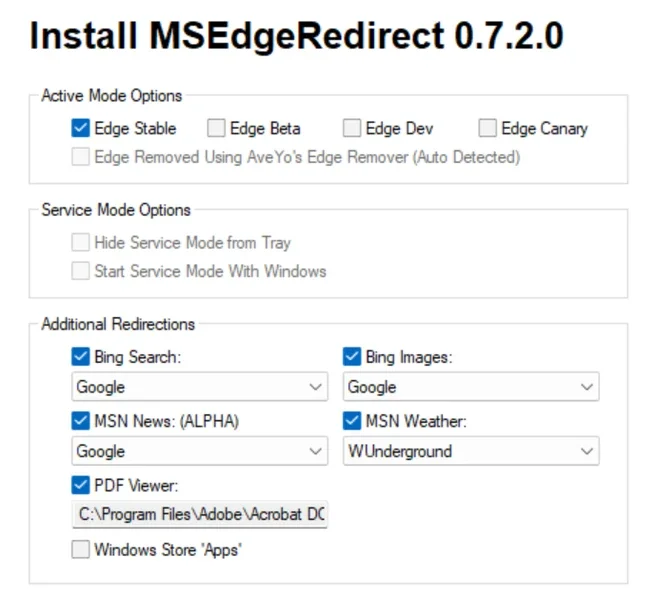
Active Mode is the one the developer recommends. It installs for all users, gives more control over redirections and has better performance. Any action sent to any Edge version can be redirected. So can the actions of some Microsoft Store apps. It does not need a permanent taskbar icon. Searches can be pointed at a search engine or weather site you pick, covering Bing, MSN News and MSN Weather. Opening PDF files can be redirected too.
Service Mode takes a quieter path. It installs for a single user, is less intrusive and does not require administrator permissions. It also avoids false positives in some antivirus programs. One example of what gets caught: when a Start menu search finds nothing, Windows may suggest an internet search that opens Bing in Edge. That request can go to Chrome instead.
Download files
f3c4f9de4553e9f88b71ce189d3d1234fa560d247443d4c2d417e3b6461cd36a
No digital signature8fe4be5a697b96c85adadd55feda1213f32e57c526363d62cae166e9baa5b593
d046c14b06347fd0053c3321828ae145e5a5a7caecde7c116d24458a8c4268ae
9f903df9025c8b5c22e5c9c80730d3d32db920cf08eb147e6158eccf6ffde60c
657f1e6a681344f2e20c8066cd61143efee1bbf5d7bfc364b58445b1a9217528
No digital signatureSystem requirements
Additional information
Developer
Latest release
Size
Category
File type
SHA-256
f3c4f9de4553e9f88b71ce189d3d1234fa560d247443d4c2d417e3b6461cd36a