
PIXresizer 2.0.8 for Windows
SHA-256 listed
Changes photo size and format, one file or a batch
All ages
Age rating
Screenshots
Description
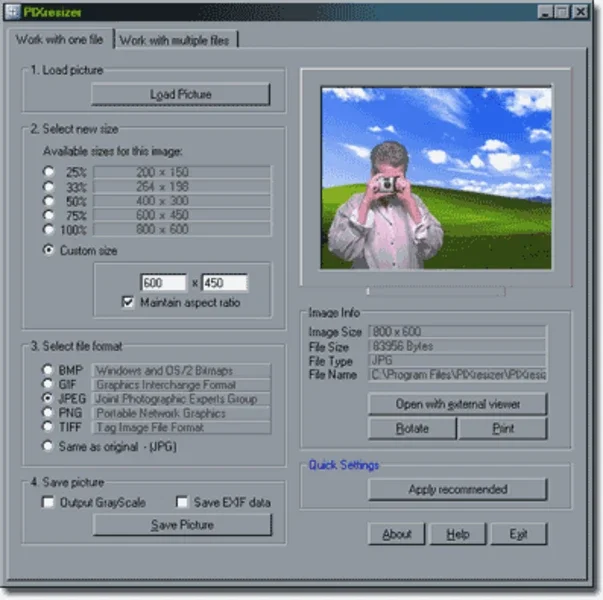
PIXresizer changes a photo's size and format. The single-file workflow runs in four steps: pick the file, give it a new size, pick what to save it as, then write the output file. Supported output formats are BMP, GIF, JPEG, PNG and TIFF.
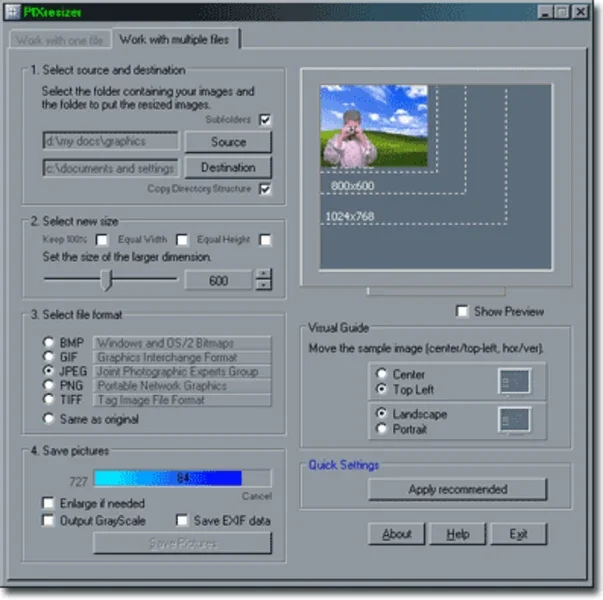
The second tab does the same job for several pictures at once, so a whole group can be converted in one pass. Batch work and the single-file route sit on separate tabs.
It is free.
Download files
FilePIXresizer.zipZIP
Version2.0.8
ReleasedNov 13, 2026
Size2.9 MB
SHA-256
Get
be15d02bca66396069c7ca9d014797be71ac8dc48019cf02cadf4b86e2bef781
File2.0.8ZIP
Version2.0.8
ReleasedOct 23, 2014
Size2.9 MB
SHA-256
Get
315de8dd210e6529f4950ad57e3020ee3b10d83e957e8ccd764a64872914e8f4
Filepixresizer-2.0.6.zipZIP
Version2.0.6
ReleasedFeb 25, 2013
Size2.9 MB
SHA-256
Get
ed3d2c186408d569da6f475ee6c4965af6ea5cd44140e872f2f62545412b60e1
Filepixresizer-2.0.5.zipZIP
Version2.0.5
ReleasedFeb 9, 2012
Size3.3 MB
SHA-256
Get
bfc682293b31d60e6e416b5c6183bba9cc894f091dfd944c6aa01caf1b8e1d9d
Filepixresizer-2.0.4.zipZIP
Version2.0.4
ReleasedJun 12, 2009
Size3.3 MB
SHA-256
Get
1b1e89c64ca743fc3406f76ea4e6472b418407e75e00c63a7974fc38acdc70ce
System requirements
Available on:
Minimum OS:
Windows Windows NT or later
Additional information
Developer
Latest release
2.0.8 · Nov 13, 2026
Size
2.9 MB
Category
File type
ZIP
SHA-256
be15d02bca66396069c7ca9d014797be71ac8dc48019cf02cadf4b86e2bef781