
Screenshots
Description
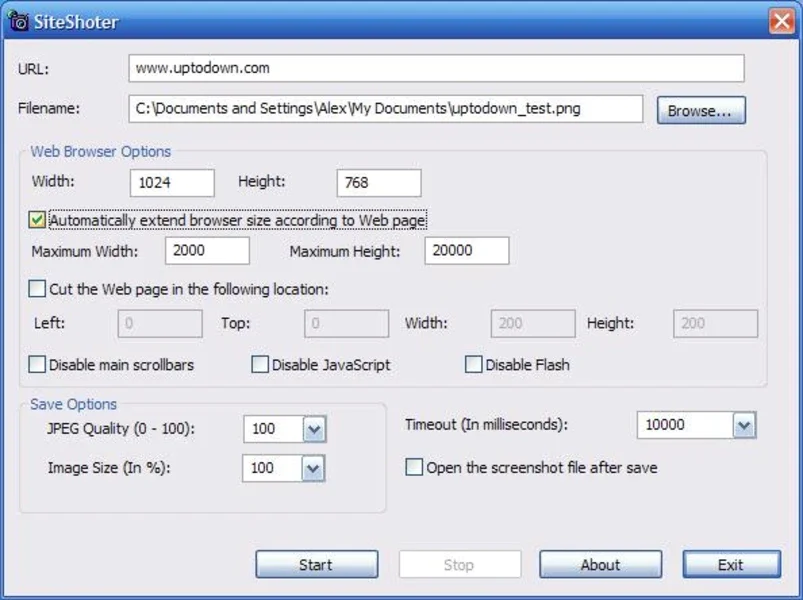
SiteShoter captures screenshots of webpages, and it takes the whole page rather than just what fits on screen. There are no size limits on the capture.
You run the program, enter the URL of the page and choose a filename for the image. Options can be changed before you capture, including browser width and height and turning Flash off.
The interface is simple and intuitive. Nothing needs installing, so it runs from a pen drive.
Download files
File1.42ZIP
Version1.42
ReleasedMar 10, 2022
Size86.6 KB
SHA-256
Get
72cc2633ebc81a5c6a79e7543c2da9b1e56e901c7d2c9e688d582a630838d2cc
Filesiteshoter-1.21.zipZIP
Version1.21
ReleasedDec 18, 2008
Size81.5 KB
SHA-256
Get
ab11572311e293db725feeb7554e6af487d12dbb073403c9062e7bbe363a7b2b
Filesiteshoter-1.36.zipZIP
Version1.36
ReleasedUnknown
Size83.4 KB
SHA-256
Get
9d26d2d871428e390cfb68ad9ef2404c24836194debe0fbabd51a6151cc98e37
System requirements
Available on:
Minimum OS:
Windows XP or later
Additional information
Developer
Latest release
1.42 · Mar 10, 2022
Size
86.6 KB
File type
ZIP
SHA-256
72cc2633ebc81a5c6a79e7543c2da9b1e56e901c7d2c9e688d582a630838d2cc