
tinySpell 1.9.64 for Windows
SHA-256 listed
Spell checking that follows you into every Windows app
All ages
Age rating
Screenshots
Description
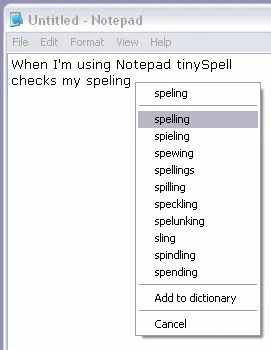
Select a piece of text in any application and tinySpell checks it, marking errors visually and showing a list of possible corrections when it finds one. It works like the Office spell checker, except it follows you into any program rather than staying inside one. The program stays minimized while it runs. You can add exclusion words the program does not recognize but that are correct.
It is a lightweight tool for correcting text in any application on Windows.
Download files
FiletinySpell_V1.9.64.exeEXE
Version1.9.64
ReleasedDec 29, 2023
Size999.6 KB
SHA-256
Get
07df7fb0f8a3074c60dc80d57adfa9b4013a59065248a8415d6baf58044c0f7b
No digital signatureFile1.9.60ZIP
Version1.9.60
ReleasedNov 18, 2015
Size757.7 KB
SHA-256
Get
dc90feb8adc6bfad9f4b2dfca69c757d6520d9fce29bae6e73a0db90b920e457
Filetinyspell-1.9.52.exeEXE
Version1.9.52
ReleasedAug 14, 2014
Size780.3 KB
SHA-256
Get
6899e9116652f1de50db0dcdda7eef2b0d3e3160215247506eee9853b372c53c
Filetinyspell-1.9.44.zipZIP
Version1.9.44
ReleasedJul 3, 2013
Size619.6 KB
SHA-256
Get
714ef82dc8db466cdd8eb8e5b1a7b8e94cad7280861abaecf721362baeca3b4b
Filetinyspell-1.9.11.exeEXE
Version1.9.11
ReleasedSep 2, 2010
Size592.2 KB
SHA-256
Get
bd1989c665ae0269997fd2560132229c830c891f4d52ef7020626ff38877059b
System requirements
Available on:
Minimum OS:
Windows Windows 10 or later
Additional information
Developer
Latest release
1.9.64 · Dec 29, 2023
Size
999.6 KB
Category
File type
EXE
SHA-256
07df7fb0f8a3074c60dc80d57adfa9b4013a59065248a8415d6baf58044c0f7b
Digital signature
No digital signature