
Video Watermark Remove 8.4.0 for Windows
Clears watermarks from video using blur or mosaic boxes
Screenshots
Description
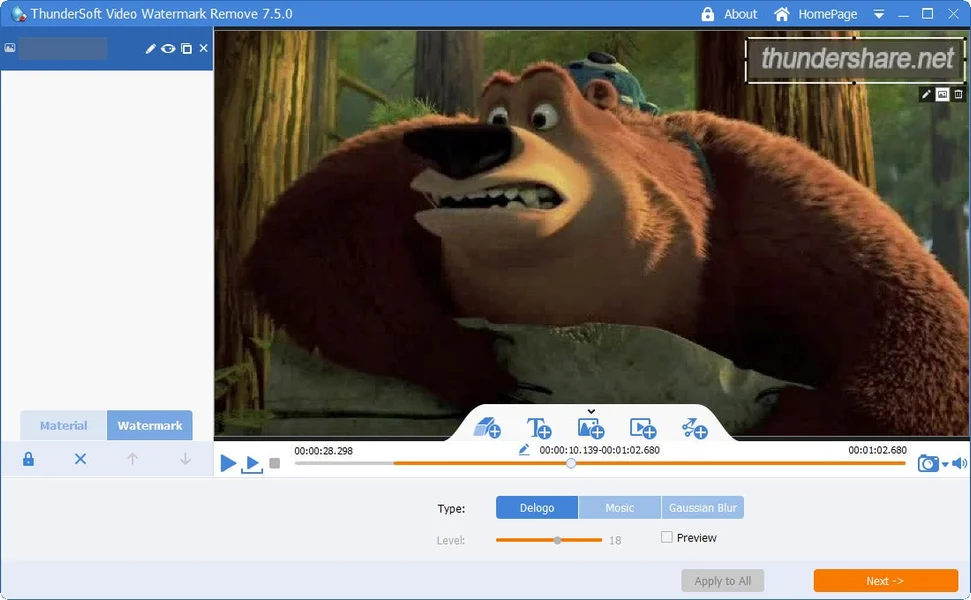
Video Watermark Remove removes watermarks from videos. You install it with standard steps, it is quick, and no other software needs to be installed first. The interface is simple. The watermark removal icon sits at the bottom of the preview window, and the removal options stay hidden until you click it.
Clicking the remove watermark button shows a resizable box on the video preview. You drag and resize that box to cover the watermark. There are three removal methods: Delogo, Mosaic, and Gaussian Blur. The steps are the same for all three, but the results differ. Delogo applies a vertical blur to the marked area, making the watermark unreadable. Mosaic turns the marked spot into a pixelated mosaic. Gaussian Blur works like Delogo but the blur is horizontal. The level of blur or mosaic can be adjusted for all methods. It works well where the watermark sits in a corner or along an edge, but it is not suitable for watermarks at the exact center of the video. All methods blur part of the video, so a centered watermark hurts the viewing experience.
Some videos cannot be processed without losing video quality.
Download files
5c207a80b58aeb12504a0554c8fea260ad197fc8f37857f0ed1b766d2fc57549
7065aa8f085a5829851e65691a8380d11c72597830073d4a0126a94bf9f1f0f8
a59af23b9b05d4beea3df5d5cf2f8abbb6e137a8c7b51ee4ecadfb323ee19f29
917510df0f47988f42d31f47a9eb7af5f59f7642111a95c6359c0fcac4ba2e4b
fa374d417f0fc168d9e6ae1f2c19c63da38fcbc333dfabca77f2082f8130acda
System requirements
Available on:
Additional information
Developer
Latest release
Size
File type
SHA-256
5c207a80b58aeb12504a0554c8fea260ad197fc8f37857f0ed1b766d2fc57549
Languages
Price
Report a problem
Nothing here yet.