Warehouse Barcode Labeling Tool 1 for Windows
Prints barcode labels for warehouse products
Screenshots
Description
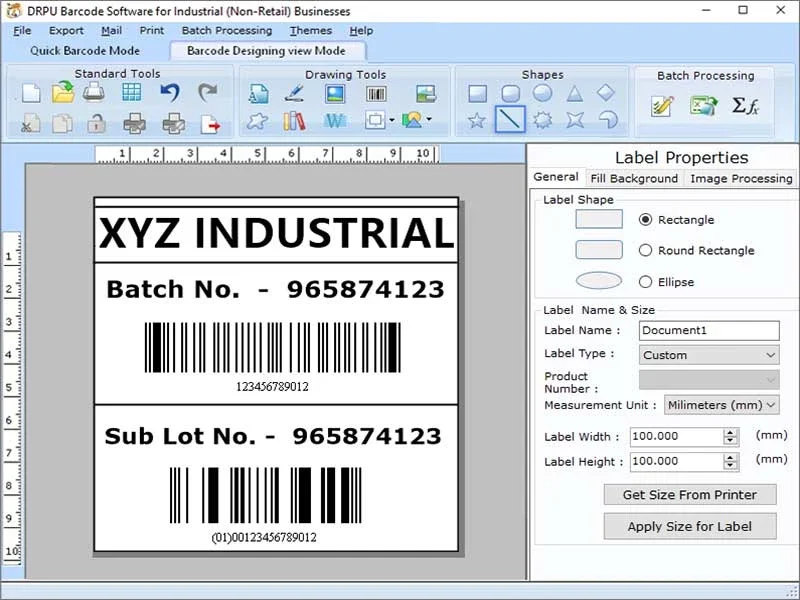
Warehouse Barcode Labeling Tool makes barcode labels for products in a warehouse. When you launch it, you pick linear or two-dimensional barcodes, then type in the information that should appear on the label. The barcodes are generated automatically from that information.
You can create several labels for different products at once. The barcode fonts cover a lot of ground. Linear options include Code 39, Code 39 Full ASCII, Code 93, USS-93, Code 11, Codabar, MSI Plessey, Telepen, Standard 2 of 5, Industrial 2 of 5, Interleaved 2 of 5, LOGMARS, and ITF-14. Code 128 comes in Set A, Set B, and Set C, and UCC/EAN-128 is there as well. Databar support includes Databar, Databar Limited, and Databar MicroPDF417. The same Databar family also lists Databar Code 128, Databar Code 128 Set A, Databar Code 128 Set B, and Databar Code 128 Set C, along with Databar PDF417. For two-dimensional work you get PDF417, DataMatrix, QR Code, Aztec, and MaxiCode.
It runs on Windows. The license is proprietary, and the program is free.
Download files
8b964eb3d9e26f44365b79657efcef6f53631f829ee1a741f8d588b251d97159
Signed by DRPU Software Private Limited · valid until Jul 25, 2023c484304eda6e36075a54a43c52b622868db5515d18fc91975cdc7653e5fb01d0
Signed by DRPU SOFTWARE PRIVATE LIMITED · valid until Dec 3, 2020System requirements
Available on:
Additional information
Developer
Latest release
Size
Category
File type
SHA-256
8b964eb3d9e26f44365b79657efcef6f53631f829ee1a741f8d588b251d97159