Armillary Sphere Watch Face
Tempus Arcanum- EveryoneAge rating
- PersonalizationCategory
- Oct 20, 2026Updated
- $0.99Price
Links to the official Google Play listing of com.tempusarcanum.armillary. Last checked on Nov 27, 2026.
About this app
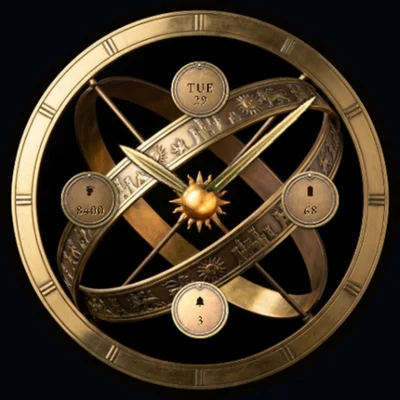
Animated 3D armillary sphere watch face: golden rings turn and the sun flares
A 3D animated analog watch face for Wear OS: a great antique armillary sphere, seen straight on, is the whole dial. Interlocking rings of polished gold and aged bronze, carved in low relief with castles, towers, suns and beasts, circle a small glowing sun at its heart, and the hands turn from beneath that sun. Every hour the inner rings swing through a slow partial turn and back, as if the sphere were moving in its frame.
KEY FEATURES
• The outermost ring carries the hours: twelve engraved bars, or Roman or Arabic numerals engraved into the metal.
• On the hour the inner rings turn and the small sun at the center flares with light.
• Tap the dial to set the rings turning whenever you like.
• The hands carry a dark edge and a soft dark halo, so they stand out on the bright rings and on the black alike.
• Steps, unread notifications and battery are engraved on aged bronze medallions at 9, 3 and 6 o'clock, with the date on a fourth medallion at 12.
• Nothing moves faster than the hands: the turning rings and the flare play only on a tap and on the hour.
MAKE IT YOURS
• Metal: gold, bronze or silver (with silver, the sun stays gold).
• Hour marks: engraved bars, Roman numerals or Arabic numerals.
• Three complications: steps, unread notifications and battery; choose other data for any of them in the watch face editor. Another app's complication shows its icon and value on the medallion; set a slot to Empty and its medallion goes, leaving the bare rings.
ALWAYS-ON DISPLAY
Always-on shows the hour marks, the hands and a fine line of the ring, dim on black.
COMPATIBILITY
Works on Wear OS 6 or later, such as Galaxy Watch models updated to One UI 8 Watch and Pixel Watch. Made in Watch Face Format: no permissions, no data collected.
HOW TO INSTALL
1. Install it from Google Play on your watch, or tap Install on my watch in the phone app.
2. Touch and hold your watch face, swipe to The Armillary and tap it. To customize, touch and hold it, then tap Customize.
More watch faces: this face is part of Tempus Arcanum, an app with 200+ animated watch faces for Wear OS, free to download. Search for "Tempus Arcanum" on Google Play, browse the whole collection on your phone and send any face to your watch with one tap.
Data safety
What Tempus Arcanum declares on Google Play about the data this app collects and shares.
- No data shared with third partiesLearn more about how developers declare sharing
- No data collectedLearn more about how developers declare collection
What’s new
Oct 20, 2026
Refreshed with the new Tempus Arcanum icon. Small fixes and improvements.
Developer contact
- Websitetempusarcanum.com
- Emailsupport@tempusarcanum.com
- Privacy policytelegra.ph
- Addressвулиця Будівельників, будинок 7 30 Помічна Кіровоградська область Ukraine 27030
Information
- Offered by
- Tempus Arcanum
- Category
- Personalization
- Updated
- Oct 20, 2026
- Released
- Oct 13, 2026
- Age rating
- Everyone
- Price
- $0.99
- Package name
- com.tempusarcanum.armillary