Armillary Sphere Watch Face
Tempus Arcanum- 3 歳以上対象年齢
- カスタマイズカテゴリ
- 2026/10/20更新日
- ¥170価格
com.tempusarcanum.armillaryのGoogle Play公式ページにリンクしています。最終確認:2026/11/27。
このアプリについて
Googleによる英語 (アメリカ合衆国)からの自動翻訳です。
アニメーション付き3D天球儀の文字盤:金色のリングが回転し、太陽が輝く
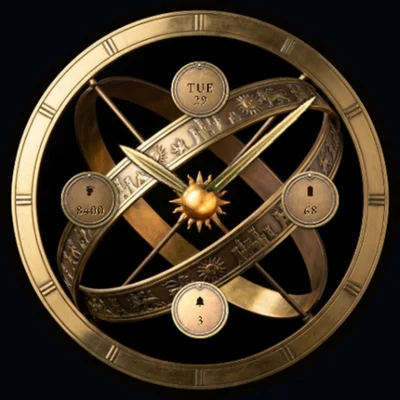
Wear OS向け3Dアニメーションアナログウォッチフェイス:正面から見た壮大な古代の天球儀が文字盤全体を占めています。磨き上げられたゴールドと古びたブロンズのリングが絡み合い、城、塔、太陽、獣などが浅浮き彫りで彫り込まれ、中心にある小さな輝く太陽を囲んでいます。針はその太陽の下から回転します。毎正時になると、内側のリングがゆっくりと部分的に回転し、まるで天球儀が枠の中で動いているかのように元の位置に戻ります。
主な特徴
• 一番外側のリングには、12本のバー、または金属に刻まれたローマ数字やアラビア数字で時刻が表示されます。
• 毎正時になると内側のリングが回転し、中心の小さな太陽が輝きます。
• 文字盤をタップして、リングの回転を好きなタイミングで設定できます。
• 針には暗い縁取りと柔らかな暗い光輪が施されているため、明るいリングの上でも黒いリングの上でも、はっきりと見えます。
• 歩数、未読通知、バッテリー残量は、9時、3時、6時の位置にあるアンティーク調ブロンズ製メダリオンに刻印されています。日付は12時の位置にある4つ目のメダリオンに表示されます。
• 針の動きは、時計の針の動きよりも速く、回転リングとフレアはタップ時と毎正時のみに作動します。
カスタマイズ
• 素材:ゴールド、ブロンズ、シルバー(シルバーの場合、太陽はゴールドのままです)。
• インデックス:刻印バー、ローマ数字、アラビア数字。
• 3つのコンプリケーション:歩数、未読通知、バッテリー残量。ウォッチフェイスエディターで、それぞれのデータ表示をカスタマイズできます。他のアプリのコンプリケーションは、メダリオンにアイコンと値が表示されます。スロットを「空」に設定すると、そのメダリオンは非表示になり、リングのみが表示されます。
常時表示
常時表示機能では、時針、針、リングの細い線が黒地に薄く表示されます。
互換性
Wear OS 6以降に対応しています。Galaxy Watch(One UI 8にアップデート済み)やPixel Watchなど、様々なモデルでご利用いただけます。ウォッチフェイス形式なので、権限の取得やデータ収集は一切行いません。
インストール方法
1. ウォッチのGoogle Playからインストールするか、スマートフォンアプリで「ウォッチにインストール」をタップしてください。
2. ウォッチフェイスを長押しし、「天球儀」までスワイプしてタップします。カスタマイズするには、長押しして「カスタマイズ」をタップしてください。
その他のウォッチフェイス:このウォッチフェイスは、Wear OS向けの200種類以上のアニメーションウォッチフェイスを収録したアプリ「Tempus Arcanum」の一部です。アプリは無料でダウンロードできます。Google Playで「Tempus Arcanum」を検索し、スマートフォンでコレクション全体を閲覧して、ワンタップでウォッチフェイスを送信できます。
原文を表示
A 3D animated analog watch face for Wear OS: a great antique armillary sphere, seen straight on, is the whole dial. Interlocking rings of polished gold and aged bronze, carved in low relief with castles, towers, suns and beasts, circle a small glowing sun at its heart, and the hands turn from beneath that sun. Every hour the inner rings swing through a slow partial turn and back, as if the sphere were moving in its frame.
KEY FEATURES
• The outermost ring carries the hours: twelve engraved bars, or Roman or Arabic numerals engraved into the metal.
• On the hour the inner rings turn and the small sun at the center flares with light.
• Tap the dial to set the rings turning whenever you like.
• The hands carry a dark edge and a soft dark halo, so they stand out on the bright rings and on the black alike.
• Steps, unread notifications and battery are engraved on aged bronze medallions at 9, 3 and 6 o'clock, with the date on a fourth medallion at 12.
• Nothing moves faster than the hands: the turning rings and the flare play only on a tap and on the hour.
MAKE IT YOURS
• Metal: gold, bronze or silver (with silver, the sun stays gold).
• Hour marks: engraved bars, Roman numerals or Arabic numerals.
• Three complications: steps, unread notifications and battery; choose other data for any of them in the watch face editor. Another app's complication shows its icon and value on the medallion; set a slot to Empty and its medallion goes, leaving the bare rings.
ALWAYS-ON DISPLAY
Always-on shows the hour marks, the hands and a fine line of the ring, dim on black.
COMPATIBILITY
Works on Wear OS 6 or later, such as Galaxy Watch models updated to One UI 8 Watch and Pixel Watch. Made in Watch Face Format: no permissions, no data collected.
HOW TO INSTALL
1. Install it from Google Play on your watch, or tap Install on my watch in the phone app.
2. Touch and hold your watch face, swipe to The Armillary and tap it. To customize, touch and hold it, then tap Customize.
More watch faces: this face is part of Tempus Arcanum, an app with 200+ animated watch faces for Wear OS, free to download. Search for "Tempus Arcanum" on Google Play, browse the whole collection on your phone and send any face to your watch with one tap.
データ セーフティ
このアプリが収集・共有するデータについて、Tempus ArcanumがGoogle Playで申告している内容です。
- 第三者と共有されるデータはありません詳しくは、デベロッパーが共有を申告する方法についての説明をご覧ください
- データは収集されません詳しくは、デベロッパーが収集を申告する方法についての説明をご覧ください
新機能
2026/10/20
Refreshed with the new Tempus Arcanum icon. Small fixes and improvements.
開発元の連絡先
- ウェブサイトtempusarcanum.com
- メールsupport@tempusarcanum.com
- プライバシーポリシーtelegra.ph
- 住所вулиця Будівельників, будинок 7 30 Помічна Кіровоградська область Ukraine 27030
情報
- 提供元
- Tempus Arcanum
- カテゴリ
- カスタマイズ
- 更新日
- 2026/10/20
- リリース
- 2026/10/13
- 対象年齢
- 3 歳以上
- 価格
- ¥170
- パッケージ名
- com.tempusarcanum.armillary