AWD BIG Forecast
AIwatch- EveryoneAge rating
- PersonalizationCategory
- Aug 5, 2026Updated
- $1.99Price
Links to the official Google Play listing of com.watchfacestudio.awd_big_forecast. Last checked on Nov 20, 2026.
About this app
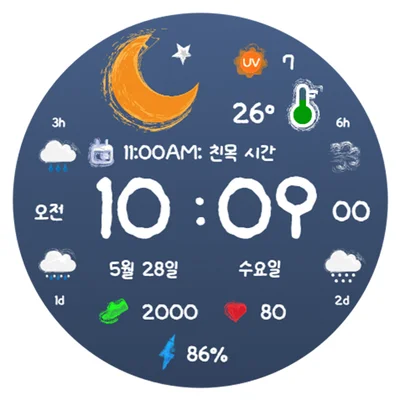
Brush Weather Watchface
An intuitive, weather-optimized digital watch face.
It has all the features you can easily and conveniently view on your Wear OS device.
Check weather and health information easily.
Function
- Brush Weather Icon
- Temperature (Celsius, Fahrenheit support)
- Temp(Low/High)Progress Bar
- Forecast (+3h , +6h , +1d , +2d)
- UV indicator
- Step Count
- Heart Rate
- Battery %
- Multilingual support
- 12h/24h Digital Time
(The weather is automatically updated about every hour. Manual update method: Launch the weather app and press the update button at the bottom.)
When you restart the watch, weather information may not be displayed.
In this case, apply the default watch face and then reapply the weather watch face.
Weather information is displayed normally.
Weather information is based on the API provided by Samsung.
There may be differences from other companies’ weather information.
Customizing
- 14 x Color Style Change
- Forecast ON / OFF
- 2 x Appshortcut
- Support wear OS
- Square screen watch mode is not supported.
***Installation Guide***
The mobile app is a guide app for installing the watch face.
Once the watch screen is installed properly, you can delete the mobile app.
1. The watch and mobile phone must be connected via Bluetooth.
2. Press the “Click” button on the mobile guide app.
3. Follow the watch faces to install the watch face in a few minutes.
You can also search for and install watch faces directly from the Google app on your watch.
You can search and install it in your mobile web browser.
Contact us : aiwatchdesign@gmail.com
Data safety
What AIwatch declares on Google Play about the data this app collects and shares.
- No data shared with third partiesLearn more about how developers declare sharing
- No data collectedLearn more about how developers declare collection
Developer contact
- Websiteinstagram.com
- Emailaiwatchdesign@gmail.com
- Privacy policysites.google.com
- Address완정로65번안길 17 (마전동, 금호어울림아파트) 101동204호 검단구, 인천광역시 23469 South Korea
Information
- Offered by
- AIwatch
- Category
- Personalization
- Updated
- Aug 5, 2026
- Released
- May 25, 2025
- Age rating
- Everyone
- Price
- $1.99
- Package name
- com.watchfacestudio.awd_big_forecast