AWD BIG Forecast
AIwatch- PEGI 3Classification d’âge
- PersonnalisationCatégorie
- 05/08/2026Mis à jour
- 1,59 €Prix
Renvoie vers la fiche Google Play officielle de com.watchfacestudio.awd_big_forecast. Dernière vérification le 20/11/2026.
À propos de cette application
Traduction automatique par Google. Langue d’origine : Anglais (États-Unis).
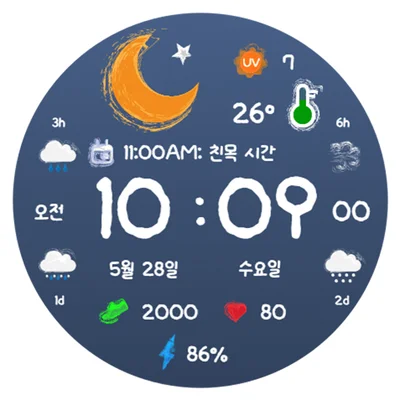
Cadran météo Brush
Un cadran numérique intuitif et optimisé pour la météo.
Il offre toutes les fonctionnalités pour un affichage facile et pratique sur votre appareil Wear OS.
Consultez facilement les informations météo et de santé.
Fonctions
- Icône météo (pinceau)
- Température (Celsius, Fahrenheit)
- Barre de progression de la température (basse/haute)
- Prévisions (+3h, +6h, +1j, +2j)
- Indicateur UV
- Nombre de pas
- Fréquence cardiaque
- % de batterie
- Support multilingue
- Heure numérique 12h/24h
(La météo est mise à jour automatiquement toutes les heures environ. Mise à jour manuelle : lancez l'application Météo et appuyez sur le bouton de mise à jour en bas.)
Lorsque vous redémarrez la montre, les informations météo peuvent ne pas s'afficher.
Dans ce cas, activez le cadran par défaut, puis réactivez-le.
Les informations météo s'affichent normalement.
Les informations météo sont basées sur l'API fournie par Samsung.
Il peut y avoir des différences avec les informations météo d'autres fournisseurs.
Personnalisation
- 14 changements de couleur
- Activation/désactivation des prévisions
- 2 raccourcis d'application
- Compatible avec Wear OS
- Le mode montre à écran carré n'est pas pris en charge.
***Guide d'installation***
L'application mobile est un guide d'installation du cadran.
Une fois l'écran correctement installé, vous pouvez supprimer l'application mobile.
1. La montre et le téléphone doivent être connectés en Bluetooth.
2. Cliquez sur le bouton « Clic » de l'application mobile.
3. Suivez les instructions pour installer le cadran en quelques minutes.
Vous pouvez également rechercher et installer des cadrans directement depuis l'application Google sur votre montre.
Vous pouvez rechercher et installer l'application dans votre navigateur web mobile.
Contactez-nous : aiwatchdesign@gmail.com
Afficher le texte d’origine
An intuitive, weather-optimized digital watch face.
It has all the features you can easily and conveniently view on your Wear OS device.
Check weather and health information easily.
Function
- Brush Weather Icon
- Temperature (Celsius, Fahrenheit support)
- Temp(Low/High)Progress Bar
- Forecast (+3h , +6h , +1d , +2d)
- UV indicator
- Step Count
- Heart Rate
- Battery %
- Multilingual support
- 12h/24h Digital Time
(The weather is automatically updated about every hour. Manual update method: Launch the weather app and press the update button at the bottom.)
When you restart the watch, weather information may not be displayed.
In this case, apply the default watch face and then reapply the weather watch face.
Weather information is displayed normally.
Weather information is based on the API provided by Samsung.
There may be differences from other companies’ weather information.
Customizing
- 14 x Color Style Change
- Forecast ON / OFF
- 2 x Appshortcut
- Support wear OS
- Square screen watch mode is not supported.
***Installation Guide***
The mobile app is a guide app for installing the watch face.
Once the watch screen is installed properly, you can delete the mobile app.
1. The watch and mobile phone must be connected via Bluetooth.
2. Press the “Click” button on the mobile guide app.
3. Follow the watch faces to install the watch face in a few minutes.
You can also search for and install watch faces directly from the Google app on your watch.
You can search and install it in your mobile web browser.
Contact us : aiwatchdesign@gmail.com
Sécurité des données
Ce que AIwatch déclare sur Google Play au sujet des données que cette application collecte et partage.
- Aucune donnée partagée avec des tiersEn savoir plus sur la manière dont les développeurs déclarent le partage
- Aucune donnée collectéeEn savoir plus sur la manière dont les développeurs déclarent la collecte
Coordonnées du développeur
- Site webinstagram.com
- E-mailaiwatchdesign@gmail.com
- Politique de confidentialitésites.google.com
- Adresse완정로65번안길 17 (마전동, 금호어울림아파트) 101동204호 검단구, 인천광역시 23469 South Korea
Informations
- Proposée par
- AIwatch
- Catégorie
- Personnalisation
- Mis à jour
- 05/08/2026
- Publié
- 25/05/2025
- Classification d’âge
- PEGI 3
- Prix
- 1,59 €
- Nom du package
- com.watchfacestudio.awd_big_forecast