Brother Print Service Plugin
Brother Industries, Ltd.- EveryoneAge rating
- ProductivityCategory
- Nov 5, 2026Updated
- FreePrice
Links to the official Google Play listing of com.brother.printservice. Last checked on Nov 26, 2026.
Screenshots




About this app
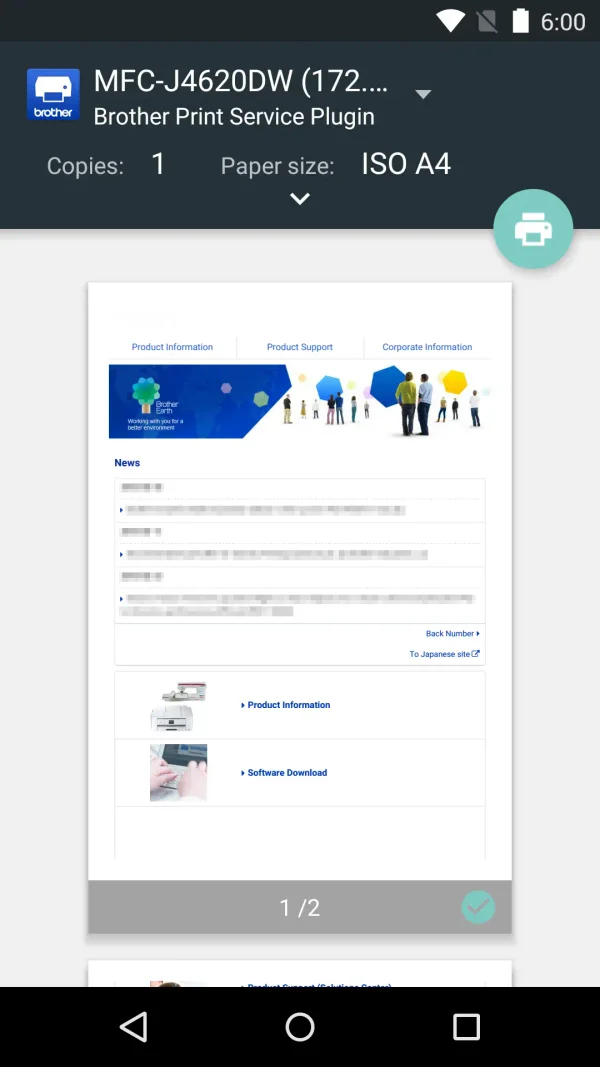
You can print from Brother printers using the built-in menu of Android apps.
The Brother Print Service Plugin enables you to print directly from your Android devices (Android 5.0 or later), to your Brother printer through a Wi-Fi network. As this is a plugin application, you can print using the "Print" option of supported Android apps. Please see below for supported applications (as of March 2015):
- Chrome Browser
- Gmail
- Photos
- Google Sheets
- Google Slides
- Google Docs
- Google Drive
The following print options are available (compatible options will depend on the selected device):
- Copies
- Paper Size
- Color/Mono
- Orientation
- Media Type
- Quality
- Layout
- 2-sided
- Borderless
After installing this application, you must activate it in one of the following ways:
- Tap the icon displayed in the notification area immediately after installation, and enable it in the displayed screen.
- Tap "Settings" on your Android device and tap "Printing", then select "Brother Print Service Plugin". Enable it in the displayed screen.
Please visit your local Brother website for supported models.
To help us improve the application, send your feedback to Feedback-mobile-apps-lm@brother.com. Please note that we may not be able to respond to individual emails.
Data safety
What Brother Industries, Ltd. declares on Google Play about the data this app collects and shares.
- No data shared with third partiesLearn more about how developers declare sharing
- No data collectedLearn more about how developers declare collection
What’s new
Version 1.17.0 · Nov 5, 2026
Minor fixes for improved functionality
Developer contact
- Websitebrother.com
- EmailFeedback-mobile-apps-ps@brother.com
- Privacy policyweb.global.brother
- Address15-1, NAESHIROCHO, MIZUHO-KU NAGOYA, 愛知県 467-0841 Japan
Information
- Offered by
- Google Commerce Ltd
- Category
- Productivity
- Version
- 1.17.0
- Updated
- Nov 5, 2026
- Released
- Mar 31, 2015
- Requires
- Android 7.0 or later
- Age rating
- Everyone
- Price
- Free
- Package name
- com.brother.printservice
Similar apps
-
 Brother Mobile Connect
Tools
-
 Phomemo
Tools
-
 SOLARMAN Smart
Tools
-
 Samsung Print Service Plugin
Productivity
-
 HP Print Service Plugin
Productivity
-
 Smart Connect
Productivity
-
 HP
Productivity
-
 Epson iPrint
Tools
-
 Samsung Smart Switch Mobile
Tools
-
 HerePrint
Tools
-
 Ring - Always Home
Lifestyle
-
 Print Master
Tools