Digiwatch WatchFace
JustWatchFace- EveryoneAge rating
- PersonalizationCategory
- Feb 21, 2026Updated
- $0.89Price
Links to the official Google Play listing of com.justwatch.digiwatch.watchface. Last checked on Nov 13, 2026.
About this app
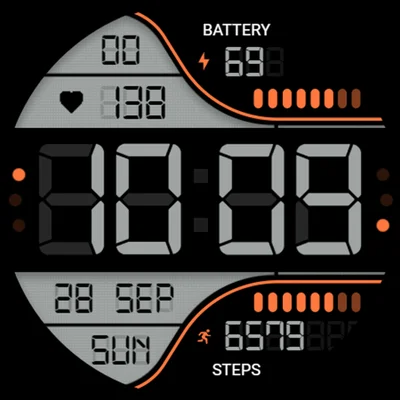
digital watch face designed for Wear OS with 15 color schemes.
Digiwatch is a modern, high-contrast digital watch face that brings essential data to your wrist with clarity and style.
FEATURES
• Digital 12/24 hour time display
• Date and Day of the week
• Real-time Heart Rate monitoring
• Battery percentage indicator with charging status
• Step counter with visual progress bar
• Advanced Always-On Display (AOD) supported
• Optimized for battery efficiency
CUSTOMIZATION
• 10+ Unique Color Schemes: Change the look to match your style.
• Compatible with Galaxy Watch, Pixel Watch, and other Wear OS devices.
INSTALLATION
1. Ensure your watch is connected to your smartphone via Bluetooth.
2. Open the Play Store on your smartphone and search for 'Digiwatch'.
3. Select your watch device from the 'Install' dropdown menu.
4. Wait for the installation to complete. The watch face will appear in your watch's face selection menu.
Designed for Wear OS.
Data safety
What JustWatchFace declares on Google Play about the data this app collects and shares.
- No data shared with third partiesLearn more about how developers declare sharing
- No data collectedLearn more about how developers declare collection
What’s new
Feb 21, 2026
1.0
• Initial Release.
Developer contact
- Emailhello.justwatch@gmail.com
- Privacy policyjustwatchface.blogspot.com
- Address496, Rahmat masjid, rahmat nagar bavalchudi, banaskantha, Gujarat Chhapi, Gujarat 385210 India
Information
- Offered by
- JustWatchFace
- Category
- Personalization
- Updated
- Feb 21, 2026
- Released
- Feb 24, 2026
- Age rating
- Everyone
- Price
- $0.89
- Package name
- com.justwatch.digiwatch.watchface