Digiwatch WatchFace
JustWatchFace- USK ab 0 JahrenAltersfreigabe
- PersonalisierungKategorie
- 21.02.2026Aktualisiert
- 0,99 €Preis
Verlinkt auf den offiziellen Google Play-Eintrag von com.justwatch.digiwatch.watchface. Zuletzt geprüft am 13.11.2026.
Über diese App
Automatische Übersetzung von Google. Originalsprache: Englisch (Vereinigtes Königreich).
Digitales Zifferblatt für Wear OS mit 15 Farbschemata.
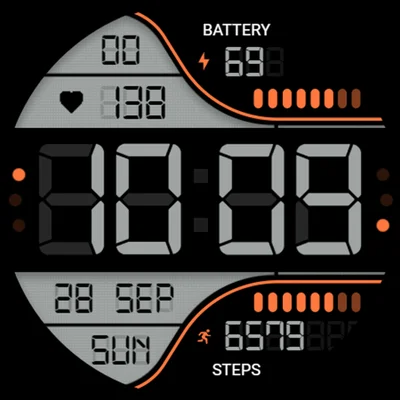
Digiwatch ist ein modernes, kontrastreiches digitales Zifferblatt, das Ihnen wichtige Daten übersichtlich und stilvoll am Handgelenk anzeigt.
FUNKTIONEN
• Digitale 12/24-Stunden-Zeitanzeige
• Datum und Wochentag
• Echtzeit-Herzfrequenzmessung
• Akkuanzeige mit Ladestatus
• Schrittzähler mit Fortschrittsanzeige
• Unterstützung für Always-On-Display (AOD)
• Optimiert für maximale Akkulaufzeit
INDIVIDUALISIERUNG
• Über 10 einzigartige Farbschemata: Passen Sie den Look Ihrem Stil an.
• Kompatibel mit Galaxy Watch, Pixel Watch und anderen Wear OS-Geräten.
INSTALLATION
1. Stellen Sie sicher, dass Ihre Uhr per Bluetooth mit Ihrem Smartphone verbunden ist.
2. Öffnen Sie den Play Store auf Ihrem Smartphone und suchen Sie nach „Digiwatch“.
3. Wählen Sie Ihr Uhrenmodell im Dropdown-Menü „Installieren“ aus.
4. Warten Sie, bis die Installation abgeschlossen ist. Das Zifferblatt wird anschließend in der Zifferblattauswahl Ihrer Uhr angezeigt.
Entwickelt für Wear OS.
Originaltext anzeigen
Digiwatch is a modern, high-contrast digital watch face that brings essential data to your wrist with clarity and style.
FEATURES
• Digital 12/24 hour time display
• Date and Day of the week
• Real-time Heart Rate monitoring
• Battery percentage indicator with charging status
• Step counter with visual progress bar
• Advanced Always-On Display (AOD) supported
• Optimized for battery efficiency
CUSTOMIZATION
• 10+ Unique Color Schemes: Change the look to match your style.
• Compatible with Galaxy Watch, Pixel Watch, and other Wear OS devices.
INSTALLATION
1. Ensure your watch is connected to your smartphone via Bluetooth.
2. Open the Play Store on your smartphone and search for 'Digiwatch'.
3. Select your watch device from the 'Install' dropdown menu.
4. Wait for the installation to complete. The watch face will appear in your watch's face selection menu.
Designed for Wear OS.
Datensicherheit
Was JustWatchFace bei Google Play zu den Daten angibt, die diese App erfasst und weitergibt.
- Keine Daten werden mit Drittunternehmen oder -organisationen geteiltWeitere Informationen dazu, wie Entwickler Angaben zur Weitergabe von Daten machen
- Keine Daten erhobenWeitere Informationen dazu, wie Entwickler Angaben zur Datenerhebung machen
Neue Funktionen
21.02.2026
1.0
• Initial Release.
Kontakt zum Entwickler
- E-Mailhello.justwatch@gmail.com
- Datenschutzerklärungjustwatchface.blogspot.com
- Adresse496, Rahmat masjid, rahmat nagar bavalchudi, banaskantha, Gujarat Chhapi, Gujarat 385210 India
Informationen
- Angeboten von
- JustWatchFace
- Kategorie
- Personalisierung
- Aktualisiert
- 21.02.2026
- Veröffentlicht
- 24.02.2026
- Altersfreigabe
- USK ab 0 Jahren
- Preis
- 0,99 €
- Paketname
- com.justwatch.digiwatch.watchface