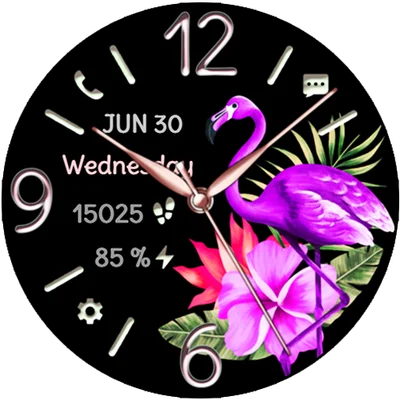
Flamingo Bloom Analog
Bloomfield Watchfaces- EveryoneAge rating
- PersonalizationCategory
- Jun 27, 2022Updated
- $0.99Price
Links to the official Google Play listing of com.bloomfield.flamingobloomanalog. Last checked on Nov 18, 2026.
About this app
Stylish Analog Watch face for Wear OS
Modern Watch Face by Bloomfield
IMPORTANT!
1. Make sure the watch is paired to the phone. After a few minutes, check the watch faces installed by the Wearable app on the phone.
2. If you are having synchronization problems between your phone and Play Store, install the app directly from watch: search "Flamingo Bloom Analog" from Play Store ON WATCH and hit on install button.
3. For device incompatibility / "This app is not available for your device", use Play Store on a WEB browser (CHROME) from PC or Laptop instead of using the playstore app on phone.
Copy and paste the watch face link on a WEB browser (CHROME) and install.
4. Enable all permissions from settings -> applications -> permissions.
5. This watch face was developed with Samsung's "Watch Face Studio" tool for devices based on the new Wear OS Google / One UI Samsung operating system like Samsung Galaxy Watch 4.
Features:
-12hr analog time (auto-sync, based on phone settings)
-Date (English default)
-Step counter
-Watch battery
-Always-On
-Preset App Shortcuts (Single tap icons to open shortcuts: Settings, Alarm, Calendar Messages & Phone)
-Changeable LCD colors (Single tap FLAMINGO to switch colors)
*some features may not be available on some watches.
Full Collection: https://play.google.com/store/apps/developer?id=Bloomfield+Watchfaces
Contact us at: bloomfieldwatchfaces@gmail.com
Facebook Page: https://www.facebook.com/bloomfieldwatchfaces
Galaxy Store: https://galaxy.store/ALwatches
Data safety
What Bloomfield Watchfaces declares on Google Play about the data this app collects and shares.
- No data shared with third partiesLearn more about how developers declare sharing
- No data collectedLearn more about how developers declare collection
Developer contact
- Websitefacebook.com
- Emailbloomfieldwatchfaces@gmail.com
- Privacy policysites.google.com
- Address0015 BLOCK 5 BLK Beverly Homes Hugo Perez, Trece Martirez City 4109 Philippines
Information
- Offered by
- Bloomfield Watchfaces
- Category
- Personalization
- Updated
- Jun 27, 2022
- Released
- Jun 27, 2022
- Age rating
- Everyone
- Price
- $0.99
- Package name
- com.bloomfield.flamingobloomanalog