Flamingo Bloom Analog
Bloomfield Watchfaces- 3 歳以上対象年齢
- カスタマイズカテゴリ
- 2022/6/27更新日
- ¥140価格
com.bloomfield.flamingobloomanalogのGoogle Play公式ページにリンクしています。最終確認:2026/11/18。
このアプリについて
Googleによる英語 (アメリカ合衆国)からの自動翻訳です。
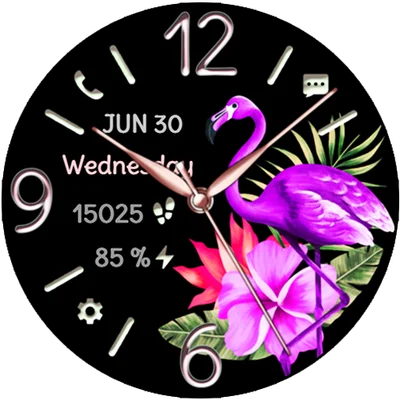
WearOS用のスタイリッシュなアナログウォッチフェイス
ブルームフィールドのモダンウォッチフェイス
重要!
1.時計が携帯電話とペアリングされていることを確認します。数分後、スマートフォンのウェアラブルアプリによってインストールされたウォッチフェイスを確認します。
2.携帯電話とPlayストアの同期に問題がある場合は、時計から直接アプリをインストールします。時計でPlayストアから「FlamingoBloom Analog」を検索し、インストールボタンを押します。
3.デバイスの非互換性/「このアプリはお使いのデバイスでは利用できません」の場合、電話でPlaystoreアプリを使用する代わりに、PCまたはラップトップからWEBブラウザー(CHROME)でPlayストアを使用します。
ウォッチフェイスのリンクをコピーしてWEBブラウザ(CHROME)に貼り付け、インストールします。
4.[設定]->[アプリケーション]->[権限]からすべての権限を有効にします。
5.このウォッチフェイスは、Samsung GalaxyWatch4などの新しいWearOSGoogle / OneUISamsungオペレーティングシステムに基づくデバイス用のSamsungの「WatchFaceStudio」ツールを使用して開発されました。
特徴:
-12時間のアナログ時間(自動同期、電話設定に基づく)
-日付(英語のデフォルト)
-ステップカウンター
-時計の電池
-常にオン
-プリセットアプリのショートカット(ショートカットを開くためのシングルタップアイコン:設定、アラーム、カレンダーメッセージ、電話)
-LCDの色を変更可能(FLAMINGOをシングルタップして色を切り替える)
*一部の機能は一部の時計では利用できない場合があります。
フルコレクション:https://play.google.com/store/apps/developer?id = Bloomfield + Watchfaces
お問い合わせ先:bloomfieldwatchfaces@gmail.com
Facebookページ:https://www.facebook.com/bloomfieldwatchfaces
ギャラクシーストア:https://galaxy.store/ALwatches
原文を表示
Modern Watch Face by Bloomfield
IMPORTANT!
1. Make sure the watch is paired to the phone. After a few minutes, check the watch faces installed by the Wearable app on the phone.
2. If you are having synchronization problems between your phone and Play Store, install the app directly from watch: search "Flamingo Bloom Analog" from Play Store ON WATCH and hit on install button.
3. For device incompatibility / "This app is not available for your device", use Play Store on a WEB browser (CHROME) from PC or Laptop instead of using the playstore app on phone.
Copy and paste the watch face link on a WEB browser (CHROME) and install.
4. Enable all permissions from settings -> applications -> permissions.
5. This watch face was developed with Samsung's "Watch Face Studio" tool for devices based on the new Wear OS Google / One UI Samsung operating system like Samsung Galaxy Watch 4.
Features:
-12hr analog time (auto-sync, based on phone settings)
-Date (English default)
-Step counter
-Watch battery
-Always-On
-Preset App Shortcuts (Single tap icons to open shortcuts: Settings, Alarm, Calendar Messages & Phone)
-Changeable LCD colors (Single tap FLAMINGO to switch colors)
*some features may not be available on some watches.
Full Collection: https://play.google.com/store/apps/developer?id=Bloomfield+Watchfaces
Contact us at: bloomfieldwatchfaces@gmail.com
Facebook Page: https://www.facebook.com/bloomfieldwatchfaces
Galaxy Store: https://galaxy.store/ALwatches
データ セーフティ
このアプリが収集・共有するデータについて、Bloomfield WatchfacesがGoogle Playで申告している内容です。
- 第三者と共有されるデータはありません詳しくは、デベロッパーが共有を申告する方法についての説明をご覧ください
- データは収集されません詳しくは、デベロッパーが収集を申告する方法についての説明をご覧ください
開発元の連絡先
- ウェブサイトfacebook.com
- メールbloomfieldwatchfaces@gmail.com
- プライバシーポリシーsites.google.com
- 住所0015 BLOCK 5 BLK Beverly Homes Hugo Perez, Trece Martirez City 4109 Philippines
情報
- 提供元
- Bloomfield Watchfaces
- カテゴリ
- カスタマイズ
- 更新日
- 2022/6/27
- リリース
- 2022/6/27
- 対象年齢
- 3 歳以上
- 価格
- ¥140
- パッケージ名
- com.bloomfield.flamingobloomanalog