h601 Gradient Watch Face
Happy Watch Faces- EveryoneAge rating
- PersonalizationCategory
- Sep 22, 2026Updated
- $3.99Price
Links to the official Google Play listing of com.AAA.h601. Last checked on Nov 21, 2026.
About this app
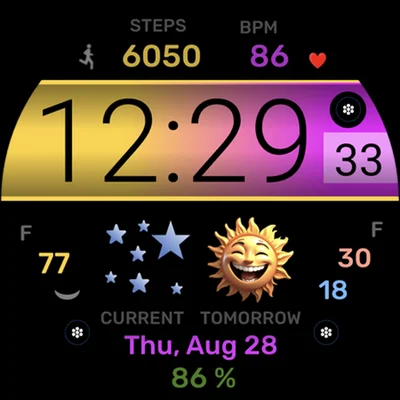
Digital Wear OS watch face with gradient colors, weather forecast, and steps.
🌈 h601 Gradient Watch Face
Bright colors, clear data! h601 is a vibrant digital watch face for Wear OS with a big gradient time display and a smart, easy-to-read dashboard. See the time, today's weather and tomorrow's forecast, your steps, heart rate, date and battery at a glance – and choose the gradient colors that match your style.
⌚ Features
- Large digital time with hours, minutes and seconds
- 12h / 24h format (follows your phone settings)
- Bright gradient background behind the time for great readability
- Current weather icon and temperature
- Tomorrow's weather forecast
- Daily step counter
- Heart rate (BPM)
- Day of the week, date and month
- Watch battery level (%)
- Clean split-screen layout
🎨 Customization
- Multiple vibrant gradient color themes, e.g. yellow / purple, green / yellow and blue / purple
- App shortcuts – open your favorite watch apps with one tap
- Touch and hold the watch face, then tap "Customize"
🌦️ Weather not showing?
1. Make sure location is enabled on your phone and watch.
2. Try to switch between two watch faces.
3. Open the Weather app on your watch once and set your location.
4. Wait a few minutes for the data to sync.
❤️ Heart rate not showing?
Allow the "Sensors / Body sensors" permission when asked, and check that heart rate measuring is turned on in your health app (e.g. Samsung Health).
📲 How to install
1. Make sure your watch is connected to your phone (Galaxy Wearable or Pixel Watch app) and uses the same Google account.
2. On your phone, open the Play Store, tap the arrow next to "Install" and select your watch.
3. Or open the Play Store directly on your watch and search for "h601".
4. After installation, touch and hold your current watch face, swipe to the end, tap "+" and select h601.
Tip: It can take a few minutes until the watch face appears on your watch.
⌚ Supported devices
Compatible with all Wear OS 5+ smartwatches (API level 34+), including:
- Samsung Galaxy Watch 4, 5, 6, 7, 8, Classic and Ultra series
- Google Pixel Watch 1, 2, 3 and 4
- Other Wear OS 5+ watches
Not compatible with Tizen (Galaxy Watch 3 or older) or Apple Watch.
💬 Support
Questions or problems? Please write to us before leaving a review – we are happy to help!
📩 luxury.watch.face@gmail.com
🌐 www.viennastudios.com
💛 Thank you for choosing Happy Watch Faces by Vienna Studios!
We hope this design brightens your day and your wrist 😊
Data safety
What Happy Watch Faces declares on Google Play about the data this app collects and shares.
- No data shared with third partiesLearn more about how developers declare sharing
- No data collectedLearn more about how developers declare collection
Developer contact
- Websiteviennastudios.com
- Emailluxury.watch.face@gmail.com
- Privacy policyviennastudios.com
- AddressPierlstraße 1/4 9020 Klagenfurt am Wörthersee Austria
Information
- Offered by
- Happy Watch Faces
- Category
- Personalization
- Updated
- Sep 22, 2026
- Released
- Aug 9, 2025
- Age rating
- Everyone
- Price
- $3.99
- Package name
- com.AAA.h601