h601 Gradient Watch Face
Happy Watch Faces- 3 歳以上対象年齢
- カスタマイズカテゴリ
- 2026/9/22更新日
- ¥700価格
com.AAA.h601のGoogle Play公式ページにリンクしています。最終確認:2026/11/21。
このアプリについて
Googleによる英語 (アメリカ合衆国)からの自動翻訳です。
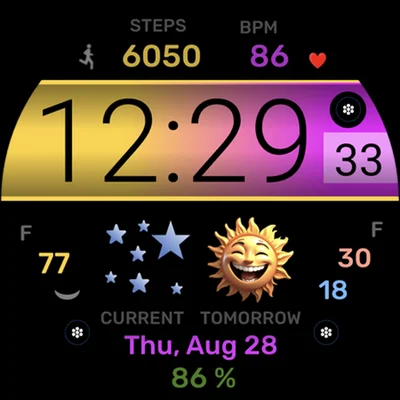
グラデーションカラー、天気予報、歩数計機能を備えたデジタルWear OSウォッチフェイス。
🌈 h601 グラデーションウォッチフェイス
鮮やかな色彩、見やすいデータ表示!h601は、Wear OS向けの鮮やかなデジタルウォッチフェイスです。大きなグラデーション表示の時刻と、スマートで読みやすいダッシュボードが特徴です。時刻、今日の天気、明日の天気予報、歩数、心拍数、日付、バッテリー残量を一目で確認できます。さらに、お好みのスタイルに合わせたグラデーションカラーをお選びいただけます。
⌚ 機能
- 時、分、秒を表示する大きなデジタル時刻表示
- 12時間/24時間表示(スマートフォンの設定に連動)
- 視認性を高める明るいグラデーション背景
- 現在の天気アイコンと気温
- 明日の天気予報
- 歩数計
- 心拍数(BPM)
- 曜日、日付、月
- バッテリー残量(%)
- すっきりとした分割画面レイアウト
🎨 カスタマイズ
- 複数の鮮やかなグラデーションカラーテーマ(例:黄色/紫、緑/黄色、青/紫
- アプリショートカット – お気に入りのウォッチアプリをワンタップで起動
- ウォッチフェイスを長押しし、「カスタマイズ」をタップ
🌦️ 天気が表示されない場合
1. スマートフォンとウォッチの両方で位置情報サービスが有効になっていることを確認してください。
2. 2つのウォッチフェイスを切り替えてみてください。
3. ウォッチで天気アプリを一度開き、現在地を設定してください。
4. データが同期されるまで数分お待ちください。
❤️ 心拍数が表示されない場合
「センサー/身体センサー」のアクセス許可を求められたら許可し、ヘルスケアアプリ(例:Samsung Health)で心拍数測定がオンになっていることを確認してください。
📲 インストール方法
1. ウォッチがスマートフォン(Galaxy WearableアプリまたはPixel Watchアプリ)に接続され、同じGoogleアカウントを使用していることを確認してください。
2. スマートフォンでPlayストアを開き、「インストール」の横にある矢印をタップして、ウォッチを選択してください。
3. または、スマートウォッチでPlayストアを直接開き、「h601」を検索してください。
4. インストール後、現在表示されているウォッチフェイスを長押しし、画面を右端までスワイプして「+」をタップし、「h601」を選択してください。
ヒント:ウォッチフェイスがスマートウォッチに表示されるまで数分かかる場合があります。
⌚ 対応デバイス
Wear OS 5+搭載スマートウォッチ(APIレベル34以上)に対応しています。対応機種:
- Samsung Galaxy Watch 4、5、6、7、8、Classic、Ultraシリーズ
- Google Pixel Watch 1、2、3、4
- その他のWear OS 5+搭載スマートウォッチ
Tizen(Galaxy Watch 3以前)およびApple Watchには対応していません。
💬 サポート
ご質問や問題がございましたら、レビューを投稿する前にご連絡ください。喜んでお手伝いいたします。
📩 luxury.watch.face@gmail.com
🌐 www.viennastudios.com
💛 Vienna StudiosのHappy Watch Facesをお選びいただきありがとうございます!
このデザインがあなたの毎日と手首を明るく彩りますように😊
原文を表示
🌈 h601 Gradient Watch Face
Bright colors, clear data! h601 is a vibrant digital watch face for Wear OS with a big gradient time display and a smart, easy-to-read dashboard. See the time, today's weather and tomorrow's forecast, your steps, heart rate, date and battery at a glance – and choose the gradient colors that match your style.
⌚ Features
- Large digital time with hours, minutes and seconds
- 12h / 24h format (follows your phone settings)
- Bright gradient background behind the time for great readability
- Current weather icon and temperature
- Tomorrow's weather forecast
- Daily step counter
- Heart rate (BPM)
- Day of the week, date and month
- Watch battery level (%)
- Clean split-screen layout
🎨 Customization
- Multiple vibrant gradient color themes, e.g. yellow / purple, green / yellow and blue / purple
- App shortcuts – open your favorite watch apps with one tap
- Touch and hold the watch face, then tap "Customize"
🌦️ Weather not showing?
1. Make sure location is enabled on your phone and watch.
2. Try to switch between two watch faces.
3. Open the Weather app on your watch once and set your location.
4. Wait a few minutes for the data to sync.
❤️ Heart rate not showing?
Allow the "Sensors / Body sensors" permission when asked, and check that heart rate measuring is turned on in your health app (e.g. Samsung Health).
📲 How to install
1. Make sure your watch is connected to your phone (Galaxy Wearable or Pixel Watch app) and uses the same Google account.
2. On your phone, open the Play Store, tap the arrow next to "Install" and select your watch.
3. Or open the Play Store directly on your watch and search for "h601".
4. After installation, touch and hold your current watch face, swipe to the end, tap "+" and select h601.
Tip: It can take a few minutes until the watch face appears on your watch.
⌚ Supported devices
Compatible with all Wear OS 5+ smartwatches (API level 34+), including:
- Samsung Galaxy Watch 4, 5, 6, 7, 8, Classic and Ultra series
- Google Pixel Watch 1, 2, 3 and 4
- Other Wear OS 5+ watches
Not compatible with Tizen (Galaxy Watch 3 or older) or Apple Watch.
💬 Support
Questions or problems? Please write to us before leaving a review – we are happy to help!
📩 luxury.watch.face@gmail.com
🌐 www.viennastudios.com
💛 Thank you for choosing Happy Watch Faces by Vienna Studios!
We hope this design brightens your day and your wrist 😊
データ セーフティ
このアプリが収集・共有するデータについて、Happy Watch FacesがGoogle Playで申告している内容です。
- 第三者と共有されるデータはありません詳しくは、デベロッパーが共有を申告する方法についての説明をご覧ください
- データは収集されません詳しくは、デベロッパーが収集を申告する方法についての説明をご覧ください
開発元の連絡先
- ウェブサイトviennastudios.com
- メールluxury.watch.face@gmail.com
- プライバシーポリシーviennastudios.com
- 住所Pierlstraße 1/4 9020 Klagenfurt am Wörthersee Austria
情報
- 提供元
- Happy Watch Faces
- カテゴリ
- カスタマイズ
- 更新日
- 2026/9/22
- リリース
- 2025/8/9
- 対象年齢
- 3 歳以上
- 価格
- ¥700
- パッケージ名
- com.AAA.h601