HMK WD031
HMKWatch- EveryoneAge rating
- PersonalizationCategory
- Oct 12, 2026Updated
- $2.19Price
Links to the official Google Play listing of com.watchfacestudio.hmk_wd031. Last checked on Nov 13, 2026.
About this app
Enjoy a classic LCD look with HMK WD031 for Wear OS.
HMK WD031 – Weather Digital Watch Face
Enjoy a classic LCD look with HMK WD031 for Wear OS.
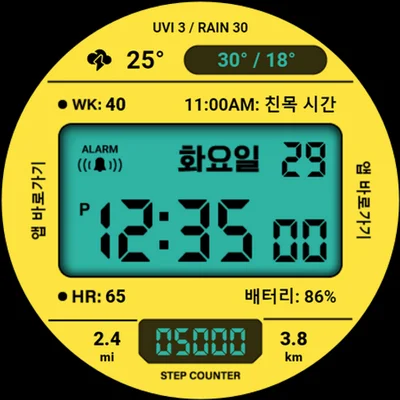
Large digital numbers, useful weather information, and everyday activity data come together with 30 color themes to match your style.
■ Time & Date
* Digital time with seconds
* Day of the week and date
* Week number
■ Weather Information
* Current temperature
* High / low temperature
* UV index
* Rain probability
* Weather conditions
■ Activity Information
* Step count
* Heart rate
* Distance displayed in kilometers and miles
■ Custom Complications
* 5 customizable complication slots
* Includes 1 invisible shortcut slot
* Display useful information or assign your favorite app shortcuts
■ Preset Shortcuts
* Alarm
* Calendar
* Heart rate
* Steps
■ Customization
* 30 color themes
* Time separator blinking on/off
* 3 Always-On Display (AOD) styles
■ Language Options
* English, Korean, Italian, Spanish, German, Russian, Thai, Japanese, and Chinese
* The 10th option follows your connected phone’s language for other languages
■ How to Customize
Touch and hold the watch face, then tap Customize to change colors, language, AOD style, and complications.
■ Phone Battery Information
To display your phone’s battery level, install the “Phone Battery Complication” app on both your watch and phone, then select it in a compatible complication slot.
[Phone Battery Complication](https://play.google.com/store/apps/details?id=com.weartools.phonebattcomp)
■ Please Note
* Designed for Wear OS watches.
* When installing, select your watch as the installation device.
* Available features and shortcuts may vary depending on your device and Wear OS version.
* Complication data is provided by the selected apps. Some options may require additional apps.
* Weather information depends on the weather data available on your watch.
■ More Watch Faces by HMKWatch
[Explore HMKWatch on Google Play](https://play.google.com/store/apps/dev?id=6624907067685453951)
■ Follow HMKWatch
[Instagram](https://www.instagram.com/hmkwatch/)
■ Contact
[hmkwatch@gmail.com](mailto:hmkwatch@gmail.com)
Data safety
What HMKWatch declares on Google Play about the data this app collects and shares.
- No data shared with third partiesLearn more about how developers declare sharing
- No data collectedLearn more about how developers declare collection
- Committed to follow the Play Families Policy
Developer contact
- Websiteinstagram.com
- Emailhmkwatch@gmail.com
- Privacy policyblog.naver.com
- Address중앙로6길 17 104동 804호 구로구, 서울특별시 08223 South Korea
Information
- Offered by
- HMKWatch
- Category
- Personalization
- Updated
- Oct 12, 2026
- Released
- Sep 2, 2026
- Age rating
- Everyone
- Price
- $2.19
- Package name
- com.watchfacestudio.hmk_wd031