HMK WD031
HMKWatch- Rating 3+Batasan usia
- PersonalisasiKategori
- 12/10/2026Diperbarui
- Rp 39.000Harga
Tertaut ke halaman resmi com.watchfacestudio.hmk_wd031 di Google Play. Terakhir diperiksa pada 13/11/2026.
Tentang aplikasi ini
Terjemahan otomatis oleh Google. Bahasa asli: Inggris (Amerika Serikat).
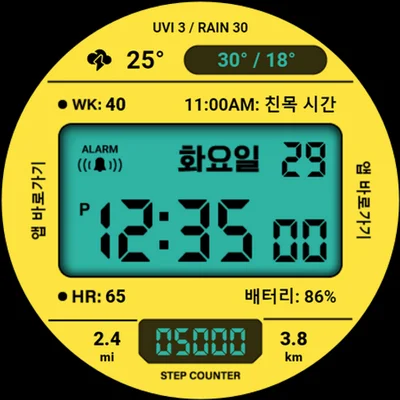
Nikmati tampilan LCD klasik dengan HMK WD031 untuk Wear OS.
HMK WD031 – Tampilan Jam Digital Cuaca
Nikmati tampilan LCD klasik dengan HMK WD031 untuk Wear OS.
Angka digital besar, informasi cuaca yang bermanfaat, dan data aktivitas sehari-hari hadir bersama dengan 30 tema warna untuk menyesuaikan gaya Anda.
■ Waktu & Tanggal
* Waktu digital dengan detik
* Hari dalam seminggu dan tanggal
* Nomor minggu
■ Informasi Cuaca
* Suhu saat ini
* Suhu tertinggi/terendah
* Indeks UV
* Probabilitas hujan
* Kondisi cuaca
■ Informasi Aktivitas
* Jumlah langkah
* Detak jantung
* Jarak yang ditampilkan dalam kilometer dan mil
■ Komplikasi Kustom
* 5 slot komplikasi yang dapat disesuaikan
* Termasuk 1 slot pintasan tak terlihat
* Tampilkan informasi yang berguna atau tetapkan pintasan aplikasi favorit Anda
■ Pintasan Bawaan
* Alarm
* Kalender
* Detak jantung
* Langkah
■ Kustomisasi
* 30 tema warna
* Pemisah waktu berkedip hidup/mati
* 3 gaya Always-On Display (AOD)
■ Pilihan Bahasa
* Inggris, Korea, Italia, Spanyol, Jerman, Rusia, Thailand, Jepang, dan Cina
* Pilihan ke-10 mengikuti bahasa ponsel Anda yang terhubung untuk bahasa lain
■ Cara Mengkustomisasi
Sentuh dan tahan Pilih tampilan jam, lalu ketuk Sesuaikan untuk mengubah warna, bahasa, gaya AOD, dan komplikasi.
■ Informasi Baterai Ponsel
Untuk menampilkan level baterai ponsel Anda, instal aplikasi “Komplikasi Baterai Ponsel” di jam tangan dan ponsel Anda, lalu pilih di slot komplikasi yang kompatibel.
[Komplikasi Baterai Ponsel](https://play.google.com/store/apps/details?id=com.weartools.phonebattcomp)
■ Harap Perhatikan
* Dirancang untuk jam tangan Wear OS.
* Saat menginstal, pilih jam tangan Anda sebagai perangkat instalasi.
* Fitur dan pintasan yang tersedia dapat bervariasi tergantung pada perangkat dan versi Wear OS Anda.
* Data komplikasi disediakan oleh aplikasi yang dipilih. Beberapa opsi mungkin memerlukan aplikasi tambahan.
* Informasi cuaca bergantung pada data cuaca yang tersedia di jam tangan Anda.
■ Lebih Banyak Tampilan Jam dari HMKWatch
[Jelajahi HMKWatch di Google Play](https://play.google.com/store/apps/dev?id=6624907067685453951)
■ Ikuti HMKWatch
[Instagram](https://www.instagram.com/hmkwatch/)
■ Hubungi Kami
[hmkwatch@gmail.com](mailto:hmkwatch@gmail.com)
Tampilkan teks asli
HMK WD031 – Weather Digital Watch Face
Enjoy a classic LCD look with HMK WD031 for Wear OS.
Large digital numbers, useful weather information, and everyday activity data come together with 30 color themes to match your style.
■ Time & Date
* Digital time with seconds
* Day of the week and date
* Week number
■ Weather Information
* Current temperature
* High / low temperature
* UV index
* Rain probability
* Weather conditions
■ Activity Information
* Step count
* Heart rate
* Distance displayed in kilometers and miles
■ Custom Complications
* 5 customizable complication slots
* Includes 1 invisible shortcut slot
* Display useful information or assign your favorite app shortcuts
■ Preset Shortcuts
* Alarm
* Calendar
* Heart rate
* Steps
■ Customization
* 30 color themes
* Time separator blinking on/off
* 3 Always-On Display (AOD) styles
■ Language Options
* English, Korean, Italian, Spanish, German, Russian, Thai, Japanese, and Chinese
* The 10th option follows your connected phone’s language for other languages
■ How to Customize
Touch and hold the watch face, then tap Customize to change colors, language, AOD style, and complications.
■ Phone Battery Information
To display your phone’s battery level, install the “Phone Battery Complication” app on both your watch and phone, then select it in a compatible complication slot.
[Phone Battery Complication](https://play.google.com/store/apps/details?id=com.weartools.phonebattcomp)
■ Please Note
* Designed for Wear OS watches.
* When installing, select your watch as the installation device.
* Available features and shortcuts may vary depending on your device and Wear OS version.
* Complication data is provided by the selected apps. Some options may require additional apps.
* Weather information depends on the weather data available on your watch.
■ More Watch Faces by HMKWatch
[Explore HMKWatch on Google Play](https://play.google.com/store/apps/dev?id=6624907067685453951)
■ Follow HMKWatch
[Instagram](https://www.instagram.com/hmkwatch/)
■ Contact
[hmkwatch@gmail.com](mailto:hmkwatch@gmail.com)
Keamanan data
Yang dinyatakan HMKWatch di Google Play tentang data yang dikumpulkan dan dibagikan aplikasi ini.
- Tidak ada data yang dibagikan kepada pihak ketigaPelajari lebih lanjut cara developer menyatakan pembagian data
- Tidak ada data yang dikumpulkanPelajari lebih lanjut cara developer menyatakan pengumpulan data
- Berkomitmen untuk mematuhi Kebijakan Keluarga Play
Kontak pengembang
- Situs webinstagram.com
- Emailhmkwatch@gmail.com
- Kebijakan Privasiblog.naver.com
- Alamat중앙로6길 17 104동 804호 구로구, 서울특별시 08223 South Korea
Informasi
- Ditawarkan oleh
- HMKWatch
- Kategori
- Personalisasi
- Diperbarui
- 12/10/2026
- Dirilis
- 2/9/2026
- Batasan usia
- Rating 3+
- Harga
- Rp 39.000
- Nama paket
- com.watchfacestudio.hmk_wd031