HMK WD131
HMKWatch- EveryoneAge rating
- PersonalizationCategory
- Oct 7, 2026Updated
- $1.89Price
Links to the official Google Play listing of com.watchfacestudio.hmk_wd131. Last checked on Nov 13, 2026.
About this app
Weather Digital Watch Face
HMK WD131 – Weather Digital Watch Face
Bring weather, daily activity, and essential information together with HMK WD131.
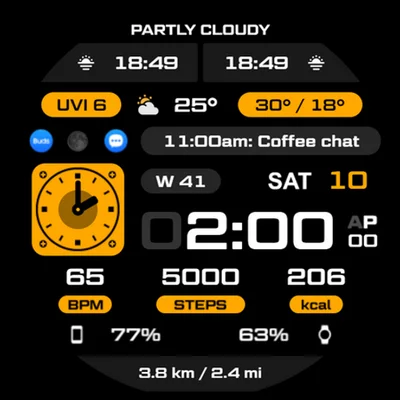
A bold digital clock, a distinctive analog subdial, and colorful accents create a practical layout with plenty of personality. Personalize your watch with 20 color themes, customizable complications, and three Always-On Display styles.
[Key Features]
• Large digital time display with seconds
• Analog subdial for a distinctive hybrid look
• Day of the week, date, and week number
• Weather condition text and icon
• Current temperature, daily high and low temperatures, and UV index
• Moon phase display
• Heart rate, step count, and calories
• Distance displayed in kilometers and miles
• Customizable information areas for useful data such as sunrise, sunset, upcoming events, and battery levels
• Preset shortcuts for Calendar, Alarm, Heart Rate, and Steps
[User Customization]
• 20 color themes
Choose an accent color to match your style, outfit, or watch strap.
• 8 customizable complication slots
Personalize the available areas with supported information or app shortcuts, including an invisible complication area.
• 10 language settings
Choose from nine languages:
English, Korean, Italian, Spanish, German, Russian, Thai, Japanese, and Chinese.
The tenth option follows the language setting of your connected smartphone.
• 3 Always-On Display styles
Choose a full information layout, a simple digital layout, or a digital layout with the analog subdial.
[Why You’ll Love It]
• Weather and daily activity information in one organized layout
• Large time digits for quick reading
• A distinctive combination of digital and analog elements
• Color themes and complications that let you make the watch face your own
• A choice of detailed or simplified AOD styles
[Compatibility]
Designed for compatible Wear OS smartwatches.
Please check Google Play for compatibility with your device.
[Notes]
• To display your phone’s battery level, install the “Phone Battery Complication” app on both your watch and smartphone, then select it in a complication slot.
• The information shown in customizable areas depends on the selected complication provider and installed apps.
• Weather and other data may require the relevant permissions and a network connection.
• Grant the permissions needed to display health and activity information.
• Screenshots show example configurations. Displayed information may vary depending on your settings and device.
────────────────────
Contact
hmkwatch@gmail.com
Follow HMKWatch
https://www.instagram.com/hmkwatch/
Data safety
What HMKWatch declares on Google Play about the data this app collects and shares.
- No data shared with third partiesLearn more about how developers declare sharing
- No data collectedLearn more about how developers declare collection
- Committed to follow the Play Families Policy
Developer contact
- Websiteinstagram.com
- Emailhmkwatch@gmail.com
- Privacy policyblog.naver.com
- Address중앙로6길 17 104동 804호 구로구, 서울특별시 08223 South Korea
Information
- Offered by
- HMKWatch
- Category
- Personalization
- Version
- 1.0.1
- Updated
- Oct 7, 2026
- Released
- Oct 7, 2026
- Age rating
- Everyone
- Price
- $1.89
- Package name
- com.watchfacestudio.hmk_wd131