HMK WD131
HMKWatch- USK ab 0 JahrenAltersfreigabe
- PersonalisierungKategorie
- 07.10.2026Aktualisiert
- 1,99 €Preis
Verlinkt auf den offiziellen Google Play-Eintrag von com.watchfacestudio.hmk_wd131. Zuletzt geprüft am 13.11.2026.
Über diese App
Automatische Übersetzung von Google. Originalsprache: Englisch (Vereinigte Staaten).
Digitales Zifferblatt für Wetteranzeige
HMK WD131 – Digitales Wetter-Zifferblatt
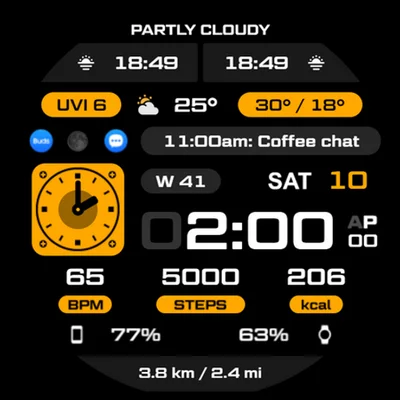
Mit der HMK WD131 haben Sie Wetter, Ihre täglichen Aktivitäten und wichtige Informationen immer im Blick.
Eine markante Digitaluhr, ein unverwechselbares analoges Hilfszifferblatt und farbige Akzente ergeben ein praktisches Design mit viel Persönlichkeit. Personalisieren Sie Ihre Uhr mit 20 Farbthemen, anpassbaren Komplikationen und drei Always-On-Display-Modi.
[Hauptmerkmale]
• Große digitale Zeitanzeige mit Sekundenanzeige
• Analoges Hilfszifferblatt für einen einzigartigen Hybrid-Look
• Wochentag, Datum und Kalenderwoche
• Wetterinformationen (Text und Symbol)
• Aktuelle Temperatur, tägliche Höchst- und Tiefsttemperaturen sowie UV-Index
• Mondphasenanzeige
• Herzfrequenz, Schrittzahl und Kalorienverbrauch
• Distanzanzeige in Kilometern und Meilen
• Anpassbare Informationsbereiche für nützliche Daten wie Sonnenaufgang, Sonnenuntergang, bevorstehende Ereignisse und Akkustand
• Voreingestellte Schnellzugriffe für Kalender, Wecker, Herzfrequenz und Schritte
[Benutzeranpassung]
• 20 Farbthemen
Wählen Sie eine Akzentfarbe passend zu Ihrem Stil, Outfit oder Armband.
• 8 anpassbare Komplikationsfelder
Personalisieren Sie die verfügbaren Bereiche mit unterstützten Informationen oder App-Verknüpfungen, inklusive eines unsichtbaren Komplikationsbereichs.
• 10 Spracheinstellungen
Wählen Sie aus neun Sprachen: Englisch, Koreanisch, Italienisch, Spanisch, Deutsch, Russisch, Thailändisch, Japanisch und Chinesisch.
Die zehnte Option richtet sich nach der Spracheinstellung Ihres verbundenen Smartphones.
• 3 Always-On-Display-Stile
Wählen Sie ein Layout mit allen Informationen, ein einfaches digitales Layout oder ein digitales Layout mit analogem Hilfszifferblatt.
[Warum Sie es lieben werden]
• Wetter- und Aktivitätsinformationen übersichtlich in einem Layout
• Große Zeitziffern für schnelles Ablesen
• Eine einzigartige Kombination aus digitalen und analogen Elementen
• Farbthemen und Komplikationen, mit denen Sie das Zifferblatt individuell gestalten können
• Auswahl zwischen detaillierten und vereinfachten Always-On-Display-Stilen
[Kompatibilität]
Entwickelt für kompatible Wear OS Smartwatches.
Bitte prüfen Sie im Google Play Store, ob Ihr Gerät kompatibel ist.
[Hinweise]
• Um den Akkustand Ihres Smartphones anzuzeigen, installieren Sie die App „Akkustand-Komplikation“ sowohl auf Ihrer Smartwatch als auch auf Ihrem Smartphone und wählen Sie sie anschließend in einem Komplikationsfeld aus.
• Die in den anpassbaren Bereichen angezeigten Informationen hängen vom gewählten Komplikationsanbieter und den installierten Apps ab.
• Wetterdaten und andere Daten erfordern möglicherweise die entsprechenden Berechtigungen und eine Netzwerkverbindung.
• Erteilen Sie die erforderlichen Berechtigungen zur Anzeige von Gesundheits- und Aktivitätsinformationen.
• Die Screenshots zeigen Beispielkonfigurationen. Die angezeigten Informationen können je nach Ihren Einstellungen und Ihrem Gerät variieren.
────────────────────
Kontakt
hmkwatch@gmail.com
Folgen Sie HMKWatch
https://www.instagram.com/hmkwatch/
Originaltext anzeigen
HMK WD131 – Weather Digital Watch Face
Bring weather, daily activity, and essential information together with HMK WD131.
A bold digital clock, a distinctive analog subdial, and colorful accents create a practical layout with plenty of personality. Personalize your watch with 20 color themes, customizable complications, and three Always-On Display styles.
[Key Features]
• Large digital time display with seconds
• Analog subdial for a distinctive hybrid look
• Day of the week, date, and week number
• Weather condition text and icon
• Current temperature, daily high and low temperatures, and UV index
• Moon phase display
• Heart rate, step count, and calories
• Distance displayed in kilometers and miles
• Customizable information areas for useful data such as sunrise, sunset, upcoming events, and battery levels
• Preset shortcuts for Calendar, Alarm, Heart Rate, and Steps
[User Customization]
• 20 color themes
Choose an accent color to match your style, outfit, or watch strap.
• 8 customizable complication slots
Personalize the available areas with supported information or app shortcuts, including an invisible complication area.
• 10 language settings
Choose from nine languages:
English, Korean, Italian, Spanish, German, Russian, Thai, Japanese, and Chinese.
The tenth option follows the language setting of your connected smartphone.
• 3 Always-On Display styles
Choose a full information layout, a simple digital layout, or a digital layout with the analog subdial.
[Why You’ll Love It]
• Weather and daily activity information in one organized layout
• Large time digits for quick reading
• A distinctive combination of digital and analog elements
• Color themes and complications that let you make the watch face your own
• A choice of detailed or simplified AOD styles
[Compatibility]
Designed for compatible Wear OS smartwatches.
Please check Google Play for compatibility with your device.
[Notes]
• To display your phone’s battery level, install the “Phone Battery Complication” app on both your watch and smartphone, then select it in a complication slot.
• The information shown in customizable areas depends on the selected complication provider and installed apps.
• Weather and other data may require the relevant permissions and a network connection.
• Grant the permissions needed to display health and activity information.
• Screenshots show example configurations. Displayed information may vary depending on your settings and device.
────────────────────
Contact
hmkwatch@gmail.com
Follow HMKWatch
https://www.instagram.com/hmkwatch/
Datensicherheit
Was HMKWatch bei Google Play zu den Daten angibt, die diese App erfasst und weitergibt.
- Keine Daten werden mit Drittunternehmen oder -organisationen geteiltWeitere Informationen dazu, wie Entwickler Angaben zur Weitergabe von Daten machen
- Keine Daten erhobenWeitere Informationen dazu, wie Entwickler Angaben zur Datenerhebung machen
- Hat sich verpflichtet, den Google Play-Richtlinien für familienfreundliche Inhalte zu folgen
Kontakt zum Entwickler
- Websiteinstagram.com
- E-Mailhmkwatch@gmail.com
- Datenschutzerklärungblog.naver.com
- Adresse중앙로6길 17 104동 804호 구로구, 서울특별시 08223 South Korea
Informationen
- Angeboten von
- HMKWatch
- Kategorie
- Personalisierung
- Version
- 1.0.1
- Aktualisiert
- 07.10.2026
- Veröffentlicht
- 07.10.2026
- Altersfreigabe
- USK ab 0 Jahren
- Preis
- 1,99 €
- Paketname
- com.watchfacestudio.hmk_wd131