HMK WD245
HMKWatch- EveryoneAge rating
- PersonalizationCategory
- Nov 12, 2026Updated
- $2.29Price
Links to the official Google Play listing of com.watchfacestudio.hmk_wd245. Last checked on Nov 20, 2026.
About this app
Weather Digital Watch Face
HMK WD245 – Weather Digital Watch Face
Bring classic LCD style to your wrist with HMK WD245.
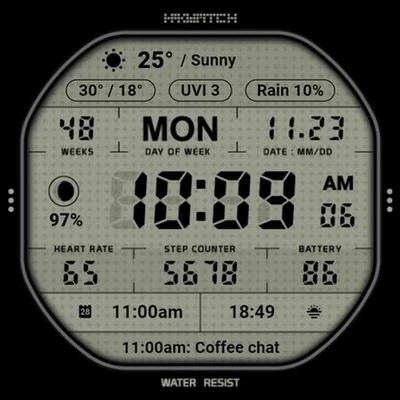
Large digital numbers, detailed weather information, and a neatly organized layout make your daily essentials easy to read. Personalize your look with 30 color themes, LCD pattern options, and 3 AOD styles.
[Key Features]
• Digital time with seconds and AM/PM indicator
• Date, day of the week, and week number
• Current weather condition and temperature
• Daily high and low temperatures
• UV index and chance of rain
• Heart rate, step count, and watch battery level
• 6 customizable complications, including an invisible shortcut slot
• Preset shortcuts for calendar, alarm, heart rate, steps, and battery
• 3 Always-On Display (AOD) styles
[User Customization]
• 30 color themes
• Cover options
• LCD background pattern on/off
• Date format: MM/DD or DD/MM
• Blinking or fixed time separator
• Customize complication slots with your preferred information and app shortcuts
• Language options: EN, KO, IT, ES, DE, RU, TH, JA, ZH
• Additional language option: Connected phone language
To customize, touch and hold the watch face, then tap Customize.
[Why You’ll Love It]
Enjoy the familiar character of a classic digital watch with useful smartwatch information. Check the time, weather, activity, and your selected complications in one organized display, and match the colors to your strap or daily style.
[Compatibility]
• Wear OS devices only.
• Available complications and shortcuts may vary depending on your device and installed apps.
[Notes]
• Allow the required permissions to display weather and health information.
• If weather information appears outdated, open the weather app on your watch and use its refresh button.
• The calendar, sunset, and phone battery information shown in the screenshots are examples of complication settings.
• To display your phone battery level, install the Phone Battery Complication app on both your watch and phone, then select it for a compatible complication slot:
https://play.google.com/store/apps/details?id=com.weartools.phonebattcomp
• Complication data and update intervals depend on the selected provider.
• Screenshots show examples of colors and customization settings.
────────────────────
[Companion App]
The phone companion app provides installation guidance. To use this watch face, install and apply HMK WD245 on your Wear OS watch.
[Follow HMKWatch]
Instagram
https://www.instagram.com/hmkwatch/
Blog
https://hmkwatch.tistory.com/
[Contact]
hmkwatch@gmail.com
Data safety
What HMKWatch declares on Google Play about the data this app collects and shares.
- No data shared with third partiesLearn more about how developers declare sharing
- No data collectedLearn more about how developers declare collection
- Committed to follow the Play Families Policy
Developer contact
- Websiteinstagram.com
- Emailhmkwatch@gmail.com
- Privacy policyblog.naver.com
- Address중앙로6길 17 104동 804호 구로구, 서울특별시 08223 South Korea
Information
- Offered by
- HMKWatch
- Category
- Personalization
- Updated
- Nov 12, 2026
- Released
- Nov 12, 2026
- Age rating
- Everyone
- Price
- $2.29
- Package name
- com.watchfacestudio.hmk_wd245