HMK WD245
HMKWatch- 3 歳以上対象年齢
- カスタマイズカテゴリ
- 2026/11/12更新日
- ¥400価格
com.watchfacestudio.hmk_wd245のGoogle Play公式ページにリンクしています。最終確認:2026/11/20。
このアプリについて
Googleによる英語 (アメリカ合衆国)からの自動翻訳です。
天気予報デジタルウォッチフェイス
HMK WD245 – 天気デジタルウォッチフェイス
HMK WD245で、クラシックなLCDスタイルを手首に。
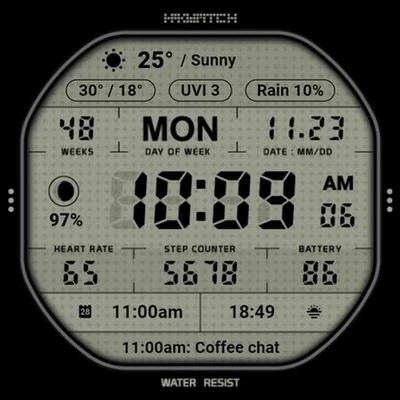
大きなデジタル数字、詳細な天気情報、そしてすっきりと整理されたレイアウトで、毎日の必需品を簡単に確認できます。30種類のカラーテーマ、LCDパターンオプション、3種類のAODスタイルで、自分好みのスタイルにカスタマイズできます。
【主な機能】
• 秒とAM/PM表示付きデジタル時刻
• 日付、曜日、週番号
• 現在の天気と気温
• 日中の最高気温と最低気温
• 紫外線指数と降雨確率
• 心拍数、歩数、バッテリー残量
• カスタマイズ可能な6つのコンプリケーション(非表示のショートカットスロットを含む)
• カレンダー、アラーム、心拍数、歩数、バッテリー残量のプリセットショートカット
• 3種類の常時表示(AOD)スタイル
【ユーザーカスタマイズ】
• 30種類のカラーテーマ
• カバーオプション
• LCD背景パターンのオン/オフ
• 日付形式:MM/DDまたはDD/MM
• 点滅または固定の時刻区切り記号
• コンプリケーションスロットにお好みの情報やアプリショートカットをカスタマイズ
• 言語オプション:英語、韓国語、イタリア語、スペイン語、ドイツ語、ロシア語、タイ語、日本語、中国語
• 追加言語オプション:接続しているスマートフォンの言語
カスタマイズするには、ウォッチフェイスを長押しし、「カスタマイズ」をタップしてください。
【おすすめポイント】
クラシックなデジタルウォッチの親しみやすいデザインに、便利なスマートウォッチ機能を搭載。時刻、天気、アクティビティ、そして選択したコンプリケーションを1つの画面で確認でき、ストラップや毎日のスタイルに合わせてカラーをカスタマイズできます。
【対応機種】
• Wear OS搭載デバイスのみ対応。
• 利用可能なコンプリケーションとショートカットは、デバイスおよびインストールされているアプリによって異なる場合があります。
【注意事項】
• 天気と健康情報を表示するために必要な権限を許可してください。
• 天気情報が古い場合は、ウォッチの天気アプリを開き、更新ボタンを押してください。
• スクリーンショットに表示されているカレンダー、日の入り時刻、スマートフォンのバッテリー残量情報は、コンプリケーションの設定例です。
• スマートフォンのバッテリー残量を表示するには、ウォッチとスマートフォンの両方に「Phone Battery Complication」アプリをインストールし、対応するコンプリケーションスロットで選択してください。
https://play.google.com/store/apps/details?id=com.weartools.phonebattcomp
• コンプリケーションのデータと更新間隔は、選択したプロバイダーによって異なります。
• スクリーンショットは、色とカスタマイズ設定の例を示しています。
────────────────────
[コンパニオンアプリ]
スマートフォン用コンパニオンアプリは、インストール手順をご案内します。このウォッチフェイスを使用するには、Wear OSウォッチにHMK WD245をインストールして適用してください。
[HMKWatchをフォロー]
Instagram
https://www.instagram.com/hmkwatch/
ブログ
https://hmkwatch.tistory.com/
[お問い合わせ]
hmkwatch@gmail.com
原文を表示
HMK WD245 – Weather Digital Watch Face
Bring classic LCD style to your wrist with HMK WD245.
Large digital numbers, detailed weather information, and a neatly organized layout make your daily essentials easy to read. Personalize your look with 30 color themes, LCD pattern options, and 3 AOD styles.
[Key Features]
• Digital time with seconds and AM/PM indicator
• Date, day of the week, and week number
• Current weather condition and temperature
• Daily high and low temperatures
• UV index and chance of rain
• Heart rate, step count, and watch battery level
• 6 customizable complications, including an invisible shortcut slot
• Preset shortcuts for calendar, alarm, heart rate, steps, and battery
• 3 Always-On Display (AOD) styles
[User Customization]
• 30 color themes
• Cover options
• LCD background pattern on/off
• Date format: MM/DD or DD/MM
• Blinking or fixed time separator
• Customize complication slots with your preferred information and app shortcuts
• Language options: EN, KO, IT, ES, DE, RU, TH, JA, ZH
• Additional language option: Connected phone language
To customize, touch and hold the watch face, then tap Customize.
[Why You’ll Love It]
Enjoy the familiar character of a classic digital watch with useful smartwatch information. Check the time, weather, activity, and your selected complications in one organized display, and match the colors to your strap or daily style.
[Compatibility]
• Wear OS devices only.
• Available complications and shortcuts may vary depending on your device and installed apps.
[Notes]
• Allow the required permissions to display weather and health information.
• If weather information appears outdated, open the weather app on your watch and use its refresh button.
• The calendar, sunset, and phone battery information shown in the screenshots are examples of complication settings.
• To display your phone battery level, install the Phone Battery Complication app on both your watch and phone, then select it for a compatible complication slot:
https://play.google.com/store/apps/details?id=com.weartools.phonebattcomp
• Complication data and update intervals depend on the selected provider.
• Screenshots show examples of colors and customization settings.
────────────────────
[Companion App]
The phone companion app provides installation guidance. To use this watch face, install and apply HMK WD245 on your Wear OS watch.
[Follow HMKWatch]
Instagram
https://www.instagram.com/hmkwatch/
Blog
https://hmkwatch.tistory.com/
[Contact]
hmkwatch@gmail.com
データ セーフティ
このアプリが収集・共有するデータについて、HMKWatchがGoogle Playで申告している内容です。
- 第三者と共有されるデータはありません詳しくは、デベロッパーが共有を申告する方法についての説明をご覧ください
- データは収集されません詳しくは、デベロッパーが収集を申告する方法についての説明をご覧ください
- Play ファミリー ポリシーの遵守に努めています
開発元の連絡先
- ウェブサイトinstagram.com
- メールhmkwatch@gmail.com
- プライバシーポリシーblog.naver.com
- 住所중앙로6길 17 104동 804호 구로구, 서울특별시 08223 South Korea
情報
- 提供元
- HMKWatch
- カテゴリ
- カスタマイズ
- 更新日
- 2026/11/12
- リリース
- 2026/11/12
- 対象年齢
- 3 歳以上
- 価格
- ¥400
- パッケージ名
- com.watchfacestudio.hmk_wd245