Lenovo Googlebook Diagnostics
Lenovo Inc.- EveryoneAge rating
- ToolsCategory
- Sep 8, 2026Updated
- FreePrice
Links to the official Google Play listing of com.lenovo.chromebookdiags. Last checked on Nov 24, 2026.

Screenshots

About this app
A hardware diagnostics tool for device testing and validation.
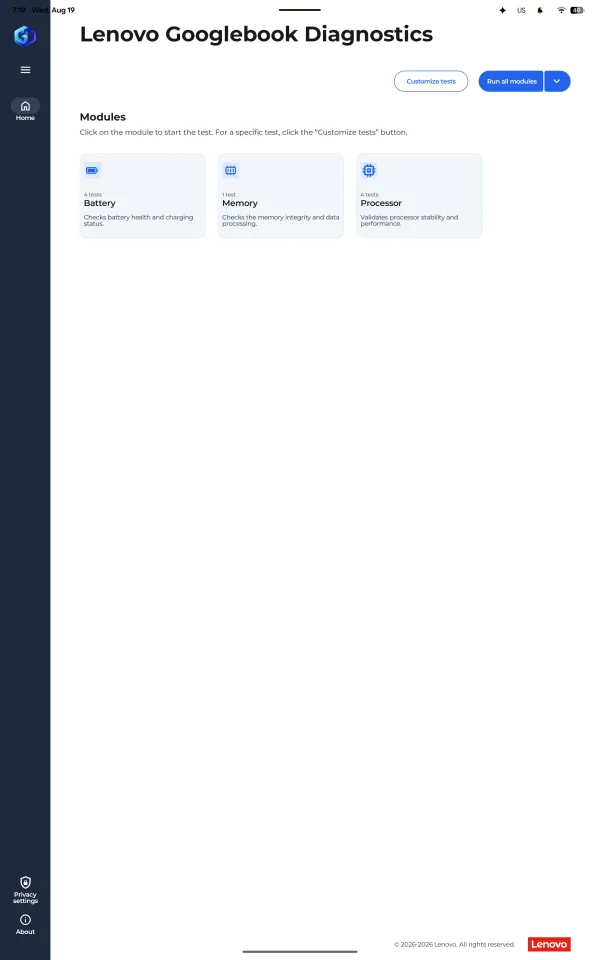
Lenovo Googlebook Diagnostics is hardware diagnostics application developed by Lenovo and designed to support Lenovo Googlebook users to verify the condition and functionality of their devices.
Run diagnostic tests on supported hardware components and review detailed information about the device, including its system, battery, and other available features.
The application provides clear diagnostic results to help identify potential problems and confirm whether supported components are working as expected.
Key features:
- Run hardware diagnostic tests
- Identify potential hardware or configuration issues
- Access diagnostic results for troubleshooting and support
The available tests and device information may vary depending on the device model, Android version, hardware capabilities, and permissions granted to the application.
Data safety
What Lenovo Inc. declares on Google Play about the data this app collects and shares.
- No data shared with third partiesLearn more about how developers declare sharing
- This app may collect these data typesDevice or other IDs
- Data is encrypted in transit
- Data can’t be deleted
What’s new
Version 1.0.1 · Sep 8, 2026
New Features:
Diagnostics:
Battery
Added battery diagnostics to evaluate battery health, charging status, and overall performance.
Memory
Introduced memory diagnostics to detect memory-related issues and verify system stability.
Processor
Added processor diagnostics to validate CPU performance.
Run All
Run all diagnostics at once or select only attended or unattended tests.
Developer contact
- Emaildiagsdevelop@lenovo.com
- Privacy policylenovo.com
- Address8001 Development Dr Morrisville, NC 27560 United States
Information
- Offered by
- Lenovo Inc.
- Category
- Tools
- Version
- 1.0.1
- Updated
- Sep 8, 2026
- Released
- Aug 21, 2026
- Age rating
- Everyone
- Price
- Free
- Package name
- com.lenovo.chromebookdiags
Similar apps
-
 Retro Mode - Icon Pack (Neon)
Personalization
-
 My Pixel app
Tools
-
 Elgato Stream Deck Mobile
Productivity
-
 Mindbook: Markdown Cloud Notes
Productivity
-
 Smart Connect
Productivity
-
 Swift Backup
Tools
-
 MindMeister - Mind Mapping
Productivity
-
 Sennheiser Smart Control
Tools
-
 Moto Buds
Tools
-
 Wallbox
Auto & Vehicles
-
 MYCPE ONE
Education
-
 Lenovo
Tools