NDW Simplex
NDAN WATCHFACES- EveryoneAge rating
- PersonalizationCategory
- Sep 4, 2022Updated
- $0.49Price
Links to the official Google Play listing of com.watchfacestudio.ndwsimplex. Last checked on Nov 24, 2026.
About this app
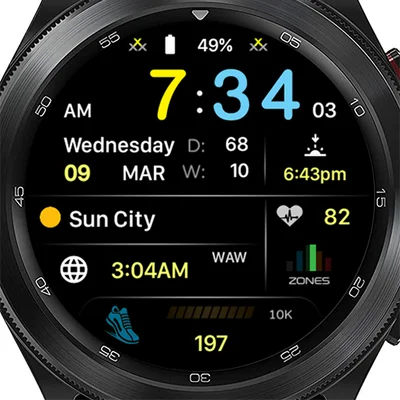
A simple watchface for Wear OS
A simple watchface for Wear OS with customization options
To enter the customization, there are two ways,
- Directly on watch by long pressing on Watchface
- Using the Galaxy wear app - For Samsung Watch 4.
Features
- Different Color selection for hour and Minute
- Option to display leading zero in 12 hour format (from 0 to 9 AM or 1 to 9 PM)
- 12 and 24 Hours (Time is set to 12 or 24 hours based on connected phone settings)
- HR with zone (see details for Heart Rate function below)
- Watch Battery % with indicator based on a percentage
- Steps with progress for 10K steps
- Complications - 4
- Selectable data colors
- Supports AOD with time, calendar Info (picks data color theme)
- Supports multiple Languages
*** Heart Rate function ***
As the watch face does not automatically measure and does not automatically display the HR when installed, pls perform manual action.
To do this, tap on the heart rate display area (Tap to measure in the watch).
As the measurement is WIP, the HR Icon will turn Red and within few seconds, the HR measurement will be displayed.
Once done, it will measure Heart Rate every 10 min. You can always tap on HR Area to take manual measurements.
Social Media:
https://www.facebook.com/NDAN.Watchfaces/
https://www.instagram.com/ndan.watchfaces/
email:
ndan.watchfaces@gmail.com
Data safety
What NDAN WATCHFACES declares on Google Play about the data this app collects and shares.
- No data shared with third partiesLearn more about how developers declare sharing
- No data collectedLearn more about how developers declare collection
What’s new
Version 3.0.0 · Sep 4, 2022
Data selection added > All data to hiding some of the data for regular use.
You can hide Day and Week (Extended Calendar info), HR Zone or complications and Extended Calendar info.
2 New colors for data added. (Hour and Min colors remain same)
Developer contact
- Websitesites.google.com
- Emailndan.watchfaces@Gmail.com
- Privacy policysites.google.com
- AddressFL. No. 16, A/2, Suncity Phase I Pune, Maharashtra 411051 India
Information
- Offered by
- NDAN WATCHFACES
- Category
- Personalization
- Version
- 3.0.0
- Updated
- Sep 4, 2022
- Released
- Mar 10, 2022
- Requires
- Android 9 or later
- Age rating
- Everyone
- Price
- $0.49
- Package name
- com.watchfacestudio.ndwsimplex