NDW Simplex
NDAN WATCHFACES- 3 歳以上対象年齢
- カスタマイズカテゴリ
- 2022/9/4更新日
- ¥90価格
com.watchfacestudio.ndwsimplexのGoogle Play公式ページにリンクしています。最終確認:2026/11/24。
このアプリについて
Googleによる英語 (アメリカ合衆国)からの自動翻訳です。
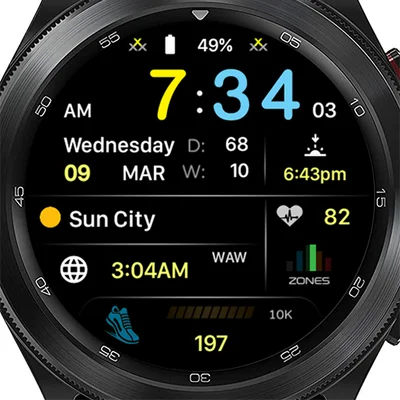
WearOSのシンプルなウォッチフェイス
カスタマイズオプションを備えたWearOSのシンプルなウォッチフェイス
カスタマイズを入力するには、2つの方法があります。
-Watchfaceを長押しして直接時計を見る
-GalaxyWearアプリの使用-SamsungWatch4の場合。
機能
-時間と分の異なる色の選択
-12時間形式(午前0時から午前9時または午後1時から午後9時)で先行ゼロを表示するオプション
-12時間および24時間(接続されている電話の設定に基づいて、時間は12時間または24時間に設定されます)
-ゾーン付きHR(以下の心拍数機能の詳細を参照)
-パーセンテージに基づくインジケーターでバッテリー%を監視します
-10Kステップの進捗状況
-合併症-4
-選択可能なデータの色
-時間、カレンダー情報(ピックデータカラーテーマ)でAODをサポート
-複数の言語をサポート
***心拍数機能***
ウォッチフェイスは自動的に測定されず、インストール時にHRを自動的に表示しないため、plsは手動アクションを実行します。
これを行うには、心拍数表示領域をタップします(タップして時計で測定します)。
測定はWIPであるため、HRアイコンが赤に変わり、数秒以内にHR測定が表示されます。
完了すると、10分ごとに心拍数が測定されます。 HRエリアをいつでもタップして手動測定を行うことができます。
ソーシャルメディア:
https://www.facebook.com/NDAN.Watchfaces/
https://www.instagram.com/ndan.watchfaces/
メール:
ndan.watchfaces@gmail.com
原文を表示
A simple watchface for Wear OS with customization options
To enter the customization, there are two ways,
- Directly on watch by long pressing on Watchface
- Using the Galaxy wear app - For Samsung Watch 4.
Features
- Different Color selection for hour and Minute
- Option to display leading zero in 12 hour format (from 0 to 9 AM or 1 to 9 PM)
- 12 and 24 Hours (Time is set to 12 or 24 hours based on connected phone settings)
- HR with zone (see details for Heart Rate function below)
- Watch Battery % with indicator based on a percentage
- Steps with progress for 10K steps
- Complications - 4
- Selectable data colors
- Supports AOD with time, calendar Info (picks data color theme)
- Supports multiple Languages
*** Heart Rate function ***
As the watch face does not automatically measure and does not automatically display the HR when installed, pls perform manual action.
To do this, tap on the heart rate display area (Tap to measure in the watch).
As the measurement is WIP, the HR Icon will turn Red and within few seconds, the HR measurement will be displayed.
Once done, it will measure Heart Rate every 10 min. You can always tap on HR Area to take manual measurements.
Social Media:
https://www.facebook.com/NDAN.Watchfaces/
https://www.instagram.com/ndan.watchfaces/
email:
ndan.watchfaces@gmail.com
データ セーフティ
このアプリが収集・共有するデータについて、NDAN WATCHFACESがGoogle Playで申告している内容です。
- 第三者と共有されるデータはありません詳しくは、デベロッパーが共有を申告する方法についての説明をご覧ください
- データは収集されません詳しくは、デベロッパーが収集を申告する方法についての説明をご覧ください
新機能
バージョン 3.0.0 · 2022/9/4
Data selection added > All data to hiding some of the data for regular use.
You can hide Day and Week (Extended Calendar info), HR Zone or complications and Extended Calendar info.
2 New colors for data added. (Hour and Min colors remain same)
開発元の連絡先
- ウェブサイトsites.google.com
- メールndan.watchfaces@Gmail.com
- プライバシーポリシーsites.google.com
- 住所FL. No. 16, A/2, Suncity Phase I Pune, Maharashtra 411051 India
情報
- 提供元
- NDAN WATCHFACES
- カテゴリ
- カスタマイズ
- バージョン
- 3.0.0
- 更新日
- 2022/9/4
- リリース
- 2022/3/10
- 必要条件
- Android 9以降
- 対象年齢
- 3 歳以上
- 価格
- ¥90
- パッケージ名
- com.watchfacestudio.ndwsimplex