Oogly Light Atmos
Oogly Watch Face- EveryoneAge rating
- PersonalizationCategory
- Nov 9, 2026Updated
- $1.99Price
Links to the official Google Play listing of com.watchfacestudio.ooglylightatmos. Last checked on Nov 19, 2026.
About this app
Advanced weather, dynamic lighting effects & custom font styles for Wear OS
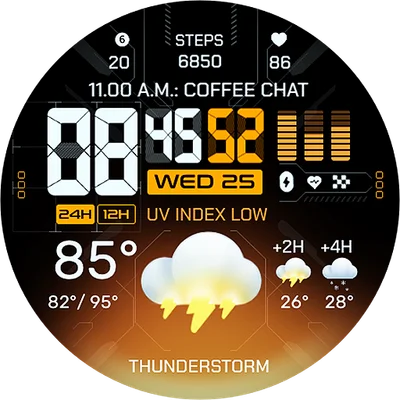
Designed for those who appreciate detailed information and distinctive aesthetics, Oogly Light Animation combines comprehensive weather insights, dynamic lighting effects, and sophisticated digital styling into one feature-rich Wear OS watch face.
Stay informed with current weather conditions, temperature, UV index, and upcoming hourly forecasts—all presented in a refined, easy-to-read dashboard.
Bring your smartwatch to life with captivating Dynamic Light Animation, featuring multiple vibrant color options and an easy On/Off toggle. Choose between two distinctive visual styles: a futuristic dark theme with striking amber illumination or clean, cool-toned elegance.
Personalize your display further with multiple digital clock font styles for hours, minutes, and seconds, alongside a variety of color themes to match your personal look.
Key Features
• Detailed Weather Information
• Dynamic Light Animation — Optional On/Off
• Multiple Animation Color Options
• Dual Visual Styles — Futuristic or Simple & Elegant
• Multiple Digital Clock Fonts
• Multiple Color Themes
• 12/24-Hour Time Format
• Custom App Shortcuts
• Custom Complications
• Always-On Display (AOD) Support
Advanced insights. Brilliant illumination. Distinctive style.
Designed for WEAR OS API 35+
Installation InstructionsAfter a few minutes, find the watch face on your watch. It may not automatically appear in the main watch face list.
Open the watch face list (tap and hold your currently active watch face), then scroll to the far right. Tap Add Watch Face and find it there.
If you still have problems, contact us at:
ooglywatchface@gmail.com
Or join our official Telegram community:
@OoglyWatchfaceCommunity
Data safety
What Oogly Watch Face declares on Google Play about the data this app collects and shares.
- No data shared with third partiesLearn more about how developers declare sharing
- No data collectedLearn more about how developers declare collection
What’s new
Nov 9, 2026
- Companion app to help you install the watch face on your Wear OS device
- Simple and easy installation process
- Once installation on your smartwatch is complete, the companion app can be safely removed
Developer contact
- Emailooglywatchface@gmail.com
- Privacy policysites.google.com
- AddressKAMPUNG MALANG UTARA 4/2B 002/004 TEGALSARI TEGALSARI SURABAYA Jawa Timur Indonesia
Information
- Offered by
- Oogly Watch Face
- Category
- Personalization
- Updated
- Nov 9, 2026
- Released
- Nov 9, 2026
- Age rating
- Everyone
- Price
- $1.99
- Package name
- com.watchfacestudio.ooglylightatmos