Oogly Light Atmos
Oogly Watch Face- 3 歳以上対象年齢
- カスタマイズカテゴリ
- 2026/11/9更新日
- ¥350価格
com.watchfacestudio.ooglylightatmosのGoogle Play公式ページにリンクしています。最終確認:2026/11/19。
このアプリについて
Googleによる英語 (アメリカ合衆国)からの自動翻訳です。
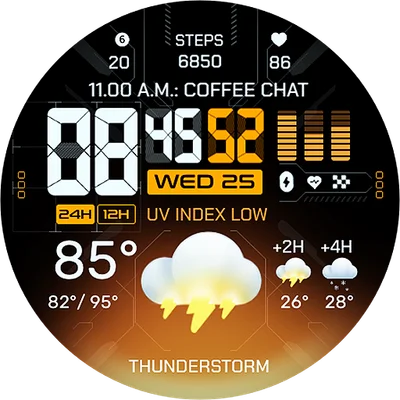
Wear OS向けの高度な天気情報、ダイナミックな照明効果、カスタムフォントスタイル
詳細な情報と洗練されたデザインを重視するユーザーのためにデザインされたOogly Light Animationは、包括的な天気情報、ダイナミックなライティング効果、そして洗練されたデジタルデザインを、機能満載のWear OSウォッチフェイスに統合しました。
現在の天気、気温、紫外線指数、そして今後の時間ごとの予報を、洗練された見やすいダッシュボードで確認できます。
魅力的なダイナミックライトアニメーションでスマートウォッチを彩りましょう。多彩なカラーオプションと簡単なオン/オフ切り替え機能を備えています。2つの個性的なビジュアルスタイルからお選びいただけます。印象的なアンバーイルミネーションが特徴的な未来的なダークテーマ、またはクリーンでクールなトーンのエレガントさです。
さらに、時、分、秒のデジタル時計フォントを複数種類から選択できるほか、様々なカラーテーマであなたのスタイルに合わせてディスプレイをカスタマイズできます。
主な機能
• 詳細な天気情報
• ダイナミックライトアニメーション(オン/オフ切り替え可能)
• 複数のアニメーションカラーオプション
• 2種類のビジュアルスタイル(未来的またはシンプルでエレガント)
• 複数のデジタル時計フォント
• 複数のカラーテーマ
• 12/24時間表示
• カスタムアプリショートカット
• カスタムコンプリケーション
• 常時表示ディスプレイ(AOD)対応
高度な分析機能。鮮やかなイルミネーション。個性的なスタイル。
WEAR OS API 35以降に対応
インストール手順:数分後、ウォッチフェイスがウォッチに表示されます。メインのウォッチフェイスリストに自動的に表示されない場合があります。
ウォッチフェイスリストを開き(現在アクティブなウォッチフェイスを長押し)、右端までスクロールします。「ウォッチフェイスを追加」をタップして、ウォッチフェイスを探してください。
問題が解決しない場合は、以下のメールアドレスまでお問い合わせください。
ooglywatchface@gmail.com
または、公式Telegramコミュニティにご参加ください。
@OoglyWatchfaceCommunity
原文を表示
Designed for those who appreciate detailed information and distinctive aesthetics, Oogly Light Animation combines comprehensive weather insights, dynamic lighting effects, and sophisticated digital styling into one feature-rich Wear OS watch face.
Stay informed with current weather conditions, temperature, UV index, and upcoming hourly forecasts—all presented in a refined, easy-to-read dashboard.
Bring your smartwatch to life with captivating Dynamic Light Animation, featuring multiple vibrant color options and an easy On/Off toggle. Choose between two distinctive visual styles: a futuristic dark theme with striking amber illumination or clean, cool-toned elegance.
Personalize your display further with multiple digital clock font styles for hours, minutes, and seconds, alongside a variety of color themes to match your personal look.
Key Features
• Detailed Weather Information
• Dynamic Light Animation — Optional On/Off
• Multiple Animation Color Options
• Dual Visual Styles — Futuristic or Simple & Elegant
• Multiple Digital Clock Fonts
• Multiple Color Themes
• 12/24-Hour Time Format
• Custom App Shortcuts
• Custom Complications
• Always-On Display (AOD) Support
Advanced insights. Brilliant illumination. Distinctive style.
Designed for WEAR OS API 35+
Installation InstructionsAfter a few minutes, find the watch face on your watch. It may not automatically appear in the main watch face list.
Open the watch face list (tap and hold your currently active watch face), then scroll to the far right. Tap Add Watch Face and find it there.
If you still have problems, contact us at:
ooglywatchface@gmail.com
Or join our official Telegram community:
@OoglyWatchfaceCommunity
データ セーフティ
このアプリが収集・共有するデータについて、Oogly Watch FaceがGoogle Playで申告している内容です。
- 第三者と共有されるデータはありません詳しくは、デベロッパーが共有を申告する方法についての説明をご覧ください
- データは収集されません詳しくは、デベロッパーが収集を申告する方法についての説明をご覧ください
新機能
2026/11/9
- Companion app to help you install the watch face on your Wear OS device
- Simple and easy installation process
- Once installation on your smartwatch is complete, the companion app can be safely removed
開発元の連絡先
- メールooglywatchface@gmail.com
- プライバシーポリシーsites.google.com
- 住所KAMPUNG MALANG UTARA 4/2B 002/004 TEGALSARI TEGALSARI SURABAYA Jawa Timur Indonesia
情報
- 提供元
- Oogly Watch Face
- カテゴリ
- カスタマイズ
- 更新日
- 2026/11/9
- リリース
- 2026/11/9
- 対象年齢
- 3 歳以上
- 価格
- ¥350
- パッケージ名
- com.watchfacestudio.ooglylightatmos