Oogly Sentinel
Oogly Watch Face- EveryoneAge rating
- PersonalizationCategory
- Oct 6, 2026Updated
- $1.49Price
Links to the official Google Play listing of com.watchfacestudio.ooglysentinel. Last checked on Nov 13, 2026.
About this app
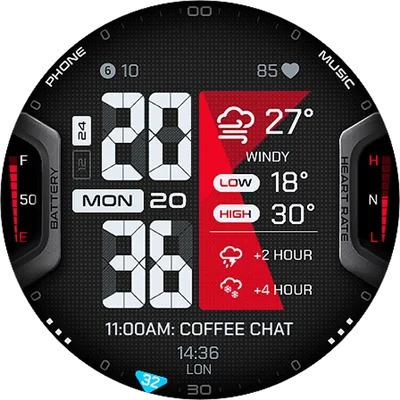
Modern watch face with fitness, weather switch & animated styles
Oogly Sentinel: Fitness & Weather Switch, is a modern watch face built to keep everything important in one place.
With a smart switch between fitness and advanced weather data, you can easily adapt the display to your daily needs. Smooth animations, flexible styles, and a clean layout create a perfect balance between function and design.
Designed for clarity and customization, Oogly Sentinel doesn’t just show information — it turns your watch into a true centerpiece that stands out on your wrist.
Key Features
- Choose from multiple animated backgrounds with on/off control
- Switch between fitness and advanced weather data
- Multiple color box styles from colorful to minimal
- 12/24-hour time format support
- Customizable information fields
- App shortcuts for quick access
- Always-On Display (AOD) support
Simple, flexible, and built to match your style. One watch face. All the data you need. Designed for WEAR OS API 34+
After few minutes, find the watch face on the watch. It is not automatically shown on the main list. Open the watch face list (tap and hold current active watch face) then scroll to the far right. Tap add watch face and find it there.
If you still have problem, contact us at :
ooglywatchface@gmail.com
or on our official telegram @OoglyWatchfaceCommunity
Data safety
What Oogly Watch Face declares on Google Play about the data this app collects and shares.
- No data shared with third partiesLearn more about how developers declare sharing
- No data collectedLearn more about how developers declare collection
What’s new
Oct 6, 2026
- Companion app to help you install the watch face on your Wear OS device
- Simple and easy installation process
- Once installation on your smartwatch is complete, the companion app can be safely removed
Developer contact
- Emailooglywatchface@gmail.com
- Privacy policysites.google.com
- AddressKAMPUNG MALANG UTARA 4/2B 002/004 TEGALSARI TEGALSARI SURABAYA Jawa Timur Indonesia
Information
- Offered by
- Oogly Watch Face
- Category
- Personalization
- Updated
- Oct 6, 2026
- Released
- Apr 23, 2026
- Age rating
- Everyone
- Price
- $1.49
- Package name
- com.watchfacestudio.ooglysentinel