Oogly Sentinel
Oogly Watch Face- 3 歳以上対象年齢
- カスタマイズカテゴリ
- 2026/10/6更新日
- ¥260価格
com.watchfacestudio.ooglysentinelのGoogle Play公式ページにリンクしています。最終確認:2026/11/13。
このアプリについて
Googleによる英語 (アメリカ合衆国)からの自動翻訳です。
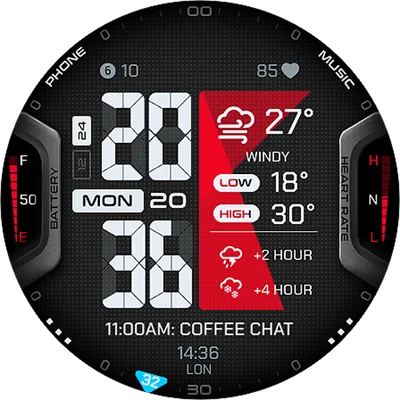
フィットネス、天気予報切り替え、アニメーションスタイルを備えたモダンなウォッチフェイス
Oogly Sentinel: Fitness & Weather Switchは、必要な情報をすべて一箇所に集約した、モダンなウォッチフェイスです。
フィットネス情報と高度な天気データをスマートに切り替えられるので、日々のニーズに合わせて表示を簡単にカスタマイズできます。滑らかなアニメーション、柔軟なスタイル、そして洗練されたレイアウトが、機能性とデザインの完璧なバランスを実現しています。
明瞭さとカスタマイズ性を追求したOogly Sentinelは、単に情報を表示するだけでなく、あなたの手首を彩る真の主役へと変貌させます。
主な機能
- オン/オフ切り替え可能な複数のアニメーション背景から選択可能
- フィットネス情報と高度な天気データを切り替え可能
- カラフルなものからシンプルなものまで、複数のカラーボックススタイルを選択可能
- 12時間/24時間表示に対応
- カスタマイズ可能な情報フィールド
- アプリへのクイックアクセスショートカット
- 常時表示ディスプレイ(AOD)に対応
シンプルで柔軟性があり、あなたのスタイルにマッチします。必要なデータはすべて、このウォッチフェイス一つで。WEAR OS API 34以降に対応。
数分後、ウォッチフェイスがウォッチ画面に表示されます。メインリストには自動的に表示されません。ウォッチフェイス一覧を開き(現在アクティブなウォッチフェイスを長押し)、一番右までスクロールしてください。「ウォッチフェイスを追加」をタップして、目的のウォッチフェイスを見つけてください。
それでも問題が解決しない場合は、以下のメールアドレスまでご連絡ください。
ooglywatchface@gmail.com
または、公式Telegramアカウント@OoglyWatchfaceCommunityまでご連絡ください。
原文を表示
Oogly Sentinel: Fitness & Weather Switch, is a modern watch face built to keep everything important in one place.
With a smart switch between fitness and advanced weather data, you can easily adapt the display to your daily needs. Smooth animations, flexible styles, and a clean layout create a perfect balance between function and design.
Designed for clarity and customization, Oogly Sentinel doesn’t just show information — it turns your watch into a true centerpiece that stands out on your wrist.
Key Features
- Choose from multiple animated backgrounds with on/off control
- Switch between fitness and advanced weather data
- Multiple color box styles from colorful to minimal
- 12/24-hour time format support
- Customizable information fields
- App shortcuts for quick access
- Always-On Display (AOD) support
Simple, flexible, and built to match your style. One watch face. All the data you need. Designed for WEAR OS API 34+
After few minutes, find the watch face on the watch. It is not automatically shown on the main list. Open the watch face list (tap and hold current active watch face) then scroll to the far right. Tap add watch face and find it there.
If you still have problem, contact us at :
ooglywatchface@gmail.com
or on our official telegram @OoglyWatchfaceCommunity
データ セーフティ
このアプリが収集・共有するデータについて、Oogly Watch FaceがGoogle Playで申告している内容です。
- 第三者と共有されるデータはありません詳しくは、デベロッパーが共有を申告する方法についての説明をご覧ください
- データは収集されません詳しくは、デベロッパーが収集を申告する方法についての説明をご覧ください
新機能
2026/10/6
- Companion app to help you install the watch face on your Wear OS device
- Simple and easy installation process
- Once installation on your smartwatch is complete, the companion app can be safely removed
開発元の連絡先
- メールooglywatchface@gmail.com
- プライバシーポリシーsites.google.com
- 住所KAMPUNG MALANG UTARA 4/2B 002/004 TEGALSARI TEGALSARI SURABAYA Jawa Timur Indonesia
情報
- 提供元
- Oogly Watch Face
- カテゴリ
- カスタマイズ
- 更新日
- 2026/10/6
- リリース
- 2026/4/23
- 対象年齢
- 3 歳以上
- 価格
- ¥260
- パッケージ名
- com.watchfacestudio.ooglysentinel