PACKER
TIMEFLIK- EveryoneAge rating
- PersonalizationCategory
- May 19, 2025Updated
- $1.99Price
Links to the official Google Play listing of com.apposter.packer. Last checked on Nov 13, 2026.
About this app
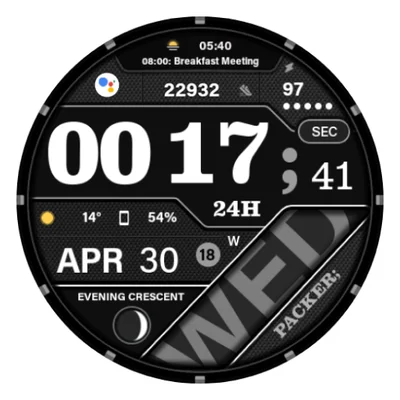
Premium Design introduced by watch face app 'TIMEFLIK
[TIMEFLIK's Watch Face Collection, Premium Design]
***This app is a standalone watch app.
It can be installed and operated in your smartwatch only.
The compatibility warning message from Google Play indicates that it is a watch-only app.
There is no problem with the use, so please don’t be confused.
[How to use]
After downloading, change the watch face by touching the screen for a while.
If your watch is a Galaxy watch, you can also change it from [Galaxy Wearable] > [Watch faces].
_______________________________
[Key Features]
- Digital Time
- 12/24H Format
- Day of Month
- Date
- Week in Year
- Battery Status
- Step Counts
- Moon Phase
- 2 Fixed Complication
- 3 Editable Complication
- 4 Preset Shortcut
- 10 Theme Colors
- Always On Display
[Troubleshooting]
Please let us know the information below to help@apposter.com.
Our development team will try to reproduce and solve it.
*This watch face supports wear OS devices.
_______________________________
**How to set a Phone Battery Level**
https://play.google.com/store/apps/details?id=com.weartools.phonebattcomp
1. Install the Phone Battery Level app on both the phone and the watch.
2. Select Phone Battery Level in Complications.
Data safety
What TIMEFLIK declares on Google Play about the data this app collects and shares.
- No data shared with third partiesLearn more about how developers declare sharing
- No data collectedLearn more about how developers declare collection
Developer contact
- Emailhelp@apposter.com
- Privacy policyweb.timeflik.com
- Address대한민국 서울특별시 마포구 마포구 성암로 189, 7층 705호 (상암동,중소기업 DMC 타워) 03929
Information
- Offered by
- TIMEFLIK
- Category
- Personalization
- Updated
- May 19, 2025
- Released
- Apr 29, 2025
- Age rating
- Everyone
- Price
- $1.99
- Package name
- com.apposter.packer