PACKER
TIMEFLIK- Classificação LivreClassificação etária
- PersonalizaçãoCategoria
- 19/05/2025Atualizado
- R$ 9,99Preço
Leva à página oficial de com.apposter.packer na Google Play. Última verificação em 13/11/2026.
Sobre este app
Tradução automática do Google. Idioma original: Inglês (Estados Unidos).
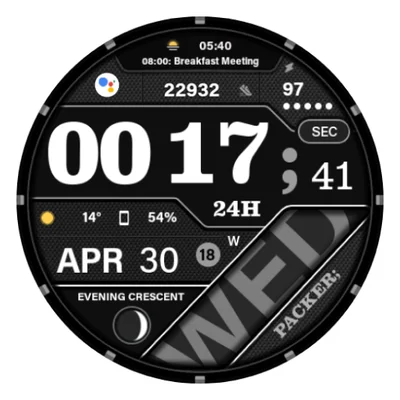
Design Premium introduzido pelo aplicativo de mostrador de relógio 'TIMEFLIK
[Coleção de mostradores de relógio da TIMEFLIK, design premium]
***Este aplicativo é um aplicativo de relógio independente.
Ele pode ser instalado e operado apenas no seu smartwatch.
A mensagem de aviso de compatibilidade do Google Play indica que é um aplicativo somente para relógio.
Não há problema com o uso, então não se confunda.
[Como usar]
Após o download, altere o mostrador do relógio tocando na tela por um tempo.
Se o seu relógio for um relógio Galaxy, você também pode alterá-lo em [Galaxy Wearable] > [Mostradores do relógio].
_______________________________
[Principais recursos]
- Hora Digital
- Formato 12/24H
- Dia do mês
- Data
- Semana no ano
- Status da bateria
- Contagens de passos
- Fase da Lua
- 2 Complicações Fixas
- 3 complicações editáveis
- 4 atalhos predefinidos
- 10 cores temáticas
- Sempre em exibição
[Solução de problemas]
Informe-nos as informações abaixo para help@apposter.com.
Nossa equipe de desenvolvimento tentará reproduzi-lo e resolvê-lo.
*Este mostrador do relógio é compatível com dispositivos Wear OS.
_______________________________
**Como definir o nível da bateria do telefone**
https://play.google.com/store/apps/details?id=com.weartools.phonebattcomp
1. Instale o aplicativo Phone Battery Level no telefone e no relógio.
2. Selecione Nível da bateria do telefone em Complicações.
Mostrar o texto original
[TIMEFLIK's Watch Face Collection, Premium Design]
***This app is a standalone watch app.
It can be installed and operated in your smartwatch only.
The compatibility warning message from Google Play indicates that it is a watch-only app.
There is no problem with the use, so please don’t be confused.
[How to use]
After downloading, change the watch face by touching the screen for a while.
If your watch is a Galaxy watch, you can also change it from [Galaxy Wearable] > [Watch faces].
_______________________________
[Key Features]
- Digital Time
- 12/24H Format
- Day of Month
- Date
- Week in Year
- Battery Status
- Step Counts
- Moon Phase
- 2 Fixed Complication
- 3 Editable Complication
- 4 Preset Shortcut
- 10 Theme Colors
- Always On Display
[Troubleshooting]
Please let us know the information below to help@apposter.com.
Our development team will try to reproduce and solve it.
*This watch face supports wear OS devices.
_______________________________
**How to set a Phone Battery Level**
https://play.google.com/store/apps/details?id=com.weartools.phonebattcomp
1. Install the Phone Battery Level app on both the phone and the watch.
2. Select Phone Battery Level in Complications.
Segurança dos dados
O que TIMEFLIK declara na Google Play sobre os dados que este app coleta e compartilha.
- Os dados não são compartilhados com terceirosSaiba mais sobre como os desenvolvedores declaram o compartilhamento
- Nenhum dado foi coletadoSaiba mais sobre como os desenvolvedores declaram a coleta
Contato do desenvolvedor
- E-mailhelp@apposter.com
- Política de privacidadeweb.timeflik.com
- Endereço대한민국 서울특별시 마포구 마포구 성암로 189, 7층 705호 (상암동,중소기업 DMC 타워) 03929
Informações
- Oferecido por
- TIMEFLIK
- Categoria
- Personalização
- Atualizado
- 19/05/2025
- Lançamento
- 29/04/2025
- Classificação etária
- Classificação Livre
- Preço
- R$ 9,99
- Nome do pacote
- com.apposter.packer