Programmers Code 2 Watch Face
Time As Art Watch Faces- EveryoneAge rating
- PersonalizationCategory
- Nov 8, 2026Updated
- $0.99Price
Links to the official Google Play listing of com.watchfacestudio.program_code2. Last checked on Nov 19, 2026.
About this app
Coder 2 — the innovative watch face for programmers, developers and web coders.
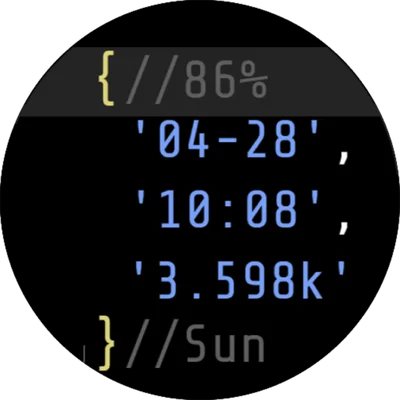
Coder 2 – the perfect watch face for programmers, IT developers and coders. Innovative, interactive, fun and with a myriad of code syntax themes. 2 live wrist controlled data sets – slightly tilt your wrist to access the 2nd data set. Design includes code comments, syntax highlighting, curly braces, single quotes, … you name it!
*Works only and exclusively on Samsung Galaxy Watch 4, 5, 6, 7 and 8.
Wear OS watch face features:
LIVE WRIST CONTROLLED DATA SETS (2)
Access the 2nd data set by simply tilting your wrist (any row).
1st DATA SET
- Battery %
- Date (Month/Day) (auto Month-Day or Day-Month)
- Time HOUR:MIN
- Steps (k = abbreviation = one thousand)
- Day of the Week
2nd DATA SET:
Access the 2nd data set by simply tilting your wrist (any row).
- Inbox (Notification count)
- Heart rate
- Percentage of Step Goal
5 CUSTOM APP SHORTCUTS (area-defined)
Fully customizable with an app shortcut or other watch function of your choice. Everything is ‘One Tap Away’.
TIP: if you set ‘Recent Apps’ and ‘Settings’ as app shortcuts you can easily access any running app as well as quickly close all apps that run in the background - or reach any setting on your watch quickly. Since the watch face has 5 custom app shortcuts you then still have 3 app shortcuts left to customize!
TIP: Customizing the customizable app shortcuts by long pressing on the watch face and then tapping on ‘Customize > Complications’ in the watch face selector on the watch gives you the most app options/choices.
SMART BATTERY FEATURES
- Battery < 15% (highlighting)
- Battery charging indicator when plugged in (+xx%, live update)
- Battery 100% charged indicator (‘full’)
OTHER FEATURES
- Wrist movement controlled code highlight bar and data display
THEMES
20+ code syntax highlighting themes.
MISC FEATURES
- Battery saving AOD screen
- Energy Efficient Display
To see more exciting 'Time As Art' watch face creations
please visit https://play.google.com/store/apps/dev?id=6844562474688703926.
Data safety
What Time As Art Watch Faces declares on Google Play about the data this app collects and shares.
- No data shared with third partiesLearn more about how developers declare sharing
- No data collectedLearn more about how developers declare collection
Developer contact
- Websitetimeasart.com
- Emaildesign@timeasart.com
- Privacy policytimeasart.com
- Address929 Notre Dame Ave Concord, CA 94518-2531 United States
Information
- Offered by
- Time As Art Watch Faces
- Category
- Personalization
- Updated
- Nov 8, 2026
- Released
- Apr 19, 2024
- Age rating
- Everyone
- Price
- $0.99
- Package name
- com.watchfacestudio.program_code2