Programmers Code 2 Watch Face
Time As Art Watch Faces- 3 歳以上対象年齢
- カスタマイズカテゴリ
- 2026/11/8更新日
- ¥150価格
com.watchfacestudio.program_code2のGoogle Play公式ページにリンクしています。最終確認:2026/11/19。
このアプリについて
Googleによる英語 (アメリカ合衆国)からの自動翻訳です。
Coder 2 — プログラマー、開発者、Web プログラマーのための革新的なウォッチフェイス。
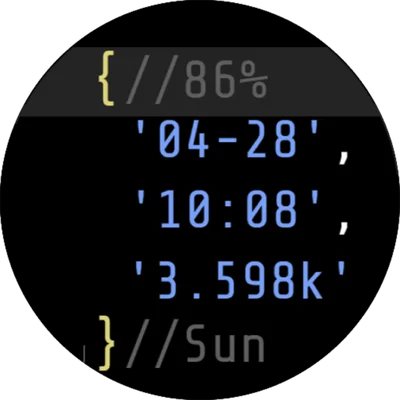
Coder 2 – プログラマー、IT開発者、そしてコーダーに最適なウォッチフェイスです。革新的でインタラクティブ、そして楽しく、豊富なコード構文テーマを備えています。手首で操作できる2つのデータセット – 手首を少し傾けるだけで2つ目のデータセットにアクセスできます。コードコメント、構文のハイライト、中括弧、一重引用符など、あらゆる要素がデザインに反映されます。
*Samsung Galaxy Watch 4、5、6、7、8 でのみ動作します。
Wear OS ウォッチフェイスの機能:
手首で操作できるデータセット (2)
手首を傾けるだけで2つ目のデータセットにアクセスできます(任意の行)。
1つ目のデータセット
- バッテリー残量(%)
- 日付(月/日)(自動表示:月-日または日-月)
- 時刻(時:分)
- 歩数(k = 1000の略称)
- 曜日
2つ目のデータセット:
手首を傾けるだけで2つ目のデータセットにアクセスできます(どの行でも)。
- 受信トレイ(通知数)
- 心拍数
- 目標歩数に対する割合(%)
5つのカスタムアプリショートカット(エリア指定)
アプリショートカットやその他のウォッチ機能で自由にカスタマイズできます。すべてが「ワンタップ」で操作できます。
ヒント:「最近使ったアプリ」と「設定」をアプリショートカットに設定すると、起動中のアプリに簡単にアクセスできるだけでなく、バックグラウンドで実行されているアプリを素早く終了したり、ウォッチのあらゆる設定に素早くアクセスしたりできます。ウォッチフェイスには5つのカスタムアプリショートカットが用意されているので、あと3つのアプリショートカットをカスタマイズできます!
ヒント:ウォッチフェイスを長押しし、ウォッチフェイスセレクターで「カスタマイズ > コンプリケーション」をタップすることで、カスタマイズ可能なアプリショートカットをカスタマイズできます。アプリのオプションや選択肢が最も多く表示されます。
スマートバッテリー機能
- バッテリー残量15%未満(ハイライト表示)
- 電源接続時のバッテリー充電インジケーター(+xx%、リアルタイム更新)
- バッテリー100%充電インジケーター(「フル」)
その他の機能
- 手首の動きで操作できるコードハイライトバーとデータ表示
テーマ
20種類以上のコード構文ハイライトテーマ
その他の機能
- バッテリー節約AOD画面
- 省エネディスプレイ
「Time As Art」ウォッチフェイスのその他の魅力的な作品は、
https://play.google.com/store/apps/dev?id=6844562474688703926 をご覧ください。
原文を表示
Coder 2 – the perfect watch face for programmers, IT developers and coders. Innovative, interactive, fun and with a myriad of code syntax themes. 2 live wrist controlled data sets – slightly tilt your wrist to access the 2nd data set. Design includes code comments, syntax highlighting, curly braces, single quotes, … you name it!
*Works only and exclusively on Samsung Galaxy Watch 4, 5, 6, 7 and 8.
Wear OS watch face features:
LIVE WRIST CONTROLLED DATA SETS (2)
Access the 2nd data set by simply tilting your wrist (any row).
1st DATA SET
- Battery %
- Date (Month/Day) (auto Month-Day or Day-Month)
- Time HOUR:MIN
- Steps (k = abbreviation = one thousand)
- Day of the Week
2nd DATA SET:
Access the 2nd data set by simply tilting your wrist (any row).
- Inbox (Notification count)
- Heart rate
- Percentage of Step Goal
5 CUSTOM APP SHORTCUTS (area-defined)
Fully customizable with an app shortcut or other watch function of your choice. Everything is ‘One Tap Away’.
TIP: if you set ‘Recent Apps’ and ‘Settings’ as app shortcuts you can easily access any running app as well as quickly close all apps that run in the background - or reach any setting on your watch quickly. Since the watch face has 5 custom app shortcuts you then still have 3 app shortcuts left to customize!
TIP: Customizing the customizable app shortcuts by long pressing on the watch face and then tapping on ‘Customize > Complications’ in the watch face selector on the watch gives you the most app options/choices.
SMART BATTERY FEATURES
- Battery < 15% (highlighting)
- Battery charging indicator when plugged in (+xx%, live update)
- Battery 100% charged indicator (‘full’)
OTHER FEATURES
- Wrist movement controlled code highlight bar and data display
THEMES
20+ code syntax highlighting themes.
MISC FEATURES
- Battery saving AOD screen
- Energy Efficient Display
To see more exciting 'Time As Art' watch face creations
please visit https://play.google.com/store/apps/dev?id=6844562474688703926.
データ セーフティ
このアプリが収集・共有するデータについて、Time As Art Watch FacesがGoogle Playで申告している内容です。
- 第三者と共有されるデータはありません詳しくは、デベロッパーが共有を申告する方法についての説明をご覧ください
- データは収集されません詳しくは、デベロッパーが収集を申告する方法についての説明をご覧ください
開発元の連絡先
- ウェブサイトtimeasart.com
- メールdesign@timeasart.com
- プライバシーポリシーtimeasart.com
- 住所929 Notre Dame Ave Concord, CA 94518-2531 United States
情報
- 提供元
- Time As Art Watch Faces
- カテゴリ
- カスタマイズ
- 更新日
- 2026/11/8
- リリース
- 2024/4/19
- 対象年齢
- 3 歳以上
- 価格
- ¥150
- パッケージ名
- com.watchfacestudio.program_code2